Troubleshoot failed deliveries
Diagnose endpoint and delivery failures.
Start with the delivery UUID from your receiver's logs, or the affected record and approximate change time. Use Integrations → Webhooks → Deliveries and Events with an administrator who has read access to those resources.
| Symptom | Start here |
|---|---|
| No webhook event or delivery appears | Check subscription matching |
| The delivery has an HTTP or network error | Interpret the latest response |
| A delivery remains pending or failed | Check retries and disabled configuration |
| The delivery is finished but your app is unchanged | Check receiver processing |
| An outage exhausted retries or missed changes | Recover missed changes |
Inspect a delivery
- Open Integrations → Webhooks → Deliveries and search for its UUID, or follow a delivery from the event or registration.
- Open the row and read State, Try count, Response status, and the latest delivery timestamp.
- Open Raw JSON to inspect the response headers and body. Avoid copying secrets or personal data into incident reports.
- Follow the event link to inspect its payload and the registration link to inspect its URL, signing mode, and subscriptions.
- Correlate the UUID and attempt number with your gateway, receiver, durable queue, and worker logs.
A delivery is one event/subscription pairing. Its row accumulates attempts and records the latest response. A pending row with try count 0 is not evidence that any request reached the network.
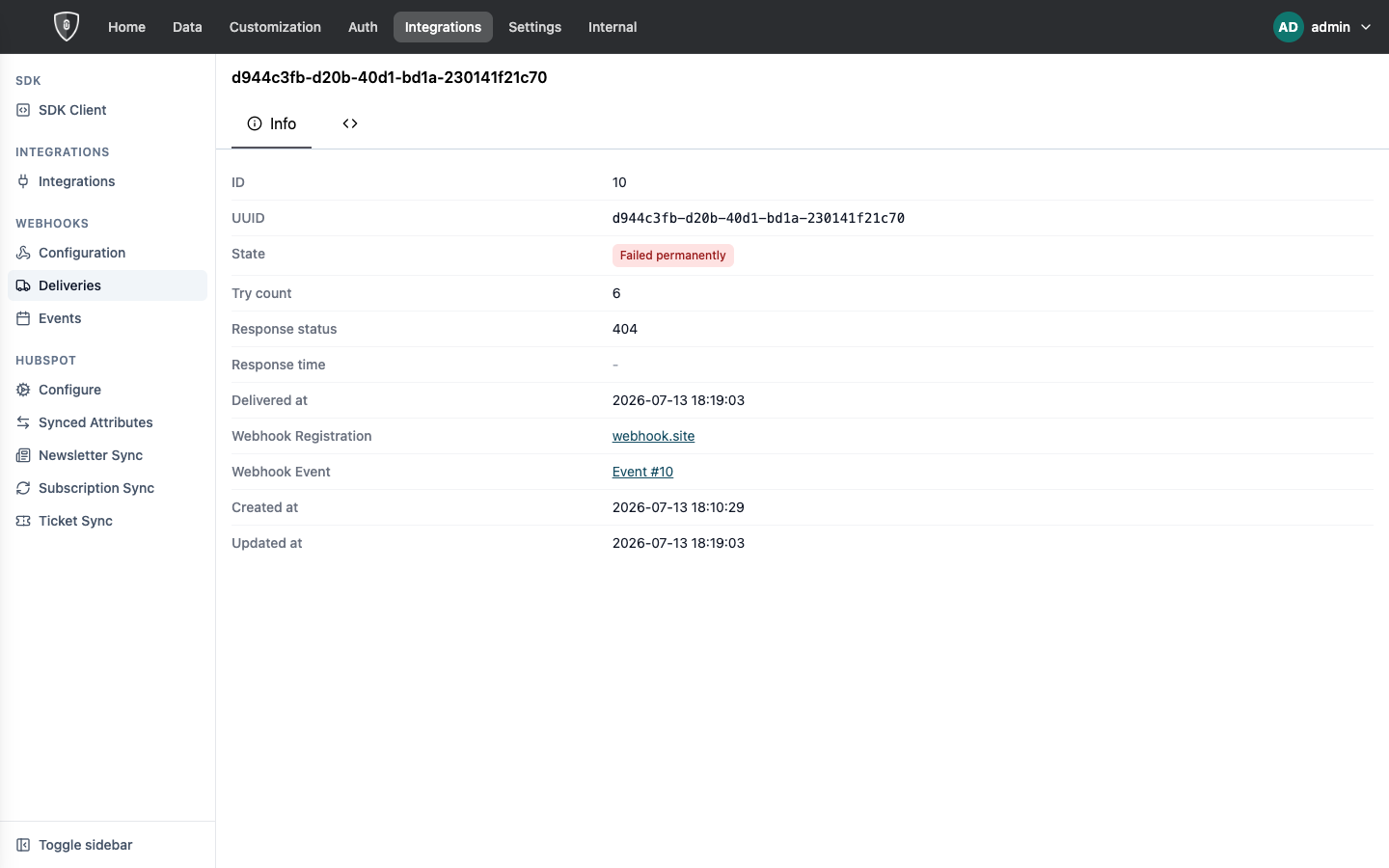
DELIVERY DETAIL — a permanently failed delivery: six attempts, a 404 from the endpoint, Response time empty as it always is, and Delivered at 8 min 34 s after Created at. Captured 2026-08-05 for page 05; the seeded database holds no deliveries today. The current build adds a Webhook Subscription row not present in this capture.
No event or delivery
Check that the registration and subscription were enabled when the asynchronous dispatch ran, and that the event type, required service, and brand match the change. Confirm that the action actually emits the event you expect in the event reference.
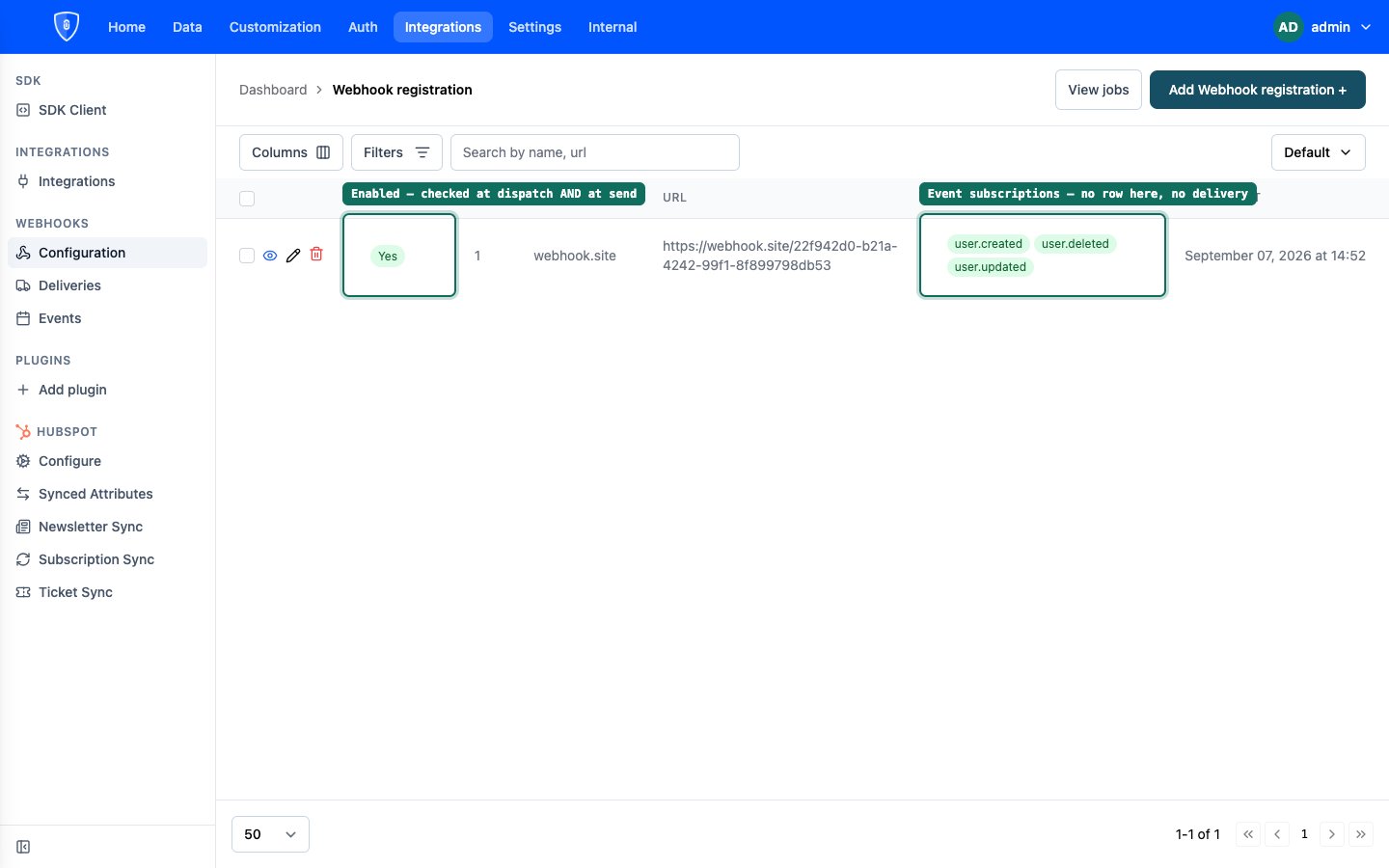
CONFIGURATION — the two gates visible from the list · highlights on ENABLED and EVENT SUBSCRIPTIONS. An endpoint with no subscription chips receives nothing however healthy it is.
Adding a subscription does not create historical webhook events. A missing row also does not establish that no customer change happened: domain-event and audit records are separate from HTTP webhook records.
If matching is correct, provide your Unidy contact with the environment, event type, affected record ID, expected brand/service, and a narrow time window. If many unrelated registrations have pending deliveries, ask them to check background queue processing.
Missing brand context
An event with brand_id: null can match subscriptions across brands because the brand filter is skipped when context is absent. Do not assign it to the subscription's configured brand or assume every record/deletion reveals a trustworthy brand. Review the scope limitation before using this stream for strict isolation.
Interpret the latest response
| Response or diagnostic | Meaning | Next action |
|---|---|---|
HTTP 401 or 403 | The receiver or gateway rejected authorization. | Check the registration's v1/v2 signing mode, exact raw-body verification, v2 clock tolerance, secret, and any Basic Auth/custom headers. |
HTTP 404 | The configured path is unavailable. | Register the final HTTPS webhook route and check routing rules. |
HTTP 3xx | Redirect handling did not finish at a successful endpoint. | Register the final URL. Only one safe 307/308 hop may be followed. |
Webhook redirect rejected: ... | A 307/308 Location was missing, invalid, insecure, or resolved to a non-public target. | Fix the redirect or remove it. Cross-origin redirects also strip Basic Auth and custom headers. |
HTTP 429 | The receiver rate-limited the request. | Increase ingress capacity or durably queue work before acknowledging. Do not assume a custom retry schedule from Retry-After. |
HTTP 5xx | The receiver or gateway failed. | Inspect receiver logs and queue/storage health; return 2xx only after durable acceptance. |
Network error on attempt ... | Connection, TLS, timeout, or another supported network failure. | Check public DNS, certificate chain, firewall, availability, and response time. A response status may be absent. |
Retries exhausted after ... | Automatic attempts have ended. | Fix the cause, verify a new test event, then reconcile the affected window. |
Unidy allows up to 5 seconds to connect and 10 seconds for the request timeout. Persist the verified event and respond quickly; run expensive work asynchronously. A timeout can occur after your application committed its change, so every retry still needs duplicate protection.
For signature debugging, use the receiver contract and example. Do not verify a payload copied from the dashboard: JSON formatting and key ordering can differ from the original HTTP bytes.
Deliveries that stop moving
An initial attempt can be followed by up to five automatic retries with increasing backoff. Scheduling, queue load, and request time affect the total duration; there is no fixed ten-minute completion guarantee.
| State | Interpretation |
|---|---|
pending, try count 0 | No attempt has been recorded. It may be queued, or a disabled registration/subscription may have caused the job to skip it. |
failed | The latest attempt failed. A retry normally remains scheduled while attempts are available; a skipped disabled job can end that chain. |
failed_permanently | The retries were exhausted. No dashboard action resends this delivery. |
finished | An attempt returned 2xx. Unidy cannot determine whether your later worker completed. |
When a sending job encounters a disabled registration or subscription, it can return without updating the row or scheduling its resumption. Re-enabling does not restart that row. Check configuration changes and queue health before attributing an old pending/failed row to one cause.
Do not repeatedly toggle the endpoint as a retry mechanism. Repair the receiver, enable the intended subscriptions, verify new traffic, and reconcile the gap.
Finished delivery without an application change
A 2xx acknowledges receipt at the HTTP endpoint. Trace the delivery through your gateway, signature verifier, persisted inbox, and processing worker. Confirm that a gateway is not returning a generic success before forwarding, that the worker reads the intended environment, and that duplicate detection distinguishes a retried event from a new change.
Events can arrive out of order. occurred_at describes payload construction time and is not a record revision or a guarantee of mutation order. For current-state projections, use an event as a prompt to fetch the record's current REST representation where available.
Recover missed changes
First define the affected environment, registrations, records, and time window. Preserve the available event payloads and delivery evidence before scheduled cleanup.
| What you need | Recovery option | Limitation |
|---|---|---|
| The original stored payload | Inspect the event's Raw JSON while it is retained. | There is no general dashboard redeliver action. Stored JSON is not the original signed HTTP byte stream and may contain registration-specific optional data. |
| Current state of existing records | Reconcile them through the REST API, using a durable checkpoint and duplicate-safe writes. | Current state cannot reconstruct every intermediate change. |
| A new notification for existing records | Use a supported single-record trigger or bulk Trigger webhooks action. | This emits fresh events, fans out to all matching subscribers, and can run connected-integration syncs. It does not replay the old payload. |
| A missed deletion | Use retained deletion payloads, your own tombstones/history, or compare against a complete authoritative inventory. | A deleted record cannot generally be fetched from a current-state endpoint. Check access/filter completeness before treating absence as deletion. |
| A complete historical change log | Use retained history maintained for that purpose and agree any reconstruction with the data owner. | Webhooks plus current REST state do not guarantee reconstruction of missing historical events. |
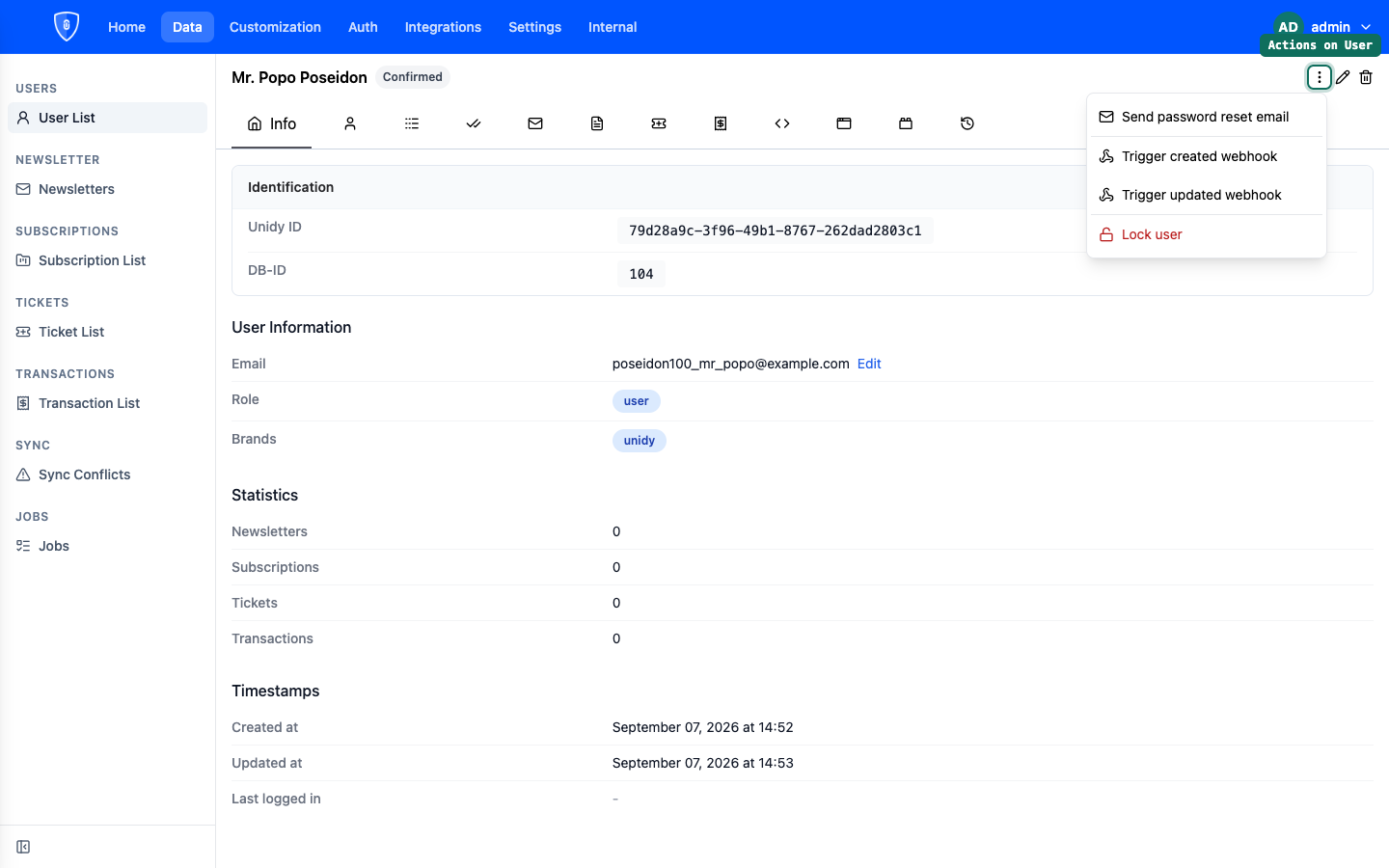
USER RECORD — the replay path · highlight on the three-dot Actions on User button. Only created and updated can be replayed; there is no deleted equivalent, so a missed user.deleted is unrecoverable this way.
For a bulk fresh-event trigger, coordinate with all affected receiver and connector owners. Track the background job and verify downstream effects on a small sample before widening the batch.
Events and their deliveries are removed by scheduled cleanup after two calendar months, including failed events. Exhausting retries does not immediately delete the stored payload. Store evidence you need beyond the retention period in your own system under your retention policy.
Monitor your receiver
Track ingress errors, signature failures, durable queue depth, worker failures, processing lag, and unexpected gaps in expected traffic. Keep delivery/event IDs in logs and exclude secrets and unnecessary personal data.
Unidy's internal delivery monitoring supplements your monitoring. It is not a customer alert SLA and does not establish that every individual failed or skipped delivery has been noticed.