React SDK
Use React hooks layered on the JavaScript SDK.
Build your own React forms and customer screens with @unidy.io/sdk-react. Its provider supplies the API client; hooks manage authentication, profile, newsletter, ticket and transaction state. You own the rendered UI.
Install and configure
Install compatible SDK packages and retain their resolved versions in your lockfile:
npm install @unidy.io/sdk-react @unidy.io/sdkObtain the SDK client key, tenant URL and allowed origins. The example below uses React 19. Check the package's release notes when selecting another React major; peer dependency metadata alone does not establish runtime compatibility.
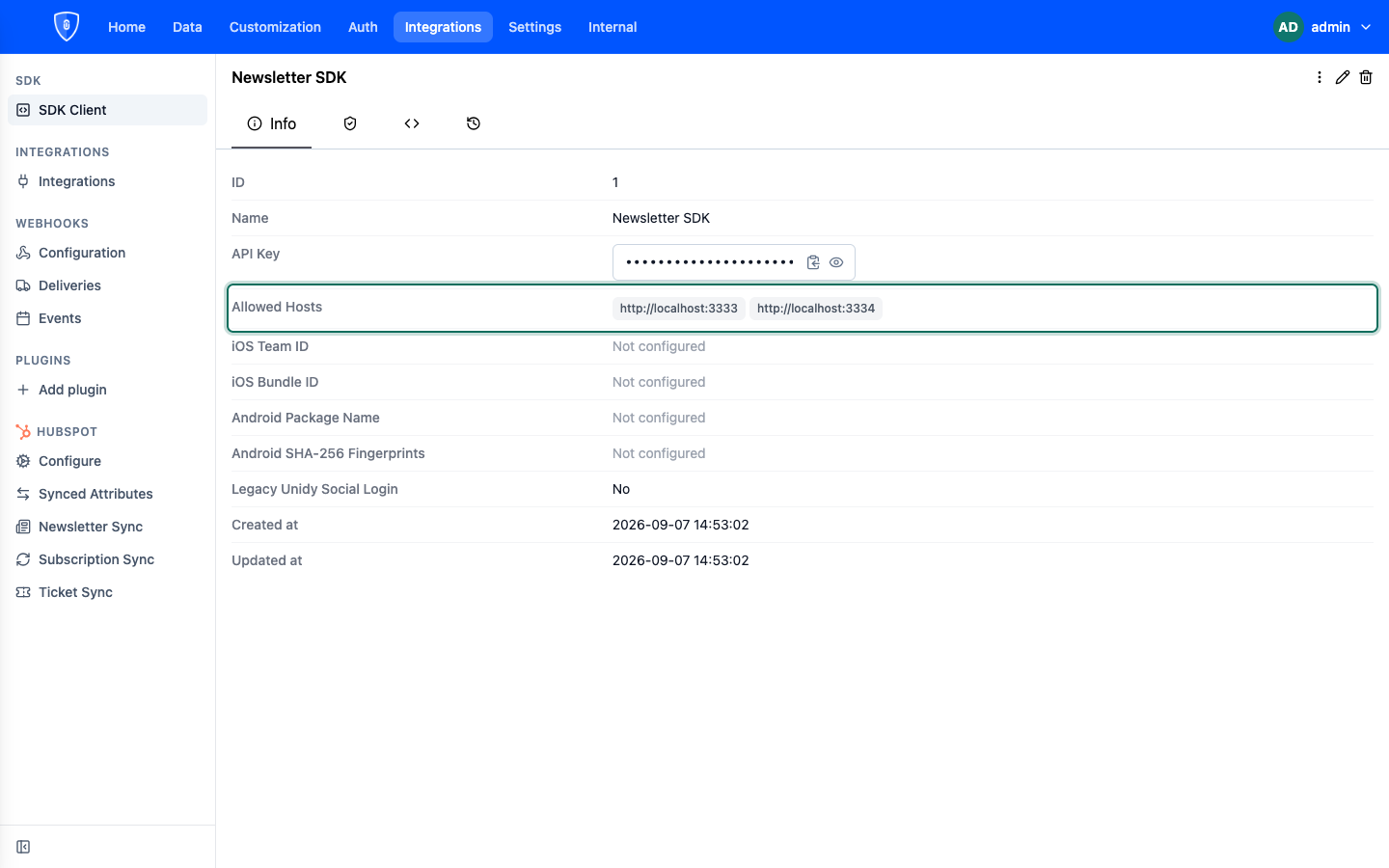
SDK Client → Info — where base URL and API Key come from · highlight on Allowed Hosts. The seeded credential allows http://localhost:3333 and :3334, which are the web-component dev server's ports. A Vite React app serves on :5173 by default and is not covered — this is the first thing that breaks.
Create one stable client for your browser application. Import this factory from @unidy.io/sdk-react, which wires customer token storage and refresh into requests:
'use client';

import { useState } from 'react';
import { createStandaloneClient, UnidyProvider } from '@unidy.io/sdk-react';

export function CustomerApp() {
  const [client] = useState(() => createStandaloneClient({
    baseUrl: 'https://login.example.com',
    apiKey: 'YOUR_SDK_CLIENT_KEY',
  }));

  return (
    <UnidyProvider client={client}>
      <CustomerSession />
    </UnidyProvider>
  );
}
Automatic refresh is enabled by default. The provider and authenticated API calls share refresh work; keep this enabled unless you intentionally provide a different complete session manager.
Render a sign-in flow
This starter implements password, magic code and passkey sign-in, links to enabled social providers, handles brand connection and confirmation, and provides a hosted continuation for registration, invitations and missing profile fields. Set hostedLoginUrl and the social callback destination to the URLs approved for your application. The callback must render this component again so useLogin can recover its result.
import { useState, type FormEvent } from 'react';
import { useLogin, useSession } from '@unidy.io/sdk-react';

const hostedLoginUrl = 'https://login.example.com';

export function CustomerSession() {
  const session = useSession();
  if (session.isLoading) return <p role="status">Restoring your session…</p>;
  if (!session.isAuthenticated) return <SignIn />;
  return (
    <section>
      <h1>Your account</h1>
      <p>{session.email}</p>
      <button onClick={() => void session.logout()}>Sign out</button>
    </section>
  );
}

function SignIn() {
  const login = useLogin();
  const [value, setValue] = useState('');
  const [pendingMessage, setPendingMessage] = useState('');
  const errors = Object.values(login.errors).filter(Boolean);
  const formStep = ['email', 'password', 'magic-code'].includes(login.step);

  async function submit(event: FormEvent<HTMLFormElement>) {
    event.preventDefault();
    if (login.step === 'email') await login.submitEmail(value);
    else if (login.step === 'password') await login.submitPassword(value);
    else if (login.step === 'magic-code') await login.submitMagicCode(value);
    setValue('');
  }

  async function resumeRegistration() {
    const result = await login.checkPendingRegistration(login.email);
    setPendingMessage(result === 'resume-link-sent'
      ? 'Check your email for a link to resume registration.'
      : result === 'not-found'
        ? 'No pending registration was found. You can create an account using the link below.'
        : 'We could not check registration. Please try again.');
  }

  return (
    <section aria-busy={login.isLoading}>
      <h1>Sign in</h1>
      {errors.length > 0 && <p role="alert">{errors.join(' · ')}</p>}
      {pendingMessage && <p role="status">{pendingMessage}</p>}
      {formStep && (
        <form onSubmit={submit}>
          <label>
            {login.step === 'email' ? 'Email' : login.step === 'password' ? 'Password' : 'Code'}
            <input required value={value} onChange={(event) => setValue(event.target.value)}
              type={login.step === 'password' ? 'password' : login.step === 'email' ? 'email' : 'text'}
              autoComplete={login.step === 'password' ? 'current-password' : login.step === 'email' ? 'email' : 'one-time-code'} />
          </label>
          <button disabled={login.isLoading}>Continue</button>
        </form>
      )}
      {login.step === 'verification' && (
        <div>
          {login.loginOptions?.password && <button disabled={login.isLoading}
            onClick={() => login.goToStep('password')}>Use password</button>}
          {login.loginOptions?.magic_link && <button disabled={login.isLoading}
            onClick={() => void login.sendMagicCode()}>Send a code</button>}
          {login.loginOptions?.passkey && <button disabled={login.isLoading}
            onClick={() => void login.authenticateWithPasskey()}>Use passkey</button>}
          {login.loginOptions?.social_logins.map((provider) => (
            <button key={provider} disabled={login.isLoading} onClick={() => {
              const callback = new URL('/account', window.location.origin).href;
              window.location.assign(login.getSocialAuthUrl(provider, callback));
            }}>Continue with {provider}</button>
          ))}
        </div>
      )}
      {login.step === 'magic-code' && <button
        disabled={login.isLoading || login.resendAvailableIn > 0}
        onClick={() => void login.sendMagicCode()}>
        {login.resendAvailableIn > 0 ? `Resend in ${login.resendAvailableIn}s` : 'Resend code'}
      </button>}
      {login.step === 'connect-brand' && <div>
        <p>Connect your account to this brand to continue.</p>
        <button disabled={login.isLoading} onClick={() => void login.connectBrand()}>Connect</button>
        <button disabled={login.isLoading} onClick={() => void login.cancelBrandConnect()}>Cancel</button>
      </div>}
      {login.step === 'unconfirmed' && <div>
        <p>Confirm your email before signing in.</p>
        <button disabled={login.isLoading}
          onClick={() => void login.resendConfirmation(login.email)}>Resend confirmation</button>
      </div>}
      {login.step === 'invited' && <div>
        <p>Open your invitation to finish creating your account.</p>
        <button disabled={login.isLoading}
          onClick={() => void login.resendInvitation(login.email)}>Resend invitation</button>
      </div>}
      {login.step === 'missing-fields' && <p>
        Your account needs additional information. <a href={hostedLoginUrl}>Complete it using hosted login</a>.
      </p>}
      {login.step === 'reset-password' && <p>
        <a href={hostedLoginUrl}>Continue password recovery</a>
      </p>}
      {login.step === 'idle' && <button onClick={() => login.goToStep('email')}>Start sign-in</button>}
      {login.step === 'authenticated' && <p role="status">Signed in.</p>}
      {login.errors.email === 'account_not_found' && <button disabled={login.isLoading}
        onClick={() => void resumeRegistration()}>Check for an unfinished registration</button>}
      {login.canGoBack && <button disabled={login.isLoading} onClick={() => {
        setValue(''); login.goBack();
      }}>Back</button>}
      <p><a href={hostedLoginUrl}>Create an account or use hosted account recovery</a></p>
    </section>
  );
}
The example deliberately routes complex recovery and required-field forms to hosted login. For an entirely embedded experience, render missingFieldDefinitions and submit typed values with submitMissingFields, add the registration workflow, and implement the password-reset/invitation callback screens. Do not hide a continuation merely because the happy-path account did not require it.
Add authenticated screens
Mount profile, ticket and transaction hooks after session restoration confirms authentication. Handle each hook's loading, fetch error, empty result and mutation error. Do not render a permanent loading indicator when the first request fails. See customer-facing recipes for examples.
| Hook | Use |
|---|---|
useLogin | Sign-in state, methods, confirmation, brand connection and missing fields. |
useSession | Session restoration, a valid token and logout. |
useRegistration | Registration state and completion. |
useInternalMatching | Match, confirm or skip supported registration matching. |
useProfile | Fetch/update profile definitions and values; field errors. |
useNewsletterSubscribe | Subscribe an address; returns { success, data } with per-subscription results. |
useNewsletterPreferenceCenter | Manage existing subscriptions and preferences. |
useNewsletterLogin | Send a preference-centre login email. |
useNewsletterResendConfirmation | Resend a newsletter's confirmation. |
usePagination | Pagination state shared with a list hook. |
useTicketables | List tickets or subscriptions and request export links. |
useTicketTransfers | Create and manage ticket transfers where enabled. |
useTransactions | List transactions and load individual details. |
useOAuth | Check consent and obtain a connection token. |
useJumpTo | Supported jumps to Unidy or an integrated service. |
useUnidyClient | Access the provider's underlying services. |
Return shapes and options differ by hook. Use the installed declarations rather than assuming every mutation returns a boolean.
Server rendering and browser behavior
Place browser hooks under a client boundary. Session storage returns a stable empty snapshot during server rendering; show a neutral loading state until browser restoration finishes. Do not use this snapshot to authenticate server routes. Server authorization needs its own verified request session.
The wrapper uses browser storage and credentialed requests. This is a web React integration, not a native React Native adapter. Check CORS, cookie restoration and social returns in the browsers and embedding contexts your application supports.
The browser SDKs share storage keys, so do not run unrelated tenant/customer sessions side by side on one origin without deliberate isolation. See session management and troubleshooting.