Customer-facing SDK workflows
Build profile editing, newsletter preferences, tickets, transactions, and connected-app consent.
Customer-facing SDK workflows
Build profile editing, newsletter preferences, ticket lists, transaction history, and application consent in your own customer area. These are independent recipes: choose the experiences your customers need and place them in your own navigation.
Use an SDK client API key and, except for newsletter sign-up or preference-token access, an authenticated customer session. Start with JavaScript SDK & Web Components or React SDK for installation, sign-in, registration, and session handling. The examples below target @unidy.io/sdk 1.12 and @unidy.io/sdk-react 0.7.
| Customer task | Recipe |
|---|---|
| Update personal details | Profile editing |
| Subscribe or manage email preferences | Newsletter preferences |
| Find a ticket or subscription | Ticket and subscription lists |
| Send a ticket to another person | Ticket transfers |
| Read order history | Transactions |
| Authorize a connected application | OAuth consent |
For Web Components, place one <u-config> before the components and use <u-signed-in> for authenticated recipes. React recipes belong inside your configured UnidyProvider and an authenticated route. Remount customer-specific components when the signed-in account changes.
<u-config base-url="https://YOUR_TENANT_HOST" api-key="YOUR_SDK_API_KEY" locale="en"></u-config>
<u-signed-in><!-- Your authenticated customer components --></u-signed-in>
<u-signed-in not><a href="/login">Sign in</a></u-signed-in>
Captcha initialization
<u-config> requests /api/sdk/v1/sdk_clients/:api_key/captcha_config and initializes a configured captcha provider even when no captcha field is rendered. If your site's consent choices must delay that third-party script, delay mounting the configuration component. There is no configuration attribute that disables this initialization.
Profile editing
The profile response contains field values and rendering metadata: type, label, required, locked, and, for custom attributes, readonly and options. Returned custom attributes follow the active-brand and profile-access configuration; when the active-brand restriction is disabled, existing values can expose definitions from other brands. Hidden fields are absent; display-only fields must not be submitted. An email change uses its dedicated confirmation flow, rather than a general profile input.
Web Components
<u-profile partial-validation="true">
  <u-field field="first_name"></u-field>
  <u-field field="last_name"></u-field>
  <u-field field="date_of_birth"></u-field>
  <u-field field="country_code"></u-field>
  <u-submit-button>Save changes</u-submit-button>
</u-profile>
Each <u-field> registers with the profile form. partial-validation="true" limits the update to the registered fields. A custom attribute uses field="custom_attributes.YOUR_ATTRIBUTE_NAME"; a name absent from the response renders nothing. For a form built without <u-field>, supply the actual field names in validate-fields.
<u-full-profile fields="first_name,last_name" enable-autosave="true" save-delay="800"> is an alternative with autosave. Choose an explicit save action or autosave according to your experience; explain when a save succeeds.
React
This example edits four standard fields and all returned custom attributes. Narrow the custom-attribute list to the fields your product needs. The form preserves numbers, booleans, multi-select arrays, and nullable values, and excludes locked or display-only fields from the update.
import { useState, type FormEvent } from "react";
import { useProfile, type UserProfileData } from "@unidy.io/sdk-react";

type Value = string | number | boolean | string[] | null;
type Field = {
  value: Value;
  type: string;
  label: string;
  required: boolean;
  locked?: boolean;
  readonly?: boolean;
  locked_text?: string | null;
  options?: { value: string; label: string }[];
  radio_options?: { value: string | boolean | null; label: string }[];
};
type Entry = [string, Field];

function profileFields(profile: UserProfileData): Entry[] {
  return [
    ["first_name", profile.first_name],
    ["last_name", profile.last_name],
    ["date_of_birth", profile.date_of_birth],
    ["country_code", profile.country_code],
    ...Object.entries(profile.custom_attributes).map(
      ([name, field]): Entry => [`custom_attributes.${name}`, field],
    ),
  ];
}

export function ProfileScreen() {
  const [saved, setSaved] = useState(false);
  const state = useProfile({
    fields: ["first_name", "last_name", "date_of_birth", "country_code", "custom_attributes"],
    callbacks: { onSuccess: () => setSaved(true) },
  });
  if (!state.profile) {
    if (state.error) return <p role="alert">{state.error} <button onClick={() => void state.refetch()}>Retry</button></p>;
    if (state.isLoading) return <p role="status">Loading profile…</p>;
    return <p>Profile unavailable. <button onClick={() => void state.refetch()}>Load profile</button></p>;
  }
  const fields = profileFields(state.profile);
  return <>
    <ProfileForm key={JSON.stringify(fields)} fields={fields} state={state} onEdit={() => setSaved(false)} />
    {saved ? <p role="status">Saved.</p> : null}
  </>;
}

function ProfileForm({ fields, state, onEdit }: { fields: Entry[]; state: ReturnType<typeof useProfile>; onEdit: () => void }) {
  const [values, setValues] = useState<Record<string, Value>>(() =>
    Object.fromEntries(fields.map(([name, field]) => [name, field.value])),
  );
  const [localError, setLocalError] = useState<string | null>(null);
  const editable = fields.filter(([, field]) => !field.locked && !field.readonly);
  const busy = state.isLoading || state.isMutating;

  async function save(event: FormEvent<HTMLFormElement>) {
    event.preventDefault();
    onEdit();
    setLocalError(null);
    const payload: Record<string, unknown> = {};
    const custom: Record<string, Value> = {};
    for (const [name] of editable) {
      const value = values[name];
      if (typeof value === "number" && !Number.isFinite(value)) {
        setLocalError("Enter a valid number.");
        return;
      }
      if (name.startsWith("custom_attributes.")) custom[name.slice(18)] = value;
      else payload[name] = value;
    }
    if (Object.keys(custom).length) payload.custom_attributes = custom;
    await state.updateProfile(payload);
  }

  return <form onSubmit={save}>
    {fields.map(([name, field]) => <fieldset key={name} disabled={busy || field.locked || field.readonly}>
      <legend>{field.label}{field.required ? " *" : ""}</legend>
      <ProfileInput name={name} field={field} value={values[name]} onChange={(value) => {
        onEdit();
        setValues((previous) => ({ ...previous, [name]: value }));
      }} />
      {field.locked_text ? <p>{field.locked_text}</p> : null}
      {state.fieldErrors[name] ? <p role="alert">{state.fieldErrors[name]}</p> : null}
    </fieldset>)}
    {localError || state.error ? <p role="alert">{localError ?? state.error}</p> : null}
    <button disabled={busy || editable.length === 0}>Save changes</button>
  </form>;
}

function ProfileInput({ name, field, value, onChange }: {
  name: string; field: Field; value: Value; onChange: (value: Value) => void;
}) {
  const common = { name, required: field.required, "aria-label": field.label };
  if (field.type === "checkbox") return <select {...common} multiple
    value={Array.isArray(value) ? value : []}
    onChange={(event) => onChange(Array.from(event.currentTarget.selectedOptions, (option) => option.value))}>
    {(field.options ?? []).map((option) => <option key={option.value} value={option.value}>{option.label}</option>)}
  </select>;
  if (field.type === "radio" || field.type === "boolean") {
    const options = field.type === "boolean"
      ? [{ value: true, label: "Yes" }, { value: false, label: "No" }]
      : field.radio_options ?? [];
    return <select {...common} value={value === null ? "" : JSON.stringify(value)}
      onChange={(event) => onChange(event.target.value === "" ? null : JSON.parse(event.target.value))}>
      <option value="">Choose…</option>
      {options.filter((option) => option.value !== null).map((option) =>
        <option key={JSON.stringify(option.value)} value={JSON.stringify(option.value)}>{option.label}</option>)}
    </select>;
  }
  if (field.type === "select") return <select {...common} value={String(value ?? "")}
    onChange={(event) => onChange(event.target.value || null)}>
    <option value="">Choose…</option>
    {(field.options ?? []).map((option) => <option key={option.value} value={option.value}>{option.label}</option>)}
  </select>;
  if (field.type === "textarea") return <textarea {...common} value={String(value ?? "")}
    onChange={(event) => onChange(event.target.value || null)} />;
  return <input {...common} type={field.type} step={field.type === "number" ? "any" : undefined}
    value={typeof value === "string" || typeof value === "number" ? value : ""}
    onChange={(event) => onChange(event.target.value === "" ? null
      : field.type === "number" ? event.target.valueAsNumber : event.target.value)} />;
}
A non-empty fields option currently enables partial validation; the hook does not send that array as an allowlist. The keys actually submitted to updateProfile determine which fields are validated. Keep that payload explicit. The server remains responsible for validating values and enforcing locks; disabling controls is presentation.
See Profile and user operations for the response, update errors, and email-change flow.
Newsletter preferences
A preference centre joins the public catalogue with this person's subscriptions. client.newsletters.listAll() returns newsletters and every preference group; useNewsletterPreferenceCenter() returns subscriptions and mutations. Use plugin_identifier, not a preference's numeric ID, in mutation requests. A preference without a plugin_identifier cannot be offered as an editable selection.
For newsletter discovery, use catalogue title, description, and position in your own interface. Older SDK descriptions mentioned a promotion flag; the current catalogue has no dedicated promotion flag. Choose any promotional placement in your application configuration. The catalogue's default value does not establish a customer's subscription or consent.
Check the returned confirmed state. soi_when_logged_in does not mean every request is immediately confirmed, and double opt-in delivery depends on the newsletter's configuration.
React preference centre
The component below preserves preferences from other groups and hidden selections. For an existing subscription, an empty preference_identifiers array means all preferences, not none. Unticking the last selected preference through togglePreference unsubscribes from the newsletter; explain that behavior beside the controls.
import { useEffect, useState } from "react";
import {
  useNewsletterPreferenceCenter, useNewsletterResendConfirmation,
  useUnidyClient, type Newsletter,
} from "@unidy.io/sdk-react";

export function PreferenceCentre({ preferenceToken }: { preferenceToken?: string }) {
  // A new link token must initialize a new hook instance.
  return <PreferenceForm key={preferenceToken ?? "authenticated-session"} preferenceToken={preferenceToken} />;
}

function PreferenceForm({ preferenceToken }: { preferenceToken?: string }) {
  const client = useUnidyClient();
  const centre = useNewsletterPreferenceCenter({ preferenceToken });
  const resend = useNewsletterResendConfirmation({ preferenceToken: centre.preferenceToken });
  const [catalogue, setCatalogue] = useState<Newsletter[] | null>(null);
  const [catalogueError, setCatalogueError] = useState<string | null>(null);

  useEffect(() => {
    let cancelled = false;
    setCatalogue(null);
    setCatalogueError(null);
    client.newsletters.listAll().then(([error, response]) => {
      if (cancelled) return;
      if (error !== null) setCatalogueError(error);
      else setCatalogue(response.newsletters);
    }).catch(() => { if (!cancelled) setCatalogueError("Unable to load newsletters."); });
    return () => { cancelled = true; };
  }, [client]);

  if (catalogueError || centre.error) return <p role="alert">{catalogueError ?? centre.error}</p>;
  if (catalogue === null || centre.isLoading) return <p role="status">Loading preferences…</p>;
  if (preferenceToken && !centre.preferenceToken && centre.subscriptions.length === 0)
    return <p role="status">You are unsubscribed. Request a new preferences link to manage another subscription.</p>;
  if (catalogue.length === 0) return <p>No newsletters are available.</p>;

  return <>
    {centre.mutationError ? <p role="alert">{centre.mutationError}</p> : null}
    {resend.error ? <p role="alert">{resend.error}</p> : null}
    {resend.success ? <p role="status">Confirmation email sent.</p> : null}
    {catalogue.map((newsletter) => {
      const name = newsletter.internal_name;
      const sub = centre.getSubscription(name);
      const busy = centre.isMutating(name);
      const catalogueIds = newsletter.preference_groups.flatMap((group) =>
        group.preferences.flatMap((preference) => preference.plugin_identifier ? [preference.plugin_identifier] : []),
      );
      // Include every group, hidden preferences, and stored IDs absent from the current catalogue.
      const allIds = [...new Set([...catalogueIds, ...(sub?.preference_identifiers ?? [])])];
      const selected = new Set(!sub ? [] : sub.preference_identifiers.length ? sub.preference_identifiers : allIds);
      return <section key={name}>
        <h3>{newsletter.title}</h3>
        <button disabled={busy} onClick={() => void (sub ? centre.unsubscribe(name) : centre.subscribe(name))}>
          {sub ? "Unsubscribe" : "Subscribe"}
        </button>
        {sub && !sub.confirmed ? <p>
          Check your inbox to confirm.
          <button disabled={resend.isLoading || busy} onClick={() => void resend.resendConfirmation(name)}>Resend confirmation</button>
        </p> : null}
        {newsletter.preference_groups.map((group) => <fieldset key={group.id} disabled={!sub?.confirmed || busy}>
          <legend>{group.name || "Preferences"}</legend>
          {group.preferences.filter((preference) => !preference.hidden && preference.plugin_identifier).map((preference) => {
            const id = preference.plugin_identifier!;
            return <label key={preference.id}>
              <input type="checkbox" checked={selected.has(id)}
                onChange={() => void centre.togglePreference(name, id, allIds)} />
              {preference.name}
            </label>;
          })}
        </fieldset>)}
        <p>Clearing the final selected preference unsubscribes you from this newsletter.</p>
      </section>;
    })}
  </>;
}
The hook's initial preferenceToken is stored in state. Changing the prop and calling refetch() does not replace that state; remount as above. The hook adopts rotated tokens returned after unsubscribe. When a token-only visitor removes their last subscription, show a completed state instead of offering further mutations with an invalid token.
For first-time sign-up, use useNewsletterSubscribe(), which accepts an explicit email and returns { success, data? }. Check success; testing the returned object itself always succeeds. A batch can contain both successful data.results and data.errors, so report each newsletter's result rather than retrying the whole batch. useNewsletterLogin().sendLoginEmail(email, redirectUri) sends an existing subscriber a preference-centre link; register the redirect host in the SDK client's Allowed Hosts.
Web Components
For first-time sign-up, replace YOUR_NEWSLETTER_NAME with a configured internal name. Retain the consent error display: the submit button may remain enabled until the customer clicks, but an unchecked required consent stops the request and sets consent_required.
<u-newsletter-root>
  <u-email-field placeholder="you@example.com"></u-email-field>
  <u-error-message for="email"></u-error-message>
  <label><u-newsletter-checkbox internal-name="YOUR_NEWSLETTER_NAME"></u-newsletter-checkbox>Newsletter</label>
  <label><u-newsletter-consent-checkbox></u-newsletter-consent-checkbox>I agree to receive this newsletter.</label>
  <u-error-message for="consent"></u-error-message>
  <u-submit-button>Subscribe</u-submit-button>
  <u-error-message for="general"></u-error-message>
</u-newsletter-root>
For an authenticated customer or preference-token visitor, render subscription controls inside the same root:
<u-newsletter-root>
  <u-conditional-render when="newsletter.loggedIn">
    <u-newsletter-toggle-subscription-button internal-name="YOUR_NEWSLETTER_NAME"></u-newsletter-toggle-subscription-button>
    <u-conditional-render when="newsletter.subscribed" is="YOUR_NEWSLETTER_NAME">
      <u-conditional-render when="newsletter.confirmed" is="YOUR_NEWSLETTER_NAME" not>
        <p>Check your inbox to confirm.</p>
        <u-newsletter-resend-doi-button internal-name="YOUR_NEWSLETTER_NAME">Resend confirmation</u-newsletter-resend-doi-button>
      </u-conditional-render>
      <label><u-newsletter-preference-checkbox internal-name="YOUR_NEWSLETTER_NAME" preference-identifier="YOUR_PREFERENCE_IDENTIFIER"></u-newsletter-preference-checkbox>Updates</label>
    </u-conditional-render>
    <u-error-message for="general"></u-error-message>
  </u-conditional-render>
</u-newsletter-root>
For multiple consent controls, give each a distinct consent-key. Configure preference-link redirects with the root's redirect-uri; supported placeholders are {preference_token}, {email}, and {newsletter_internal_name}. Treat preference tokens as credentials and avoid copying them into analytics, logs, or permanent links.
Ticket and subscription lists
Listing tickets, product subscriptions, and transactions is read-only. Ticket transfers are a separate mutation workflow described below. These APIs use the signed-in customer's scope; they are not an administrative export surface.
React
import { useState } from "react";
import { usePagination, useTicketables } from "@unidy.io/sdk-react";

export function Tickets() {
  const pagination = usePagination({ perPage: 10 });
  const [downloadError, setDownloadError] = useState<string | null>(null);
  const [downloadUrl, setDownloadUrl] = useState<string | null>(null);
  const tickets = useTicketables({
    type: "ticket", pagination,
    filter: { state: "active", paymentState: "payed", orderBy: "starts_at", orderDirection: "desc" },
    callbacks: { onError: setDownloadError },
  });
  async function download(id: string, format: "pdf" | "pkpass") {
    setDownloadError(null);
    setDownloadUrl(null);
    const link = await tickets.getExportLink(id, format);
    if (link) setDownloadUrl(link.url);
    else setDownloadError("This download is unavailable.");
  }
  return <section aria-busy={tickets.isLoading}>
    {tickets.error || downloadError ? <p role="alert">{tickets.error ?? downloadError}</p> : null}
    {tickets.isLoading ? <p role="status">Loading tickets…</p> : null}
    {!tickets.isLoading && !tickets.error && tickets.items.length === 0 ? <p>No tickets found.</p> : null}
    <ul>{tickets.items.map((ticket) => <li key={ticket.id}>
      {ticket.title}
      <button onClick={() => void download(ticket.id, "pdf")}>Get PDF link</button>
      {ticket.exportable_to_wallet ? <button onClick={() => void download(ticket.id, "pkpass")}>Get Wallet link</button> : null}
    </li>)}</ul>
    {downloadUrl ? <p><a href={downloadUrl} target="_blank" rel="noopener noreferrer">Open download</a></p> : null}
    <button disabled={tickets.isLoading || !pagination.hasPrevPage} onClick={pagination.prevPage}>Previous</button>
    <span> Page {pagination.page} </span>
    <button disabled={tickets.isLoading || !pagination.hasNextPage} onClick={pagination.nextPage}>Next</button>
  </section>;
}
Use type: "subscription" for product subscriptions. Dates are parsed to Date objects, but nullable dates still need an empty state. Export links expire; request a fresh link when the customer asks to download. The server decides whether the current customer can export a ticket, including transferred tickets.
Web Components
<u-ticketable-list ticketable-type="ticket" filter="state=active;payment_state=payed" limit="10">
  <template>
    <article><ticketable-value name="title"></ticketable-value></article>
  </template>
  <p slot="empty">No tickets found.</p>
  <div slot="pagination">
    <u-pagination-button direction="prev"></u-pagination-button>
    <u-pagination-page></u-pagination-page>
    <u-pagination-button direction="next"></u-pagination-button>
  </div>
</u-ticketable-list>
The list creates a pagination store automatically. Assign store only when you need external state management. For table rows, use target to point to a <tbody> and place the template inside the list.
Use your template and CSS to render a table, cards, or tiles; these layouts do not change which records the customer may access. For a search interface, use the supported field filters and comparison operators in Lists, pagination and filtering. Filtering only the loaded page searches that page, not the customer's complete collection.
Web Component filter names are snake case: state, payment_state, order_by, order_direction, service_id, and ticket_category_id or subscription_category_id. React uses paymentState, orderBy, orderDirection, serviceId, and the corresponding category property. Ticket payment values are payed and not_payed; transaction payment state uses different vocabulary.
PDF controls inside list templates
In SDK 1.12, the list gates both PDF and Wallet export elements on exportable_to_wallet, and disables exports for tickets held by somebody else. A disabled PDF element therefore does not prove that the PDF endpoint is unavailable. Use getExportLink(id, "pdf") or the standalone client's export method for a separate PDF action and handle the server's response.
Ticket transfers
useTicketTransfers() supports creating an offer, accepting or declining an incoming offer, cancelling an outgoing offer, revoking a transferred ticket as its owner, and returning a ticket as its holder. These actions change transfer and holding state and can send email; the ticket's owner is retained. Show an explicit customer action for each operation.
import { useState, type FormEvent } from "react";
import { useTicketTransfers } from "@unidy.io/sdk-react";

export function TransferTicket({ ticketId }: { ticketId: string }) {
  const transfers = useTicketTransfers({ fetchOnMount: false });
  const [sent, setSent] = useState(false);
  async function submit(event: FormEvent<HTMLFormElement>) {
    event.preventDefault();
    setSent(false);
    const email = String(new FormData(event.currentTarget).get("email") ?? "").trim();
    const transfer = await transfers.createTransfer(ticketId, email);
    setSent(transfer !== null);
  }
  return <form onSubmit={submit}>
    <label>Recipient email <input name="email" type="email" required disabled={transfers.isMutating} /></label>
    <button disabled={transfers.isMutating}>Send transfer offer</button>
    {transfers.error ? <p role="alert">{transfers.error}</p> : null}
    {sent ? <p role="status">Transfer offer sent.</p> : null}
  </form>;
}
For Web Components, <u-ticket-transfer-form ticket-id="YOUR_TICKET_UUID"> provides the offer form. Inside a ticket-list template, the list assigns the ticket ID automatically. See Customer tickets, subscriptions, and transactions for the transfer endpoints and owner/holder rules. Refetch affected ticket lists after a successful transfer action; the transfer hook refreshes its own incoming and outgoing offers, not every ticket list in your application.
Transactions
Use useTransactions({ pagination, filter }) with the same usePagination object as a ticket list, or <u-transaction-list> with a template. The transaction states are open, partially_paid, paid, partially_refunded, refunded, and cancelled.
import { usePagination, useTransactions } from "@unidy.io/sdk-react";

export function Orders() {
  const pagination = usePagination({ perPage: 20 });
  const orders = useTransactions({ pagination, filter: { state: "paid", orderBy: "placed_at", orderDirection: "desc" } });
  return <section aria-busy={orders.isLoading}>
    {orders.error ? <p role="alert">{orders.error}</p> : null}
    {orders.isLoading ? <p role="status">Loading orders…</p> : null}
    {!orders.isLoading && !orders.error && orders.items.length === 0 ? <p>No orders found.</p> : null}
    <ul>{orders.items.map((order) => <li key={order.id}>{order.reference ?? order.id}: {order.total} {order.currency ?? ""}</li>)}</ul>
    <button disabled={orders.isLoading || !pagination.hasPrevPage} onClick={pagination.prevPage}>Previous</button>
    <button disabled={orders.isLoading || !pagination.hasNextPage} onClick={pagination.nextPage}>Next</button>
  </section>;
}<u-transaction-list filter="state=paid;order_by=placed_at;order_direction=desc" limit="10">
<template>
<article>
<transaction-value name="reference" default="Order"></transaction-value>
<transaction-value name="total"></transaction-value>
<transaction-value name="currency"></transaction-value>
</article>
</template>
<p slot="empty">No orders found.</p>
<div slot="pagination">
<u-pagination-button direction="prev"></u-pagination-button>
<u-pagination-page></u-pagination-page>
<u-pagination-button direction="next"></u-pagination-button>
</div>
</u-transaction-list>For a detail page, getTransaction(id) returns a transaction or null; its errors go to callbacks.onError, separately from the list's error. Format line-item money using the parent transaction's nullable currency. Do not assume a default currency when it is missing.
Presentation is not access control
The response currently includes staff_note, including line-item notes. Omitting a field from your template does not prevent it reaching the customer's browser. Data that customers must not receive needs to be excluded on the server; do not store confidential internal information in exposed fields.
OAuth consent
This recipe connects an authenticated customer to an OAuth application. Use the application's Client ID / UID, not its numeric database ID. Configure the application and its required fields in OAuth applications, claims, and services.
For applications requiring authentication confirmation, use the hosted authorization/consent flow. SDK 1.12 and React 0.7 do not model the password/passkey confirmation response completely. For required custom attributes, collect editable values through the profile recipe before checking consent, or use hosted consent: the current server uses custom_attribute: names in missing-field responses while automatic SDK field handling expects custom_attributes.. Keep business-required fields enabled.
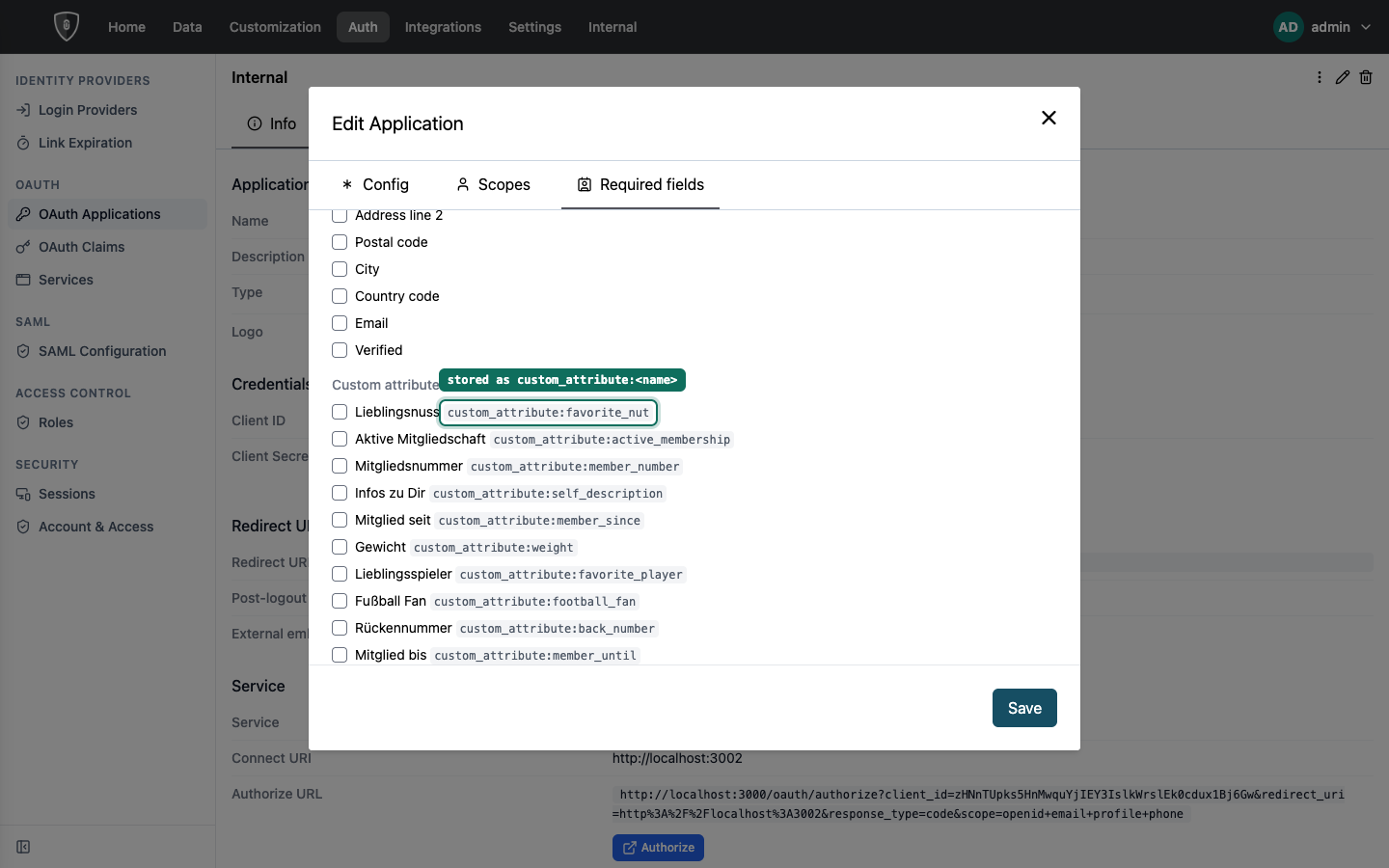
AUTH → OAUTH APPLICATIONS → Edit Application → Required fields — the source of required_fields and missing_fields · highlight on the stored form of a custom attribute. Read this screen before building the consent dialog: the two columns do not behave the same way in the SDK.
React
This example grants consent only when required fields are already complete. It provides a profile link and a hosted authorization fallback instead of inventing a missing-field form. hostedAuthorizationUrl must be your application's configured authorization entry point with the appropriate OAuth state and, when applicable, PKCE handling. redirectUri is an approved application destination, not an arbitrary incoming query value.
import { useEffect } from "react";
import { useOAuth } from "@unidy.io/sdk-react";

type ConsentProps = {
  clientId: string;
  baseUrl: string;
  redirectUri: string;
  profileUrl: string;
  hostedAuthorizationUrl: string;
  requiresAuthenticationConfirmation: boolean;
};

export function ConsentScreen(props: ConsentProps) {
  const oauth = useOAuth({ clientId: props.clientId, autoCheck: !props.requiresAuthenticationConfirmation });
  useEffect(() => {
    if (!oauth.token) return;
    const url = new URL("/one_time_login", props.baseUrl);
    url.searchParams.set("token", oauth.token);
    url.searchParams.set("redirect_uri", props.redirectUri);
    window.location.assign(url.toString());
  }, [oauth.token, props.baseUrl, props.redirectUri]);

  if (props.requiresAuthenticationConfirmation)
    return <a href={props.hostedAuthorizationUrl}>Continue securely with Unidy</a>;
  if (!oauth.consent) {
    if (oauth.error) return <p role="alert">{oauth.error} <a href={props.hostedAuthorizationUrl}>Continue with Unidy</a></p>;
    if (oauth.isLoading) return <p role="status">Loading application…</p>;
    return <button onClick={() => void oauth.checkConsent()}>Load application</button>;
  }
  const { application, missing_fields } = oauth.consent;
  return <section aria-busy={oauth.isLoading}>
    <h2>{application.name}</h2>
    <p>{application.description}</p>
    <h3>Requested access</h3>
    <ul>{application.scopes.map((scope) => <li key={scope.scope}>{scope.name}</li>)}</ul>
    {missing_fields.length > 0 ? <p>
      Complete your <a href={props.profileUrl}>profile</a>, then check again, or <a href={props.hostedAuthorizationUrl}>continue with Unidy</a>.
      <button disabled={oauth.isLoading} onClick={() => void oauth.checkConsent()}>Check again</button>
    </p> : null}
    {oauth.error ? <p role="alert">{oauth.error} <a href={props.hostedAuthorizationUrl}>Continue with Unidy</a></p> : null}
    <button disabled={oauth.isLoading || missing_fields.length > 0} onClick={() => void oauth.grantConsent({
      scopes: application.scopes.map((scope) => scope.scope), redirect_uri: props.redirectUri,
    })}>Authorize application</button>
  </section>;
}
Supply requiresAuthenticationConfirmation from your integration configuration; the hook's parsed response cannot reliably reveal that requirement. Remount this screen when changing applications or customers so that a previous one-time token is not reused. Never log that token.
Web Components
For applications without authentication confirmation and with required profile fields already completed, use:
<u-oauth-provider client-id="YOUR_OAUTH_CLIENT_ID" auto-redirect="true">
  <u-oauth-button action="connect">Connect application</u-oauth-button>
  <u-oauth-modal>
    <h2><u-oauth-text type="title"></u-oauth-text></h2>
    <u-oauth-text type="description"></u-oauth-text>
    <u-oauth-scopes></u-oauth-scopes>
    <u-oauth-missing-fields></u-oauth-missing-fields>
    <u-oauth-button action="cancel">Not now</u-oauth-button>
    <u-oauth-button action="submit">Authorize</u-oauth-button>
  </u-oauth-modal>
</u-oauth-provider>
Handle oauthError in your page and offer a configured hosted authorization link if the embedded flow cannot complete. auto-redirect="false" leaves the redirect to your oauthSuccess handler; the React hook always leaves it to your application.
Handle errors and verify the experience
Show request errors separately from loading, retain field-level validation messages, and distinguish an empty successful list from a failed request. For newsletters, distinguish an unconfirmed subscription from a failed subscription. For transfers, require an explicit action and show whether the offer was created.
Before releasing a customer area, exercise it with a disposable account for your target brand: locked and hidden profile fields, unconfirmed subscriptions, all-preferences state, an expired preference link, empty and multi-page lists, unavailable exports, ticket transfers, and hosted consent fallback. See SDK troubleshooting for credentials, origins, and error identifiers.