SDK troubleshooting
Diagnose initialization, authentication, and request failures.
Start with the failed request's host, HTTP status and error_identifier, then use the matching section. Record your installed SDK package versions and whether the failure occurs in a browser or in a server client.
| Symptom | Check |
|---|---|
| Blank components or an uninitialized SDK | Configuration |
| Browser reports a network or CORS error | Origins and redirects |
401, invalid_id_token, or a session that cannot refresh | Credentials and sessions |
origin_not_allowed | Origins and redirects |
| Required fields, confirmation or brand connection interrupts sign-in | Authentication continuations |
422, field errors or invalid_response from a library | Validation |
429 or repeated email/code requests | Rate limits |
| The same server error occurs on every endpoint | Host and server errors |
Configuration
For web components, register the custom elements, provide exactly one <u-config> and set both base-url and api-key. Empty build-time environment values prevent initialization. The base URL must be the configured Unidy tenant or brand host, not your application's origin.
For React, place hooks below a stable <UnidyProvider client={client}>. For the core standalone client, supply deps.getIdToken for customer operations; it does not read browser session storage for you.
Origins and redirects
These are separate checks:
- Browser CORS: the installation constructs its allowlist from SDK clients' allowed hosts. Use the correct scheme and port. A rejected preflight prevents the actual request; a simple request may reach the server while the browser refuses to expose its response. A successful server-side request therefore does not prove browser configuration is correct.
- Brand association: a client used on a host belonging to an unassociated brand can return
origin_not_allowed. - Endpoint-specific restrictions: newsletter preference-login validates its redirect URL against the SDK client's Allowed Hosts. Newsletter operations can also use
origin_not_allowedfor a newsletter's brand mismatch. Inspect the operation and response metadata before changing CORS configuration.
Inspect the browser Network panel's OPTIONS response, Origin, requested headers and Access-Control-Allow-Origin. Your JSON and credential headers can trigger preflight. Do not work around the failure with mode: 'no-cors': that produces a response your application cannot read.
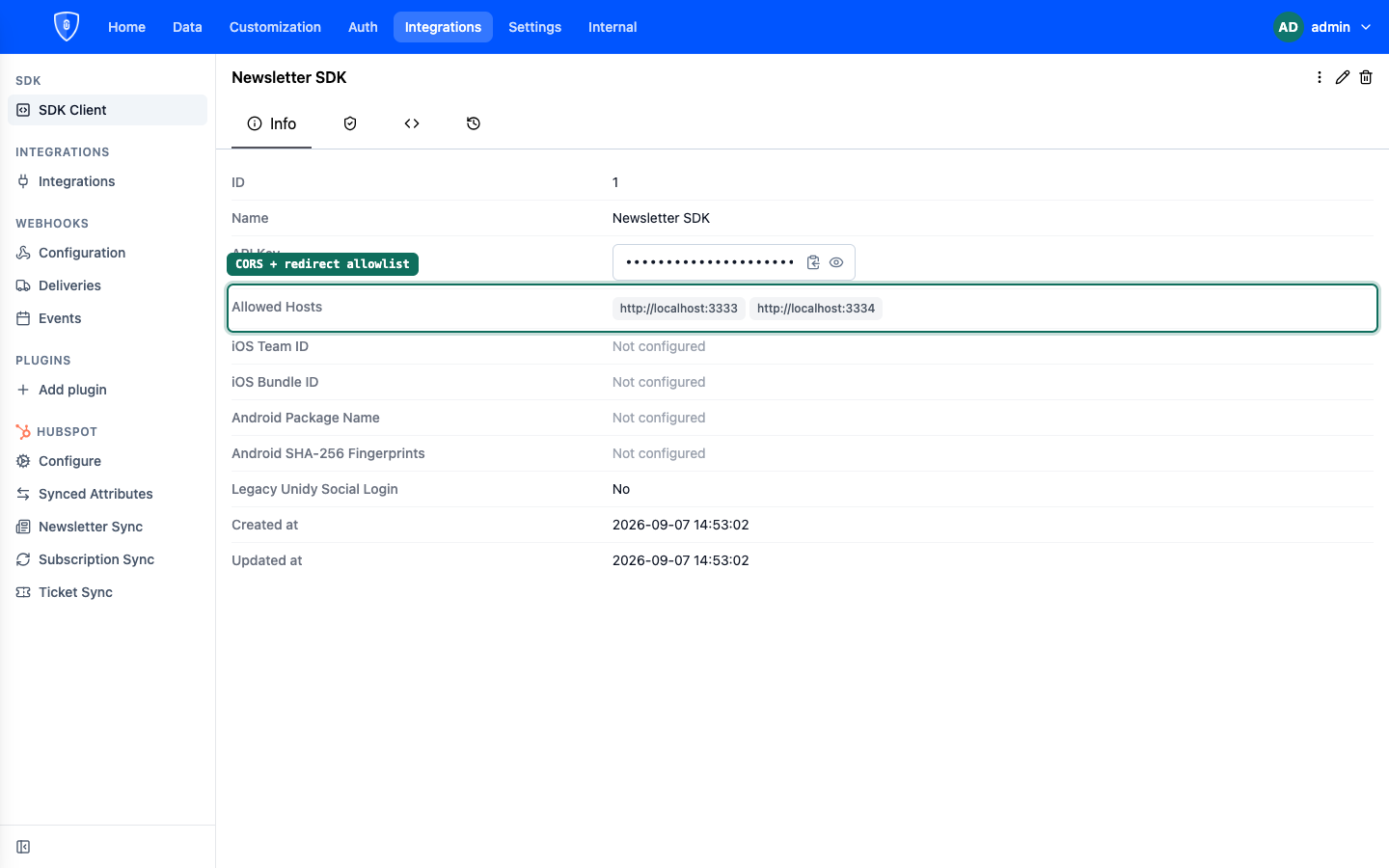
SDK CLIENTS → detail, Info tab — the two entries on this one credential are part of an installation-wide allowlist, not a per-credential check · highlight on Allowed Hosts
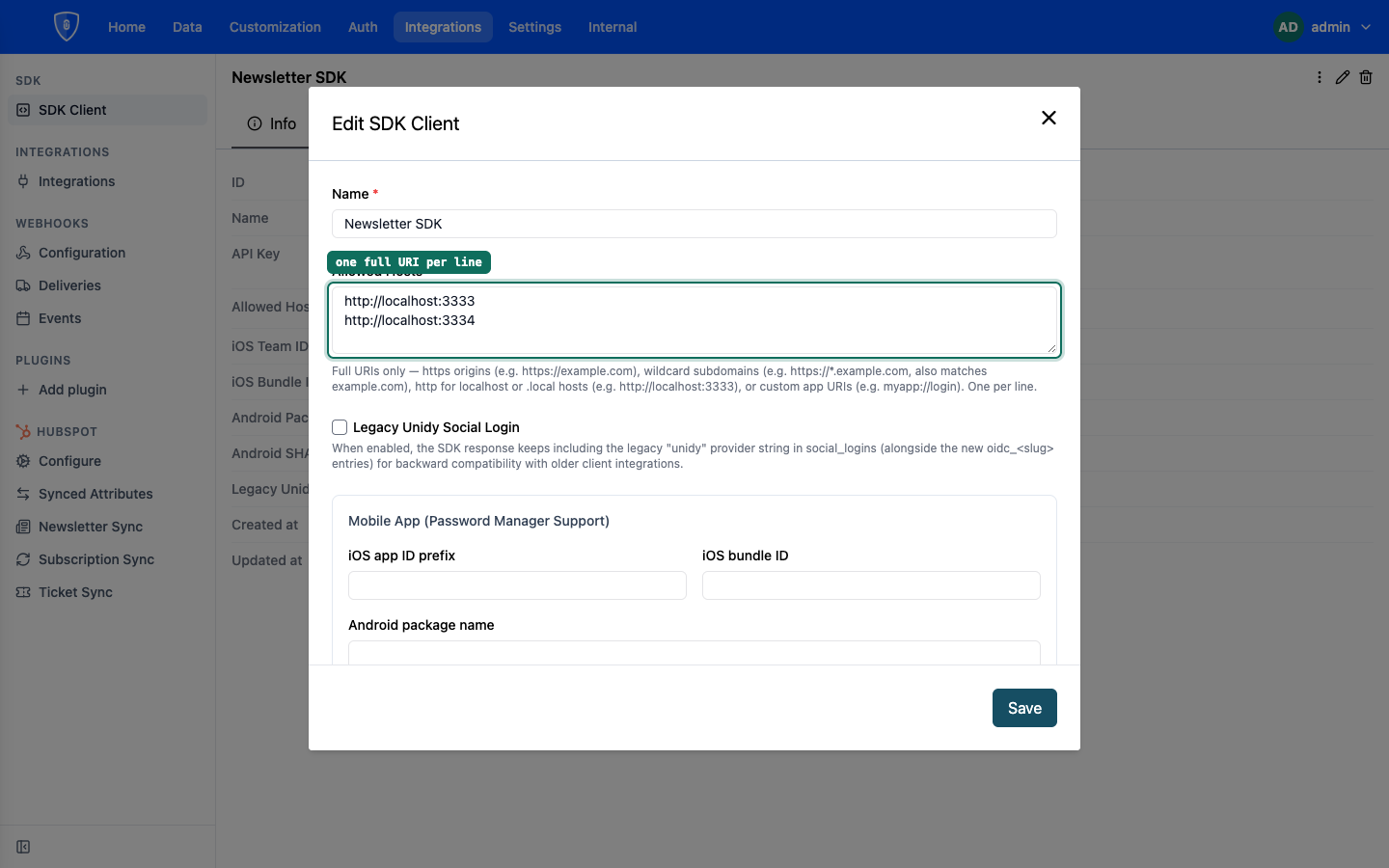
SDK CLIENTS → Edit SDK Client — one full URI per line; the help text under the field is the authoritative list of accepted forms · highlight on the Allowed Hosts textarea
Credentials and sessions
The SDK application key belongs in Authorization: Bearer …; the customer JWT belongs in X-ID-Token. Use tokens issued for this SDK application. OAuth REST tokens are a different credential.
The current HTTP error contract reports unusable or expired SDK JWTs as invalid_id_token; do not depend on a distinct expired_id_token response. Inspect the token's exp locally for diagnostics without logging the token, and check your device clock. Refresh through the library or the documented token lifecycle.
Modern JavaScript and React SDK releases share in-flight refresh work and handle rotated credentials. Keep React automatic refresh enabled unless your application intentionally owns the complete lifecycle. Network failures can be recoverable; repeated refresh attempts with an invalid, revoked or already consumed token are not. Offer sign-in again after a permanent failure.
Cookie-based session restoration is distinct from JWT-authenticated requests. Same-site and cross-site contexts, browser settings, embedding and credentialed fetch rules affect whether the Unidy cookie is sent. A missing restoration cookie does not prove that password sign-in or a top-level social redirect is broken. Test those paths separately in your supported browsers.
Authentication continuations
Handle confirmation, invitations, missing fields and brand connection as explicit states. Do not replace an unknown state with an empty screen. For unfamiliar emails, registration and pending-registration recovery are separate from sign-in. See sign-in and registration operations.
account_locked can refer to an administrative lock or a temporary lock after failed authentication attempts. Stop retrying credentials; follow the recovery text or ask the account administrator to inspect the lock.
Validation
Use /profile definitions to determine visibility, editability, required status and field types. Send booleans and numbers as typed JSON, and arrays for multi-select fields. Clear a multi-select with []; omit fields you are not editing. Email recovery/change uses its dedicated hosted flow, not a profile PATCH.
Library error codes are not always HTTP identifiers. Client-side schema validation can reject arguments or responses before your UI receives data. Capture the operation name and a redacted response shape, and compare it with your installed package's types. For pagination, use a positive perPage no greater than 250 in the library, or limit in raw HTTP requests.
Rate limits
Honor a readable Retry-After header when present. A cross-origin browser response only exposes it when the server permits that header; same-origin requests and server clients have different visibility. If neither the header nor the response provides a cooldown, use bounded exponential backoff with jitter and disable repeated submissions during the delay.
Do not assume all cooldown values use the same unit: the raw magic-code response uses milliseconds, while confirmation cooldown metadata uses seconds. The React useLogin().resendAvailableIn value is already in seconds. Global throttles can return an empty metadata object.
Host and server errors
Check the configured hostname first when every operation fails. An unknown host can currently fail during brand resolution with a server error rather than a useful configuration response. Use the tenant's registered login host and escalate a reproducible error on a correct host. A 500 does not uniquely identify a host problem, and a 403 does not uniquely identify a brand mismatch.
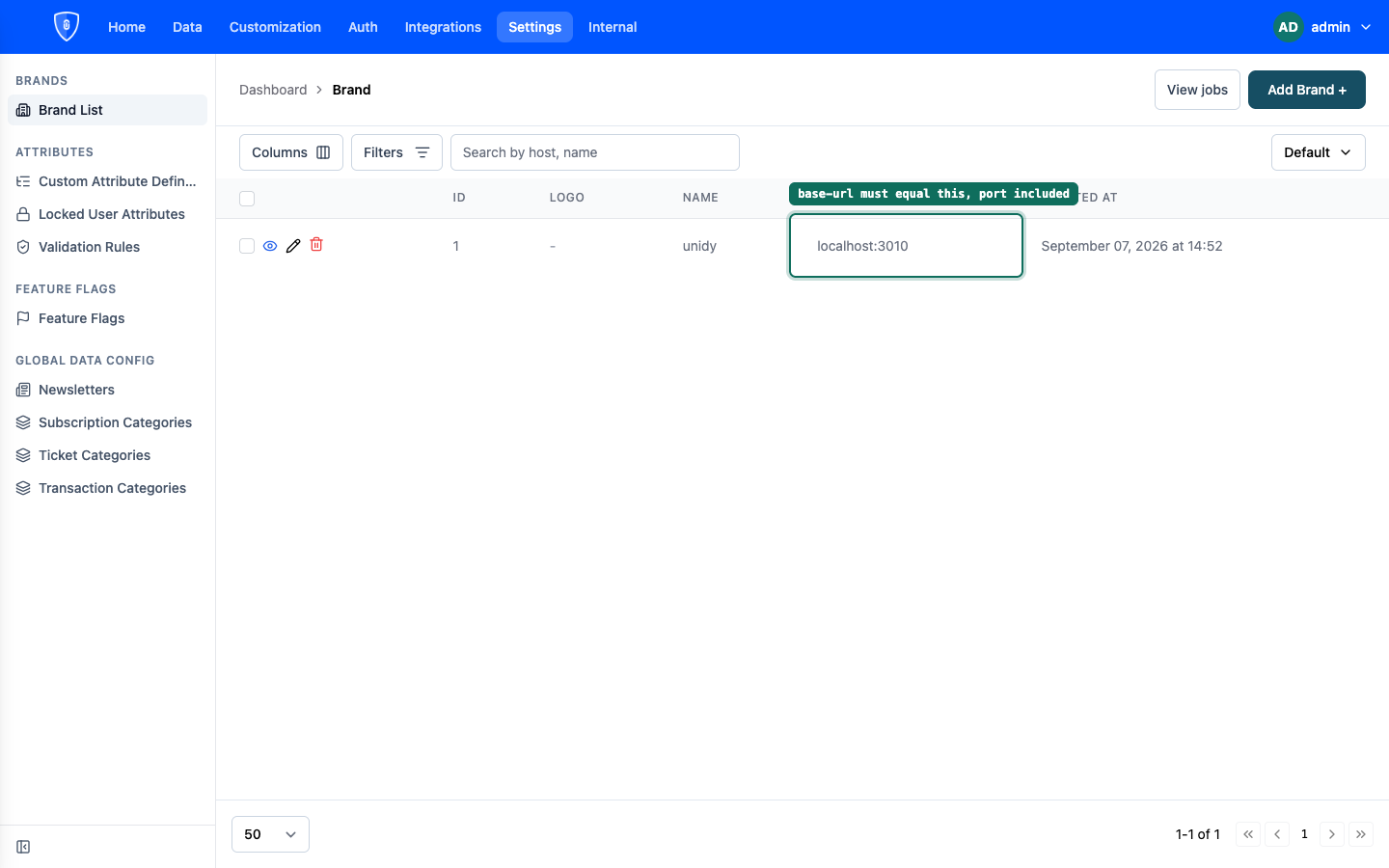
SETTINGS → BRANDS → Brand List — the Host column is the string your base-url must resolve to. Anything else is a different brand, or no brand at all · highlight on the Host value
When contacting support, include the SDK-client identifier, package versions, host, origin, operation, timestamp, HTTP status, error identifier, request ID if available, and redacted header names. Remove passwords, API keys, customer JWTs, refresh tokens and preference tokens from screenshots and logs.