Token refresh, sessions, and logout
Manage the complete authentication lifecycle.
Refresh OAuth tokens without losing track of the newest pair, and end the parts of a sign-in that your user expects to end.
| You want to… | Use |
|---|---|
| Continue API access after an access token expires | The refresh-token grant. |
| Sign out of your application | Destroy your application's session and remove its token copy. Revoke tokens when access should end immediately. |
| Also sign out of Unidy in this browser | RP-initiated logout after preserving an ID token hint. |
| Check whether the browser still has a Unidy session | Silent authentication, with an interactive fallback. |
Three independent layers
| Layer | What it represents | What ends it |
|---|---|---|
| Application session | Your application's cookie, server session, or signed-in client state. | Your application clears or expires it. Unidy does not automatically destroy your cookie. |
| Issued OAuth tokens | Authorization to access resources; access and refresh tokens are held by your application. | Expiry, revocation, associated record removal, or scheduled cleanup. |
| Unidy browser session | The user's sign-in at Unidy, also used when an authorized administrator opens the dashboard. | Browser logout, session invalidation, server retention, or cookie expiry. |
Ending one layer does not automatically end the other two. Signing out of the dashboard also ends that browser's Unidy sign-in, but existing application sessions and OAuth tokens can remain usable. There is no automatic front-channel or back-channel logout notification to your applications.
Lifetimes and retention
| Artifact | Current default or retention behavior |
|---|---|
| Authorization code | Single use, ten minutes. Start a new authorization request after expiry or failed consumption. |
| Access token | Two hours by default. Use the returned expires_in; deployment configuration can change the default. |
| ID token | Two minutes by default; configurable per OAuth application up to fourteen days. Validate its actual exp; retain the raw value securely if needed as a logout hint. |
| Refresh token | No independent protocol expiry field, but revocation and token-row cleanup limit use. It is not an indefinite session guarantee. |
| OAuth token/grant rows | Scheduled cleanup deletes rows more than fourteen days after creation, or more than one day after revocation. Refresh creates a new token row. |
| Unidy browser session | The cookie is configured for two months; scheduled cleanup removes server session rows whose updated_at is older than two weeks. A cookie can therefore outlive its backing session. |
Cleanup runs on a schedule, so retention thresholds are not exact expiry timestamps. A refresh token left unused for several weeks may have no backing row when the customer returns. Your application must be able to start a fresh sign-in. Refreshed OAuth pairs inherit their original access-token lifetime; changing the deployment default does not necessarily change an existing refresh chain.
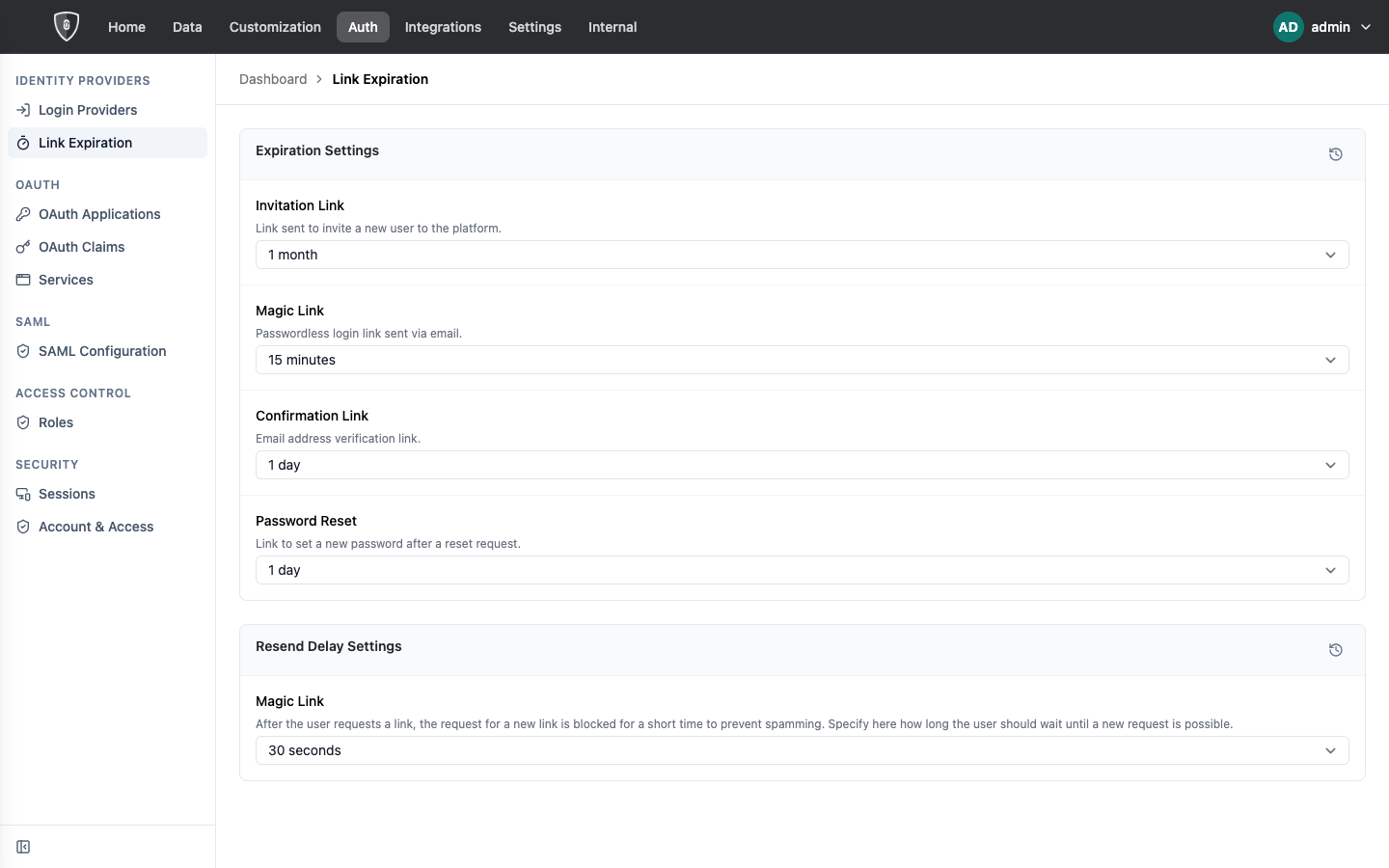
Auth → Link Expiration — included because it is the screen people look for when they want to change a token lifetime. It governs emailed links only: the magic login link defaults to 15 minutes and can only be set to 15 minutes, 1 hour or 6 hours. No value on this screen affects an OAuth token.
Access-token formats
OAuth applications use opaque access tokens by default. An administrator can enable JWT access tokens for an application; newly issued user access tokens then use the RFC 9068 form. Client-credentials tokens remain opaque, and the SDK system application cannot enable this option.
JWT access tokens have header typ: at+jwt, the trusted issuer as aud, and claims including client_id, sub, scope, exp, iat and jti. ID tokens instead target the OAuth client ID as audience. Do not substitute one for the other.
Clients can continue passing the access token as a bearer string without decoding it. Existing tokens keep their issued format when the application option changes. Unidy still checks token records, expiry and revocation; an offline JWT signature check alone does not establish that Unidy currently accepts the credential.
Refresh the token pair
Send a form-encoded request to the discovered token endpoint. Public clients send their client ID without a secret. Confidential clients also use their configured client authentication.
curl --request POST 'https://login.example.com/oauth/token' \
  --header 'Content-Type: application/x-www-form-urlencoded' \
  --data-urlencode 'grant_type=refresh_token' \
  --data-urlencode 'client_id=YOUR_APPLICATION_UID' \
  --data-urlencode 'refresh_token=YOUR_REFRESH_TOKEN'
A response for an openid grant includes a fresh ID token as well as the replacement access and refresh tokens:
{
  "access_token": "NEW_ACCESS_TOKEN",
  "token_type": "Bearer",
  "expires_in": 7200,
  "refresh_token": "NEW_REFRESH_TOKEN",
  "scope": "openid profile email",
  "created_at": 1790899200,
  "id_token": "NEW_ID_TOKEN"
}
Refresh does not mean the user just entered credentials again. The refreshed ID token is issued without the original request nonce, and auth_time, when present, represents the recorded sign-in time. Let your OIDC library apply the refresh-specific validation rules; do not reapply the initial request's nonce requirement. Require fresh interactive authentication separately when your task needs it.
Omit scope to retain the existing grant or request a subset to narrow it. Refresh cannot add permissions. Branch on stable OAuth error codes rather than localized error_description text.
Rotation and concurrent requests
Every successful refresh creates a new access/refresh pair. Revocation of its parent pair is deferred until the new access token is first used to authenticate a request. Until then, the parent may still be accepted. Concurrent refreshes can therefore create separate child pairs. Use of one child revokes the parent; it does not provide family-wide revocation of every sibling pair.
Use one refresh operation per application session at a time:
- Read the current token generation from durable session storage.
- Acquire a lock scoped to that user/session. A backend-wide promise would incorrectly share one user's refresh with another user.
- Re-read the tokens after acquiring the lock. If another request already refreshed them, use that newer generation.
- Perform one refresh, validate the response, and atomically persist the returned pair and expiry before releasing the lock.
- Retry the original resource request at most once when it is safe to repeat. An old request's late
401must not trigger another refresh of an already-replaced generation.
Do not retry a resource mutation solely because its HTTP response was lost; its effect may already have happened. Multiple browser tabs also need coordination if they share refresh tokens.
| Refresh failure | Application behavior |
|---|---|
invalid_grant | The grant is no longer usable. Clear that application token session and offer a fresh sign-in. |
invalid_client | Check client configuration and recent secret rotation. Repeatedly asking the customer to sign in will not repair credentials. |
invalid_scope | Fix the requested scope; refresh cannot widen the existing grant. |
Network failure, 429, or 5xx | Preserve the session state, apply bounded backoff, and surface a recoverable failure. A lost response leaves refresh outcome uncertain; do not create an unbounded retry loop. |
Revoke access deliberately
Use the discovered revocation endpoint when the user disconnects your application or you need its tokens invalidated immediately. Authenticate the client in the same way as token exchange.
curl --request POST 'https://login.example.com/oauth/revoke' \
  --header 'Content-Type: application/x-www-form-urlencoded' \
  --data-urlencode 'client_id=YOUR_APPLICATION_UID' \
  --data-urlencode 'token=YOUR_REFRESH_TOKEN' \
  --data-urlencode 'token_type_hint=refresh_token'
Revoke the refresh token to invalidate its associated pair; do not assume it revokes every independently issued pair for that user. Revoking an already-expired access token can return success without invalidating the still-usable refresh token. The endpoint can also return success for an unknown token, so a successful response is not proof that a particular token previously existed.
A revocation response does not destroy your application's session or the Unidy browser session. Remove your local token copy when the user signs out even if revocation fails, and record the failure without recording the token.
The current cross-origin configuration covers the OAuth token endpoint but not revocation. A browser-only app cannot assume a direct cross-origin fetch to /oauth/revoke will work. If immediate revocation is required, provide it through your application's own authenticated server-side integration. Local browser sign-out alone leaves server-side tokens usable until they expire or are revoked.
Inspect token status
A server can send a form-encoded POST to /oauth/introspect with a token and authorized client credentials. The response's active value describes that OAuth token, not the user's current browser sign-in or your application's session. An inactive response can mean expired, revoked, unknown, or outside the caller's permitted introspection context; do not infer which solely from active: false.
Keep introspection credentials server-side and continue enforcing the endpoint's required scopes and resource authorization. Introspection does not replace the identity validation performed during sign-in.
Sign out of this application and Unidy
- Preserve the current raw ID token temporarily for
id_token_hint, plus a random logoutstateif you use a callback. - Revoke the application's tokens if sign-out should immediately end their API access.
- Destroy your application session and remove its token copies.
- Navigate the browser to the discovered
end_session_endpoint, with the hint and the separately registered post-logout URI. - On your signed-out callback, validate the logout state if one was sent and clear any remaining transaction data.
Construct the logout URL with URL and URLSearchParams so the token and redirect URI are encoded correctly. The endpoint accepts GET; it is a browser navigation, not a cross-origin background logout request.
| Parameter | Contract |
|---|---|
id_token_hint | A signed Unidy ID token for the current browser user. Its subject must match that session; its audience identifies the application. |
post_logout_redirect_uri | Optional. Register it in the application's Post-logout redirect URIs field. Omit it entirely when you do not need an external destination; do not send an empty value. |
state | Optional value returned to your post-logout destination. Use it to correlate that callback with the logout transaction. |
An expired ID token can still serve as a hint if its signature is valid under the configured signing key. That does not make an expired token valid for authentication, and a signing-key change can invalidate an older hint.
Strict and compatibility behavior
The OIDC-compliant RP-initiated logout setting controls handling of invalid hints and destinations. Build a correct request regardless of the setting.
| Situation | Behavior |
|---|---|
| Valid hint, matching user, registered destination | Ends the current Unidy browser sign-in and redirects. |
| Invalid request with strict mode enabled | Rejects the request and returns to Unidy with an error; do not treat it as a successful federated logout. |
| Invalid request with compatibility mode enabled (the default) | Signs out and redirects externally only if the destination passes the effective external-redirect allowlist; otherwise returns to Unidy. |
| No current Unidy user | Uses the external-redirect allowlist for the destination, otherwise returns to Unidy. |
The application's post-logout URI list and the external-redirect host allowlist are different controls. The latter merges global hosts with the current brand's hosts; brand hosts are managed under Customization → Security. An empty global list alone does not imply every external redirect is denied.
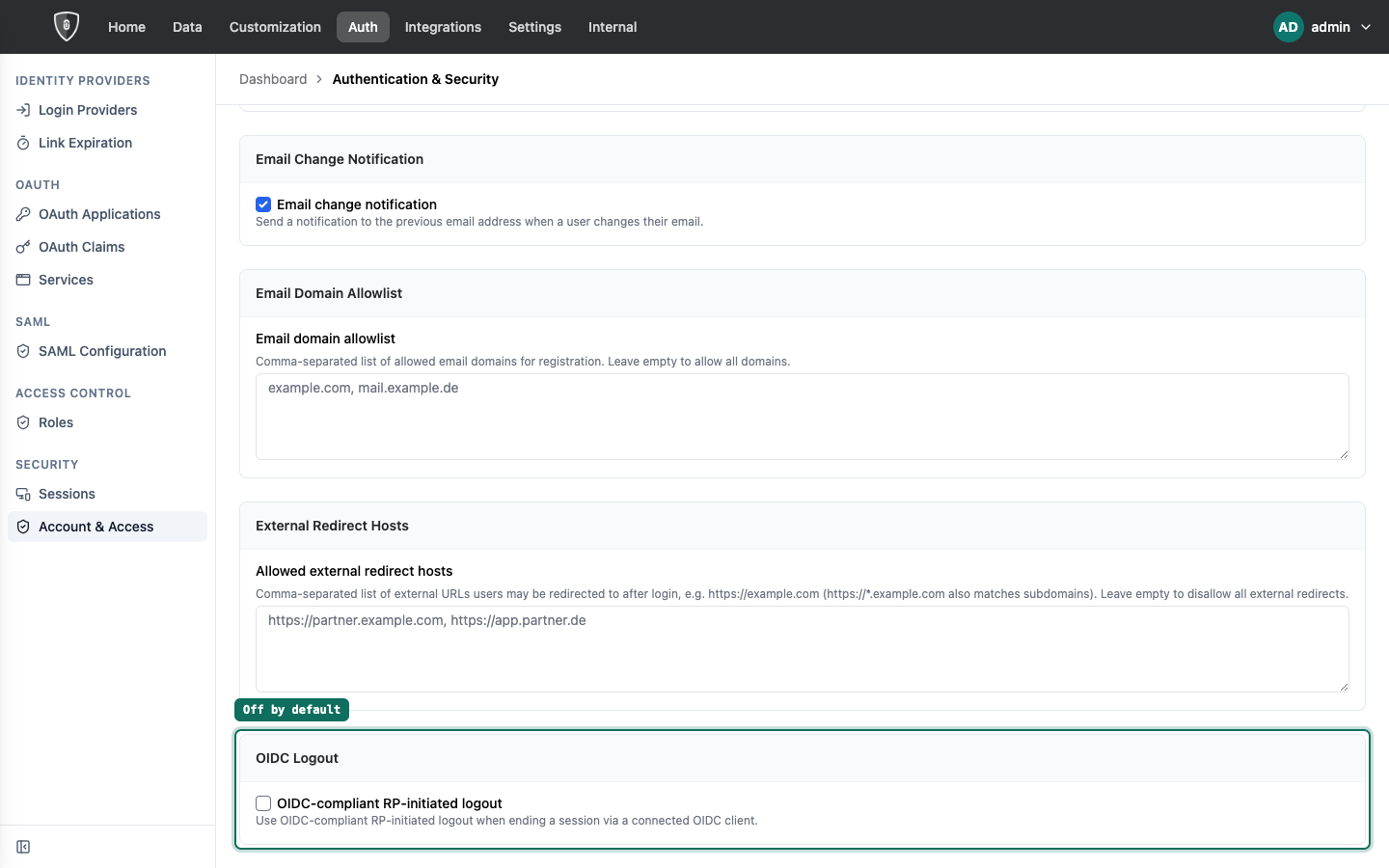
Auth → Account & Access — the two settings that change how /oauth/logout behaves · highlight on the OIDC-compliant RP-initiated logout card, unticked by default. The External Redirect Hosts card immediately above is the allowlist used when the user's session has already expired.
Register a narrow logout destination
The current implementation matches application post-logout destinations by string prefix. Register the complete HTTPS callback path, preferably ending in /, and always send that exact URI. Avoid a bare domain prefix. Do not treat prefix acceptance as permission to send arbitrary destinations.
Browser logout does not revoke tokens and does not sign out the user's other devices. Session-management actions have their own scope; see Manage user sessions. Your application remains responsible for its own session lifecycle.
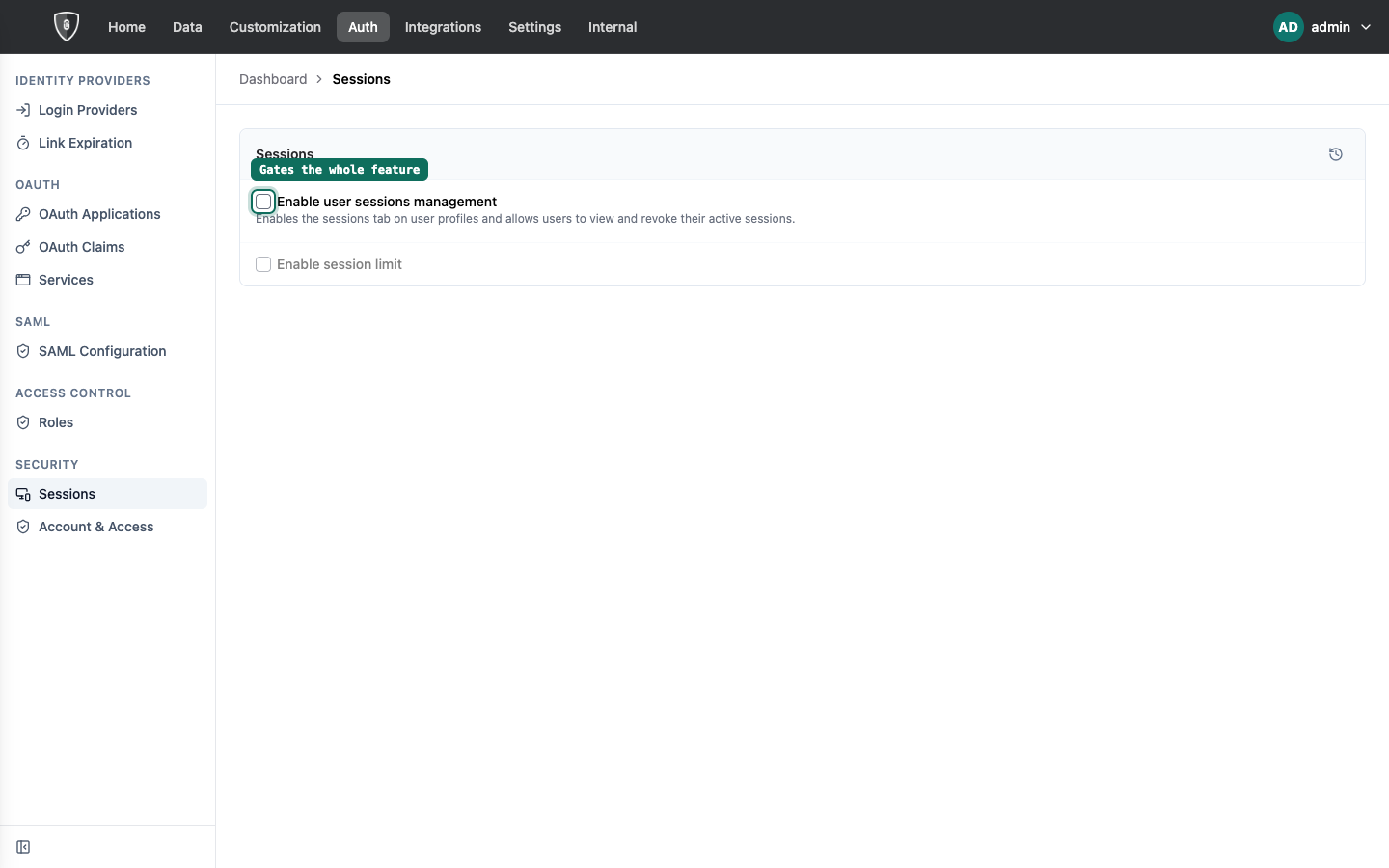
Auth → Sessions — session management, off in seeded data · highlight on Enable user sessions management, which gates everything else on the screen including the Max concurrent sessions field. Nothing here changes a token lifetime.
SDK token sessions
The SDK HTTP API uses a separate token system. Do not send SDK tokens to the OAuth refresh endpoint.
| Behavior | OAuth | SDK HTTP API |
|---|---|---|
| Refresh endpoint | POST /oauth/token with grant_type=refresh_token | POST /api/sdk/v1/sign_ins/:id/refresh_token |
| Rotation | Parent revocation deferred until the new access token is used. | Previous token revoked when the new pair is issued. |
| Refresh lifetime | Limited by revocation and the OAuth row-retention rules above. | Ten days since that token pair was issued; successful refresh starts a new ten-day window. |
The SDK's refresh window is renewed by successful refresh; it is not an absolute cap on the whole user's session. Use the SDK session guide for its credentials, storage, and errors.