Authorization Code for confidential clients
Implement server-backed authorization.
Use Authorization Code with S256 PKCE when your server signs users in and can keep its client secret private. The browser carries the authorization redirect; your server exchanges the code, validates identity, stores tokens, and creates your application's session.
For a background job acting as the application rather than a signed-in user, use client credentials. Do not request openid for client credentials. Browser-only and native applications instead use a public client.
1. Register the application
Ask an administrator to create an OAuth application with:
- Confidential enabled.
- An exact HTTPS callback URI handled by your server.
- A separate post-logout callback URI if you will return the browser to your application.
- Only the scopes the integration needs. Start with
openid profile email; add API scopes when required. - A name and description the customer will recognize on the consent screen.
Obtain the trusted issuer, client ID, and client secret. An administrator with write permission can reveal or copy the existing secret from the application detail view; read-only detail viewers receive a masked field. Coordinate credential transfer through your approved secret store.
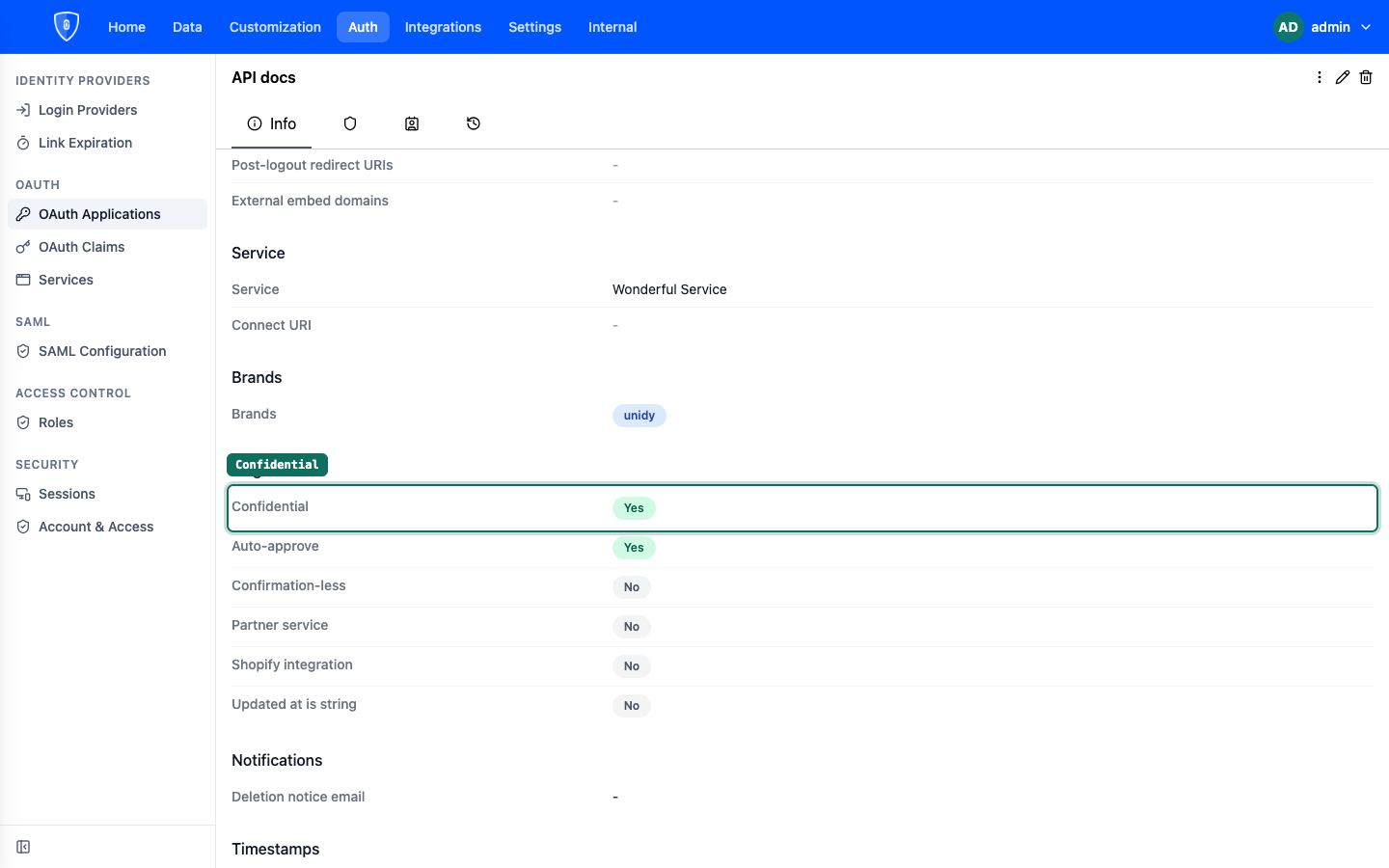
Auth → OAuth Applications → an application → Info — the Flags section · highlight on Confidential. Auto-approve just below it decides whether your customers see a consent screen on first sign-in.
Store the secret in server configuration. Do not commit it, send it through the browser, or use a build variable prefix such as NEXT_PUBLIC_ or VITE_ that exposes it in client output. Redact secrets, authorization headers, codes, and tokens in logs.
2. Configure an OIDC client on the server
Use a maintained OpenID Connect client library with discovery, state and nonce validation, and PKCE support. Configure the issuer from your trusted tenant configuration rather than from incoming request data. The discovery reference lists Unidy's endpoint and metadata contract.
For example, the initialization below uses openid-client 6.8.8 on a server runtime supported by that library:
import * as oidc from 'openid-client';

function required(name: string): string {
  const value = process.env[name];
  if (!value) throw new Error(`Missing server configuration: ${name}`);
  return value;
}

const config = await oidc.discovery(
  new URL(required('UNIDY_ISSUER')),
  required('UNIDY_CLIENT_ID'),
  { id_token_signed_response_alg: 'RS256' },
  oidc.ClientSecretBasic(required('UNIDY_CLIENT_SECRET')),
);
oidc.enableNonRepudiationChecks(config);
This configures the protocol client. Your framework still needs the login and callback handlers, transaction storage, and application-session handling described below. The example does not create those services for you.
| Client authentication | Token request |
|---|---|
client_secret_basic | Client ID and secret in the HTTP Basic authorization header. Let the library encode them. |
client_secret_post | Client ID and secret in the form-encoded body. |
Choose one supported method. Both require HTTPS and log redaction; placing credentials in a header does not guarantee that infrastructure will exclude them from logs.
3. Start a login transaction
In your login handler:
- Generate a fresh PKCE verifier, state, and nonce with cryptographically secure randomness.
- Store them server-side against this browser's pending login transaction, with a short expiry. Support distinct transactions if the browser can start multiple logins.
- Derive the S256 challenge from the verifier.
- Redirect to the authorization URL with
response_type=code,client_id, the exact callback URI, requested scopes, state, nonce, challenge, andcode_challenge_method=S256.
The secret stays on the server. PKCE remains useful for confidential clients and does not replace client authentication.
4. Process the callback once
Your callback handler must reject missing, empty, duplicated, mismatched, or expired transaction state. Compare it with the state stored for this browser; a comparison between two missing values is not validation. Handle an OAuth error callback without attempting a code exchange.
Consume the transaction atomically so the same callback cannot be processed twice. Give the OIDC library the callback URL, original PKCE verifier, expected state, expected nonce, and the requirement for an ID token. With openid-client, use authorizationCodeGrant with pkceCodeVerifier, expectedState, expectedNonce, and idTokenExpected: true. The library validates the authorization response and the token response; use its successful result rather than a separately decoded JWT.
The token request contains grant_type=authorization_code, the authorization code, and the same redirect URI used during authorization. Client authentication and the matching PKCE verifier are both required. The code is single use and normally valid for ten minutes. On failure, clear the transaction and start a new login; do not retry the same code indefinitely.
Before creating your application's session:
- Require successful HTTP and protocol responses, not just a parseable JSON body.
- Accept identity only after the ID token's signature, required claims, issuer, audience, time constraints, and nonce have passed validation.
- Identify the account using the trusted issuer and
sub, not an email address. - Regenerate the application session ID to prevent session fixation. Use a secure, HttpOnly application cookie with a SameSite policy appropriate to your callback flow.
- Persist the token pair and expiry server-side, together with the raw ID token if you implement RP-initiated logout.
- Clear the verifier, state, nonce, and callback parameters. Redirect to a fixed or independently validated application destination.
Return a controlled sign-in failure on network, validation, or token errors. Do not log the callback URL or token response. See ID tokens and claims for optional claims, roles, and profile updates.
5. Refresh and sign out
Refresh with the same client authentication. Persist the new access/refresh pair atomically and coordinate refreshes per user/session. An openid refresh returns a new ID token, but it does not mean the user has interactively authenticated again.
At sign-out, end your application's session, revoke tokens if their API access should end immediately, and navigate to Unidy's end-session endpoint when the user should also leave their Unidy browser session. Preserve an ID token hint for that navigation before removing local tokens. Registered post-logout URIs are separate from login callback URIs.
Follow token refresh, sessions, and logout for deferred parent revocation, cleanup retention, strict/compatibility logout behavior, and redirect settings.
Rotate a client secret
Rotate secret generates a new value and invalidates the old credential immediately. There is no built-in overlap period on that application's secret, so coordinate a brief cutover:
- Prepare a fast configuration update for every application instance and worker that uses this client.
- Have an authorized administrator rotate the secret and securely retrieve the generated value.
- Update the secret store and reload or redeploy the affected application processes using your normal release process.
- Confirm a new authorization-code exchange and a refresh work using the replacement credential.
- Remove obsolete copies from deployment configuration and check for failed client authentication during the cutover.
You cannot deploy the generated secret before the rotation creates it. Existing access tokens are not revoked by secret rotation, but new exchanges and refresh requests fail on instances still using the old secret. If you require overlapping credentials, agree a separately provisioned replacement-client migration in advance; do not assume rotating one application's secret supports overlap.
Troubleshooting
| Result | What to check |
|---|---|
invalid_client | Missing, incorrect, or stale secret; wrong client ID; client-authentication method; configuration reaching every worker. |
invalid_grant | Reused/expired code, a different callback URI during exchange, or a mismatched verifier. |
Missing code_verifier | Keep PKCE enabled and send the verifier from this transaction. A secret does not remove that requirement. |
| State or nonce mismatch | Reject the login and check transaction storage, browser association, parallel sign-ins, and callback replay. |
invalid_scope or fewer scopes than expected | Compare request and application configuration. Unconfigured known custom scopes can be dropped at authorization; inspect the granted scope rather than assuming the whole request failed. |
| Unexpected consent screen | Check application consent/auto-approval configuration with the administrator. |
| Secret cannot be revealed | Check write permission for this application; opening the detail page alone does not grant reveal access. |
Verify the complete flow with a dedicated test account: successful login, rejected state/nonce, declined consent, an expired or replayed callback, refresh, and logout. Initialization or a successful discovery request alone is not an end-to-end sign-in test.