ID tokens and claims
Validate identity tokens and consume claims safely.
ID tokens and claims
An ID token tells your application who authenticated to Unidy. Request the openid scope, complete the authorization-code flow, and validate the returned id_token before creating your application session.
Use the Authorization Code with PKCE guide for the client-library setup and callback. This page describes the identity contract that the callback consumes.
| Value | Purpose | How to use it |
|---|---|---|
id_token | A signed identity assertion addressed to your OAuth application | Validate it with your OIDC client, then read its claims. Do not send it as an API bearer credential. |
access_token | A bearer credential for the granted API scopes | Treat it as opaque. Send it to UserInfo or the permitted REST endpoints. |
| UserInfo response | Current identity values for the access token's user | Fetch over HTTPS and match its sub to the validated ID token before using the response. |
The ID token lifetime defaults to 120 seconds and can be configured per OAuth application, up to fourteen days. Validate the actual exp claim instead of assuming a fixed lifetime. That expiry governs acceptance of the assertion; it does not determine how long your own application session lasts. Read the token response's expires_in for the access token's lifetime. The SDK system application's ID-token lifetime is managed separately.
Applications can also opt into JWT access tokens. Those are API credentials, with a different audience and purpose from an ID token; see Access-token formats.
Keep the logout hint when you need it
If your application implements RP-initiated logout, retain the raw ID token securely with the application session so your OIDC client can send it as id_token_hint. Unidy accepts an expired hint when its signature and other logout checks pass. Delete it when you finish ending the session. A signing-key change can invalidate a retained hint; see sessions and logout.
Validate before reading identity
Use an OIDC client library's authorization-code callback processing. Decoding a JWT or checking only its signature does not validate the login transaction. The PKCE starter keeps state, nonce, and the PKCE verifier together and passes them into the library's callback validation.
Configure the client with the issuer and client ID you trust. Resolve discovery and signing keys from that configured issuer; never choose an issuer or key URL from an unverified token. Use the following checklist when reviewing your integration:
| Check | Expected behavior |
|---|---|
| Callback transaction | Match the callback to the stored authorization request, verify state, and exchange the code with its PKCE verifier. Reject missing or mismatched transaction state. |
| Signature | Verify against the trusted issuer's JWKS and restrict the accepted signing algorithm to RS256. |
| Required claims | Require correctly typed iss, sub, aud, exp, and iat; sub must identify a user. |
| Issuer and audience | Require the configured issuer and your application's client_id. |
| Time | Enforce exp and an appropriate iat freshness policy with a small clock tolerance. Keep the application's clock synchronized. |
| Nonce | When a nonce was sent, require the matching value stored for that transaction. A refresh response does not carry a new authorization-request nonce. |
| Authentication freshness | If you requested max_age, enforce the corresponding auth_time requirement. Token issuance alone is not proof of a new interactive login. |
Unidy's built-in aud is a string containing the application UID. A string audience is valid OIDC; an absent optional azp is not an error for this single-audience contract. Let the client library apply the applicable OIDC validation rules. See ID Token Validation in OpenID Connect Core.
After validation, identify the account by (issuer, sub). The sub is the user's UNIDY ID and is stable across applications in the same tenant; it is not a per-application pseudonym. Combining it with the issuer prevents accidental collisions when your application accepts multiple issuers. Email addresses and role names can change and are unsuitable account keys.
Token structure
The JWT header identifies the signing algorithm and the signing key's kid. The payload combines the identity claims granted by scopes with protocol claims:
| Claim | Type | Meaning |
|---|---|---|
iss | string | The configured issuer. Multi-domain deployments can use the approved request domain as their issuer; use the exact issuer configured for your integration. |
sub | string | The user's UNIDY ID. |
aud | string | The OAuth application's UID, used as client_id. |
exp | integer | Expiry in Unix seconds, using the application's configured ID-token lifetime or the 120-second default. |
iat | integer | Issue time in Unix seconds. |
nonce | string, optional | The nonce supplied with the authorization request, when present. |
auth_time | integer, when available | The account's recorded sign-in time, which can precede this token or refresh. |
This illustrative payload assumes openid email profile and a nonce. It is not a token to use in a request:
{
  "iss": "https://login.example.com",
  "sub": "9f1c7b3e-2d84-4a15-9c6f-08b2e5d47a31",
  "aud": "YOUR_CLIENT_ID",
  "iat": 1790900000,
  "exp": 1790900120,
  "nonce": "nonce-for-this-authorization-request",
  "auth_time": 1790899900,
  "email": "person@example.com",
  "email_verified": true,
  "given_name": "Alex",
  "family_name": "Taylor",
  "name": "Alex Taylor",
  "updated_at": 1790899000
}
Claims by scope
Request the minimum scopes your application needs. A granted scope permits release of its claims; it does not ensure every profile field has a value. In an ID token, unset built-in scalar profile claims can be omitted. Handle missing values without treating the whole login as invalid unless your application explicitly requires that field.
| Scope | Claims | Value details |
|---|---|---|
openid | sub and the ID token's protocol claims | Required to receive an ID token and use UserInfo. |
email | email, email_verified | Email string and verification boolean; see the confirmation rules below. |
profile | given_name, family_name, name, gender, birthdate, updated_at | Profile values can be absent. birthdate is a date string. updated_at is normally Unix seconds; applications using the legacy updated_at_is_string compatibility setting receive a timestamp string. |
phone | phone_number | Absent from the ID token if unset. |
address | address | An object whose members may be null or empty even when the object is present. |
roles | unidy_admin, unidy_roles, unidy_staff | Administrative standing and tenant-defined role names; see the limits below. |
The separate email_verified scope does not release the email_verified claim. Request email to receive it.
Email confirmation
email_verified is computed from confirmation state, the application's Confirmation less setting, and whether the account still has a synthetic placeholder address.
| Account and application state | email_verified |
|---|---|
| Real primary email, confirmed account | true |
| Real primary email, unconfirmed account, normal application | false |
| Real primary email, application has Confirmation less enabled | true, even without confirmation |
| Synthetic primary email, including when a real email is pending or Confirmation less is enabled | false |
For a synthetic account with a pending real email, email prefers that pending address. Receiving an address is therefore not proof that it has been confirmed. If your application uses this claim for account linking, verify the application's confirmation policy first. Do not substitute the user's identity-verification/KYC status for email confirmation.
Administrative standing
With the roles scope:
unidy_adminis a boolean indicating legacy administrative standing or an assigned RBAC role.unidy_rolesis an array of role names, including roles assigned through groups. Names are tenant-defined and can be renamed; an empty array is valid.unidy_staffindicates a confirmed, non-synthetic Unidy email address. Its usefulness depends on the deployment's registration and email-verification trust model.
These claims can help your application decide which navigation to display. They do not grant a resource/action permission in Unidy, identify the permitted brand, or replace server-side authorization. Avoid building an authorization contract around a mutable role name or an email-derived staff flag. See roles and permissions.
Address values
The address object includes formatted, street_address, locality, region, country, and postal_code, plus address_line_1, address_line_2, street, house_number, country_code, and company. Check each member for a usable value. The legacy street and house_number fields are derived by splitting the first address line at its last space; prefer the full address lines rather than treating that split as authoritative address parsing.
Prefer country_code when you need an ISO 3166-1 alpha-2 code. The country value is normally a localized country name; applications configured for Shopify compatibility receive the code in that field instead.
Custom claims
An administrator can configure an OAuth claim with a unique name, a scope, and one or more user fields. The name becomes the token's claim key. Request its configured scope; requesting a claim name alone does not select it.
| Fields selected | Value shape |
|---|---|
| One | That field's value, which can be a scalar, object, or array according to the field. |
| Multiple | An object keyed by field name. Members can be null or empty. |
For example, a membership claim selecting two fields could produce:
{
  "membership": {
    "member_number": "A-4471",
    "member_since": "2019-03-01"
  }
}
Custom claims are configured for the tenant and released by their scope. Attaching a sensitive field to a broad scope such as profile can expose it to every application granted that scope. Use a dedicated scope when access needs to be controlled separately, and agree on names and value shapes with consumers before changing them.
The custom: marker shown beside a custom attribute in the dashboard is a picker label; multi-field claim objects use the underlying attribute name. The special active_subscriptions_for_service field returns a map keyed by subscription-category UNIDY ID for the requesting application's service. Its values indicate whether the user has an active or passive subscription; it returns an empty object when no service is attached.
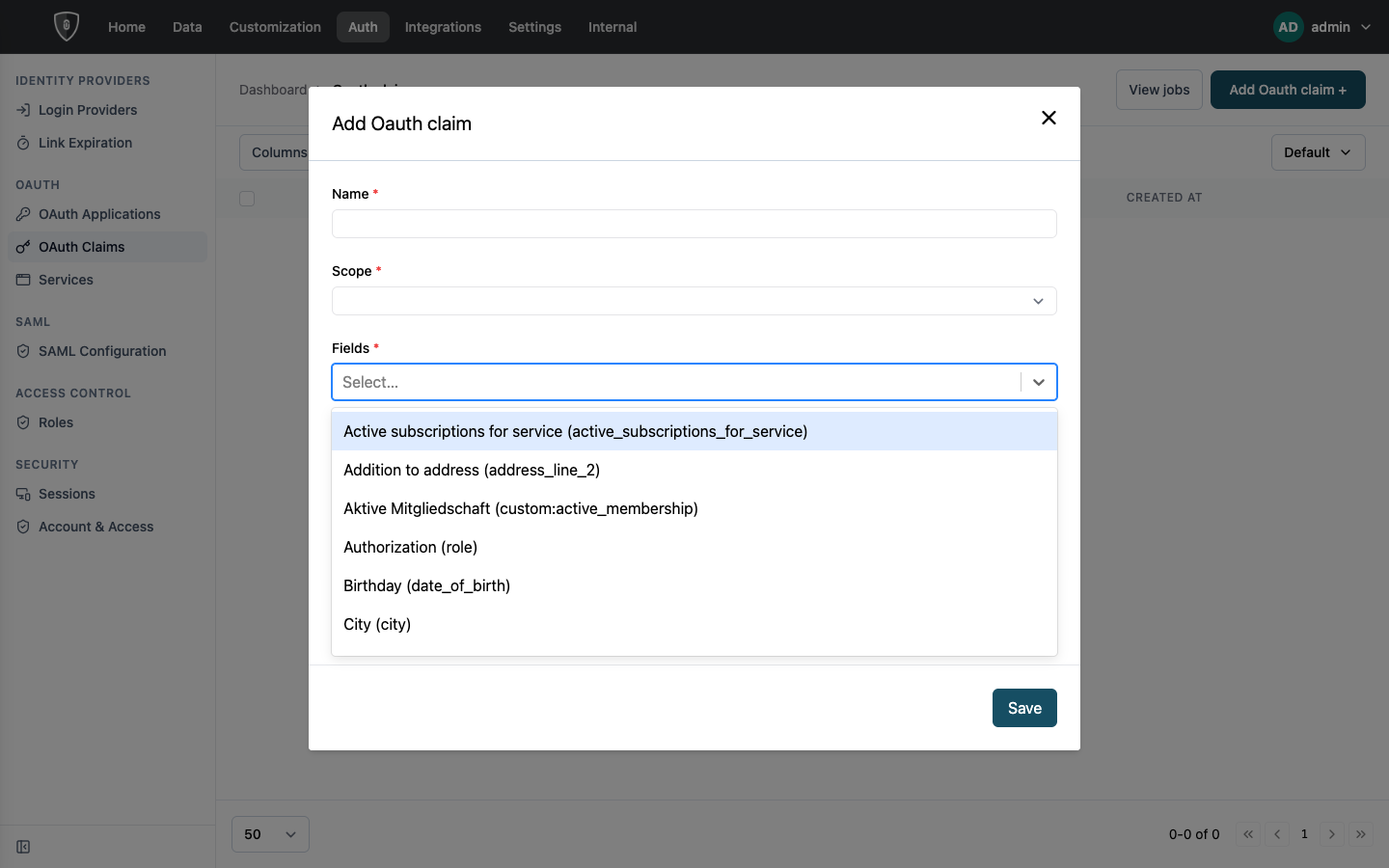
Auth → OAuth Claims → Add Oauth claim + — three required inputs: Name, Scope, and Fields. Fields is a multi-select of 35 options: 22 standard user attributes, the 12 Customer experienceCustom attributeA configurable customer field whose shared definition specifies its key, type and presentation.6 fields — listed in full on the pageRelated: User · ImportRead the page →Open custom attributes (choose an instance) defined on this tenant, and active_subscriptions_for_service. Each option's label ends in the attribute it reads.
Discovery does not enumerate tenant-created claims and scopes. A known custom scope that is not configured on your application can be removed from the authorization request instead of causing an error. Check the granted scopes and treat the custom claim as optional until you establish that it was granted and has a value. See OIDC discovery and scopes and OAuth applications, claims, and services.
Read current values from UserInfo
An ID token is a snapshot taken when that token was issued. UserInfo evaluates identity claims when requested, using the access token's granted scopes. An account edit can therefore make its response differ from an older ID token. Refreshing an openid grant can also issue a fresh ID token; it does not prove the person signed in interactively again.
curl --fail-with-body --silent --show-error \
  'https://login.example.com/oauth/userinfo' \
  -H "Authorization: Bearer $ACCESS_TOKEN"
Use your own access token over HTTPS. Before using the returned profile, require its sub to match the validated ID token's sub; do not associate the response by email. UserInfo returns JSON identity claims, not a new signed ID token. See the UserInfo response contract.
For the same illustrative grant above, a later profile edit could yield:
{
  "sub": "9f1c7b3e-2d84-4a15-9c6f-08b2e5d47a31",
  "email": "person@example.com",
  "email_verified": true,
  "given_name": "Alexandra",
  "family_name": "Taylor",
  "name": "Alexandra Taylor",
  "updated_at": 1790900200
}
No address appears in these examples because their grant does not include address.
Signing keys and changes
Use the jwks_uri in your trusted issuer's discovery document. The current provider publishes its configured RSA signing key; replacing it does not publish a previous-key overlap. Configure your client library to refresh keys when it encounters an unknown kid, with bounded caching and retry behavior. Do not pin a copied public key indefinitely or fetch a key URL supplied by an arbitrary JWT header.
Key changes can affect both new-login validation and retained logout hints. Coordinate signing-key changes with the deployment operator and test the affected client flows. See OIDC overview for discovery and endpoint details.
Troubleshooting
| Symptom | Check |
|---|---|
Successful exchange has no id_token | Was openid requested and granted? An OAuth-only exchange does not establish OIDC identity. |
| Issuer or audience mismatch | Compare the configured issuer and application UID with the validated environment and brand. Do not disable the checks. |
| Nonce or state mismatch | Keep transaction values separate for concurrent sign-ins and consume the matching saved transaction exactly once. |
| Profile claim is absent | Inspect granted scopes, optional profile values, and any custom claim's scope and configuration. |
updated_at has an unexpected type | Check the application's legacy string compatibility setting. |
UserInfo returns 401 | Check whether the access token is missing, expired, or revoked. Read WWW-Authenticate; do not branch on localized descriptions. |
UserInfo returns 403 | Check that the access token has openid. |
| Introspection reports an ID token inactive | Introspection applies to OAuth access tokens. Validate an ID token with the OIDC client. |