Scopes and permissions
Choose the narrowest access required by an integration.
A REST request needs an access token with a scope accepted by the operation and the token type accepted by its route. The application’s service, the request’s brand context, ownership rules, and enabled features can further restrict access.
Use the tables below to choose the smallest set of scopes for your integration. Dashboard roles control who can configure applications; they do not automatically grant API scopes to an administrator’s tokens. A superadmin account does not bypass these API checks.
Choose a token and route
All paths in this table are relative to your Unidy host.
| Task | Route | Token type | Narrow scope |
|---|---|---|---|
| Read users | GET /api/v1/users or /api/v1/users/{id} | Application token from client credentials | users:read |
| Read the signed-in person’s tickets | GET /api/v1/tickets or /api/v1/tickets/{id} | User-authorized token | tickets:read |
| Read a specified person’s tickets | GET /api/v1/users/{user_id}/tickets or its /{id} member | Application token | tickets:read |
| Read the signed-in person’s subscriptions | GET /api/v1/subscriptions or /api/v1/subscriptions/{id} | User-authorized token | subscriptions:read |
| Read a specified person’s subscriptions | GET /api/v1/users/{user_id}/subscriptions or its /{id} member | Application token | subscriptions:read |
| Read transactions, including per-user transactions | GET /api/v1/transactions or /api/v1/users/{user_id}/transactions | Application token | transactions:read |
| Create tickets or subscriptions in a batch | POST /api/v1/tickets/batch or /api/v1/subscriptions/batch | Application or user-authorized token | tickets_batch:write or subscriptions_batch:write, respectively |
| Mint a login handoff for the token’s person | POST /api/v1/one_time_login_tokens or /api/v1/one_time_login_tokens/unidy | User-authorized token | one_time_login_tokens:write |
The two ticket routes use the same resource scope but different token types. A client-credentials token with tickets:read can use the nested /users/{user_id}/tickets route; it cannot use /api/v1/tickets. The same distinction applies to subscriptions and their write operations.
A user-authorized batch request remains restricted to its resource owner. Batch access is not permission to submit arbitrary customers’ records.
V1 ticket and subscription RBAC rollout
Ticket and subscription record scoping is moving from the application's service-only boundary to its role assignments and their constraints. The enable_rbac_v1_api_scoping rollout setting selects the behavior on an installation. With it off, legacy service scoping remains active; with it on, the principal's role-based resource scope is enforced.
Before an instance changes mode, review the OAuth application's effective role assignments, permitted brands, service and category restrictions. Verify representative allowed and denied reads and writes using the application's actual token. Existing user/holder/ownership restrictions still apply.
The OAuth scope and accepted token type remain prerequisites. A resource role does not replace tickets:read, subscriptions:write or another required scope, and a legacy service link alone does not establish the new effective record set.
This section applies to v1 tickets and subscriptions; API v2 has its own API-key/delegated-OAuth contract.
Provision and request explicit scopes
- Create or edit the OAuth application using an administrator account with the required application-management permission.
- Configure its service and allow only the scopes the integration needs.
- Request those scopes explicitly in the authorization or token request.
- Check the returned
scopeand useexpires_into schedule token renewal.
An empty scope list is not a deny-all setting
Configure an explicit, nonempty application scope list. In the current OAuth configuration, an empty application list can fall back to provider-defined scopes when validating a token request. Do not leave the checklist blank to disable access. Ask your administrator to revoke or disable an unused integration and its credentials using the supported management process.
For a backend that reads users and custom-attribute definitions:
curl --request POST 'https://your-tenant-host/oauth/token' \
  --header 'Content-Type: application/x-www-form-urlencoded' \
  --data-urlencode 'grant_type=client_credentials' \
  --data-urlencode "client_id=$UNIDY_CLIENT_ID" \
  --data-urlencode "client_secret=$UNIDY_CLIENT_SECRET" \
  --data-urlencode 'scope=users:read custom_attributes:read'
Keep the client secret on your server. Request a new client-credentials token before the returned expiry; this flow does not use a refresh token. Send the access token in Authorization: Bearer ….
For customer authorization, use Authorization Code with PKCE or Authorization Code for confidential clients. Add the required API scope to that authorization request.
Identity scopes and API scopes
Identity scopes determine the claims returned about a signed-in person. API scopes authorize operations. Request identity scopes only in a flow with a resource owner; they do not add useful access to a client-credentials token.
| Scope | Purpose |
|---|---|
openid | Request an OpenID Connect identity assertion. |
profile | Request available profile claims. |
email | Request email and email_verified. |
address | Request address claims. |
phone | Request the phone number. |
roles | Request unidy_admin, unidy_roles, and unidy_staff standing claims. These do not authorize API operations; role names can change. |
email_verified | Legacy selectable scope; it does not independently release the verification claim. Request email for that claim. |
Additional scopes may be configured for custom claims. They release those claims; they do not implicitly authorize REST operations. See Scopes and claims reference for claim availability and validation.
Resource scope catalogue
A write scope does not imply its corresponding read scope. Include both when a workflow writes and then reads back the result.
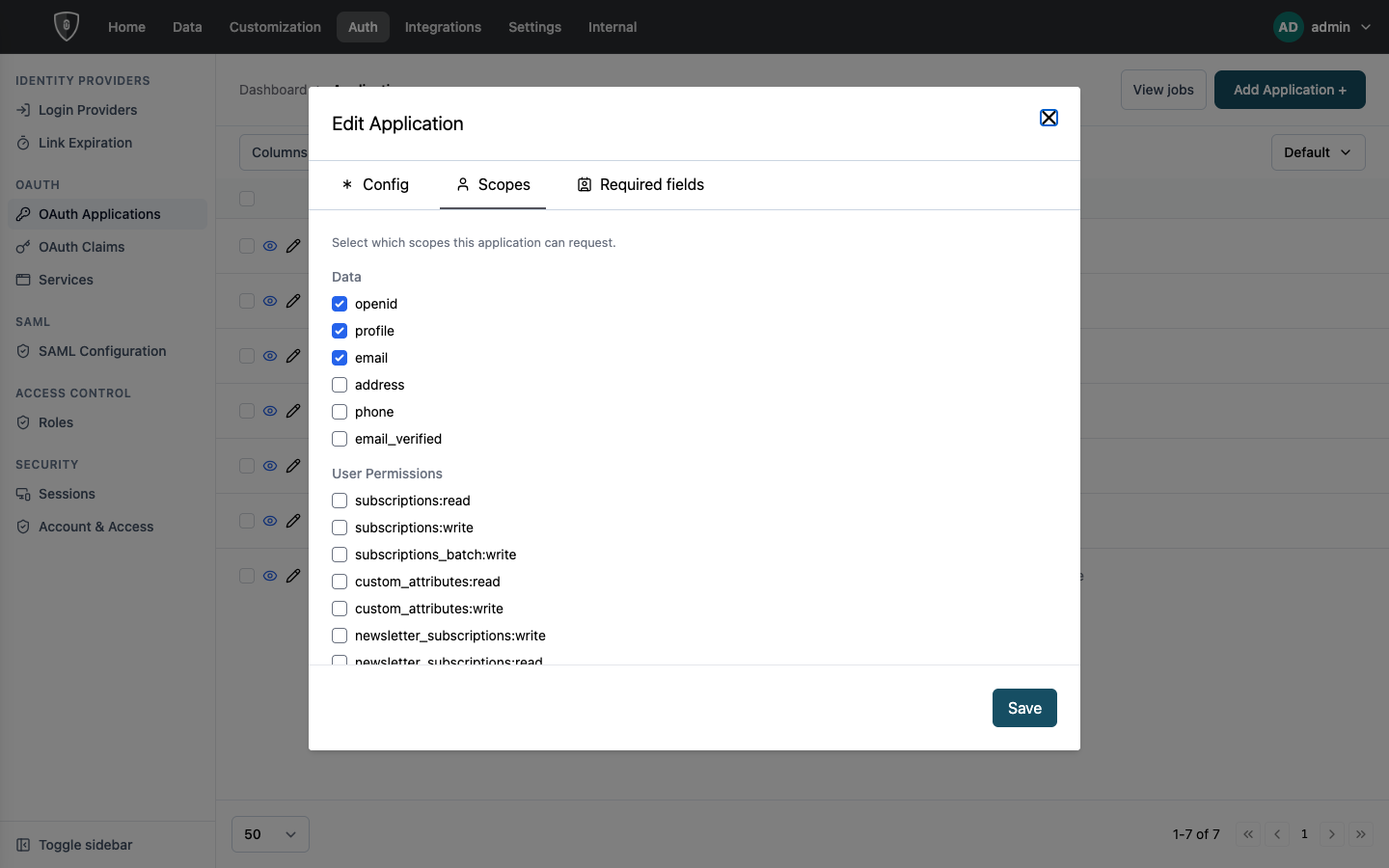
Auth → OAuth Applications → Edit → Scopes — "Select which scopes this application can request." Scopes are grouped Data, User Permissions, Admin, Root, and shown as raw strings with no descriptions.
Users and custom attributes
These routes require an application token.
| Scope | Operations |
|---|---|
users:read | List users with the required changed_since filter; read one user; look up by custom attribute. |
users:read_by_email | Look up a user with GET /api/v1/users/by_email. |
users:write | Create or update a user; update or delete plugin data through the user’s plugin-data routes. |
users:change_email | Change a user’s email through the dedicated change-email action. users:write alone does not cover it. |
custom_attributes:read | Read custom-attribute definitions and a user’s custom-attribute values. |
custom_attributes:write | Update or delete a user’s custom-attribute values. This does not create or edit attribute definitions. |
The user list requires changed_since; a bare GET /api/v1/users fails even with a valid scope. See Pagination and filtering for date semantics and synchronization limits.
Tickets and subscriptions
| Scope | Operations | Token and route |
|---|---|---|
tickets:read | List/read tickets and list ticket transfers. | User token on direct routes; application token on corresponding /users/{user_id}/… routes. |
tickets:write | Create, update, or delete tickets; create, accept, decline, cancel, revoke, or return ticket transfers. | User token on direct routes; application token on corresponding nested user routes. Transfer actions enforce sender, recipient, owner, or holder rules. |
tickets_batch:write | POST /api/v1/tickets/batch. | Either token type; user tokens remain subject-bound. |
subscriptions:read | List/read subscriptions. | User token on direct routes; application token on nested user routes. |
subscriptions:write | Create, update, or delete subscriptions. | User token on direct routes; application token on nested user routes. |
subscriptions_batch:write | POST /api/v1/subscriptions/batch. | Either token type; user tokens remain subject-bound. |
Scopes do not change record ownership. With ticket transfers enabled, reads include owned or held tickets, while ordinary ticket updates and deletes require ownership. See User-authorized access.
Transactions
These routes require an application token.
| Scope | Operations |
|---|---|
transactions:read | List, read, or search transactions; read nested line items and transaction categories; read or search a specified user’s transactions. |
transactions:write | Create, update, or delete a transaction or its line items. |
transactions_batch:write | Create a batch with POST /api/v1/transactions/batch, or upsert with POST /api/v1/transactions/batch/upsert. |
Newsletters
These routes require an application token.
| Scope | Operations |
|---|---|
newsletter_subscriptions:read | List/read newsletters and read newsletter subscriptions, including lookup by email. |
newsletter_subscriptions:write | Create, update, delete, or confirm newsletter subscriptions, including supported delete-by-email routes. |
Login handoffs
one_time_login_tokens:write permits the one-time-login-token creation routes for a user-authorized token. There is no application-token equivalent for minting a handoff for an arbitrary person. See One-time login tokens.
Administrative scopes
Use resource scopes for normal integrations. Administrative scopes are broader alternatives for specific actions, not a bypass for token type, service, ownership, feature, or validation checks.
| Scope | Default coverage | Explicit additions |
|---|---|---|
admin:read | Standard index and show actions. | Do not assume it covers custom reads such as by_email, by_custom_attribute, or transaction search; use the resource scope documented for the action. |
admin:write | Standard create, update, and destroy actions. | Also accepted for custom-attribute bulk updates and the transfer accept, decline, cancel, revoke, and return actions. Other custom actions require their declared scope. |
For example, admin:write is accepted for a batch action implemented as create, but it does not automatically cover the separate transaction upsert action. Provision transactions_batch:write for a batch-upsert integration.
Reserved operational scopes
The root:* scopes support Unidy operational endpoints. They are not needed for customer integrations and do not replace resource scopes.
| Scope | Purpose |
|---|---|
root:deployment | Deployment/status and certificate challenge operations. |
root:translations | Operational translation reads. |
root:general | Reserved; do not rely on it for an API operation. |
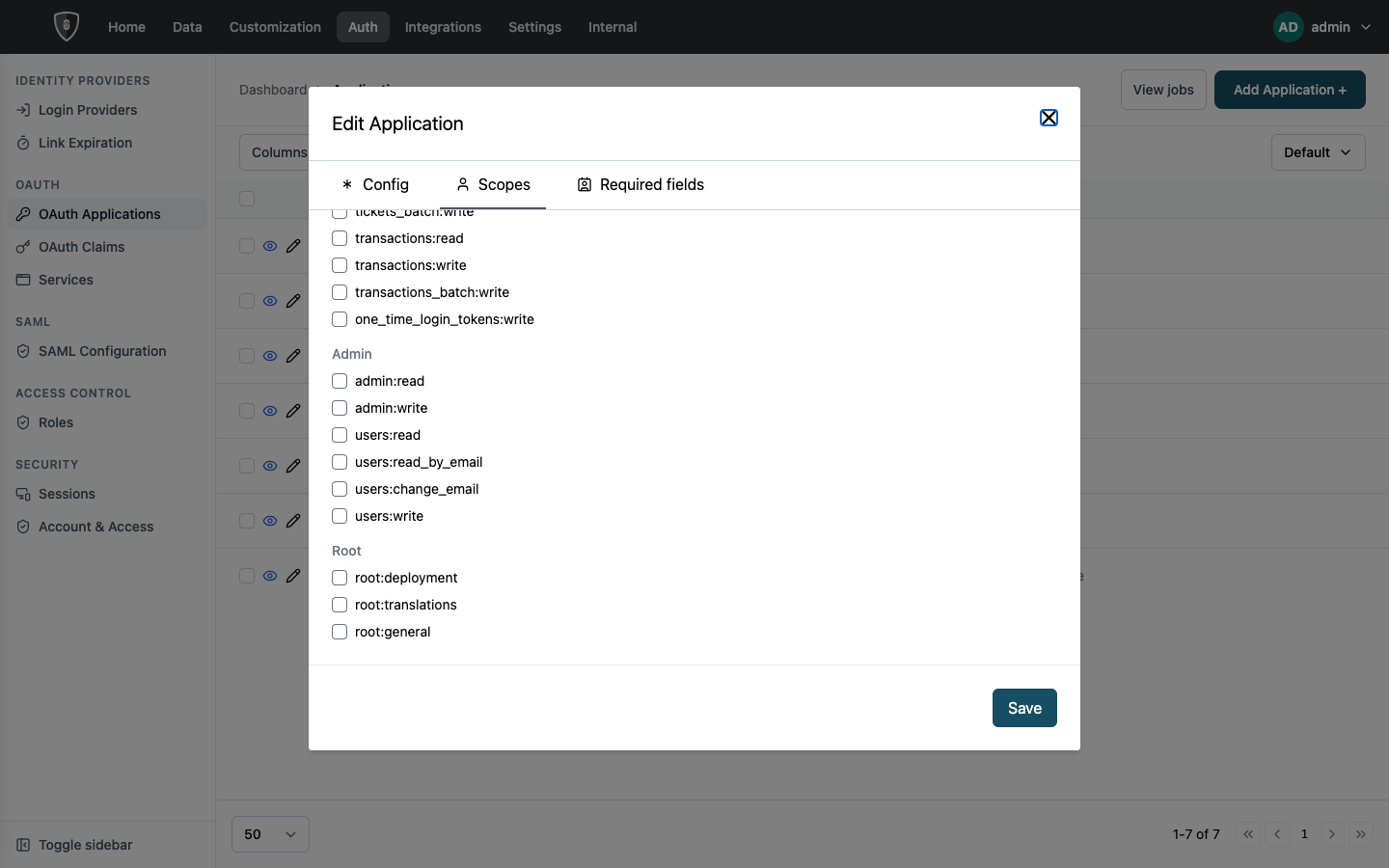
The same form scrolled down — the Admin and Root groups sit in the ordinary list, offered to any administrator who can edit an application.
Diagnose an access failure
| Result | Check |
|---|---|
Token endpoint returns invalid_scope | Scope spelling, the explicit application grant, and the requested scope string. Parse the machine-readable error, not translated descriptions. |
401 from the API | Bearer header, token expiry, revocation, and the host that issued the token. |
403 with insufficient_scope | The scope accepted by that particular action. Renewing a token with the same scopes will not fix it. |
400 saying a user-based or non-user-based token is required | Switch to the matching route and flow; adding more scopes will not change the token type. |
Empty list or 404 | Resource ID, application service, applicable brand visibility, and ownership. Do not assume the record is absent across the installation. |
Another 403 | Inspect the error: feature availability and operation-specific authorization can also reject a request. |
OAuth-layer failures may have an empty or non-JSON body. Read the status and WWW-Authenticate header before attempting JSON parsing. See Errors, idempotency, and retries.
Next steps
- Role-based access control reference explains dashboard permission resources and their relationship to API authorization.
- Make your first REST request
- User-authorized access
- OAuth applications, claims, and services
- Roles and account security