Common REST workflows
Implement recurring data and administrative tasks.
These independent recipes cover customer records, user synchronization, transactions, newsletter subscriptions, and custom attributes. They use REST V1 application tokens from a confidential backend client. Start with your first request if you do not yet have a token.
Prepare the integration
Provision the resource scopes required by the recipe, including read access for reconciliation. Keep the application secret and access token on your backend. Feature enablement and resource visibility still apply after the token's scope check.
| Recipe | Scopes to provision |
|---|---|
| Find or create a customer by email | users:read_by_email, users:read, users:write |
| Find a customer by a unique custom attribute | users:read |
| Sync user records | users:read |
| Import and reconcile transaction batches | transactions:read, transactions_batch:write |
| Create or update individual transactions | transactions:read, transactions:write |
| Manage and reconcile newsletter subscriptions | newsletter_subscriptions:read, newsletter_subscriptions:write |
| Read and write custom attributes | custom_attributes:read, custom_attributes:write |
Do not replace these with a blanket assumption that admin:read or admin:write covers every custom action. The scopes reference explains the route-specific alternatives.
Replace the illustrative host, IDs, and values below with your own configuration. The JSON shown is a request example or an abbreviated response shape, not a record to import unchanged. Parse each operation's envelope: single records are often bare objects, paginated collections use {meta, results}, and batch operations expose per-record errors.
Find or create a customer
Use a validated, normalized email address and look it up before creating:
curl --get 'https://your-tenant-host/api/v1/users/by_email' \
  -H 'Authorization: Bearer YOUR_ACCESS_TOKEN' \
  --data-urlencode 'email=customer@example.com'
A successful response is a bare user object. Save its id, the user's Unidy UUID, for later calls. Check that you actually supplied a nonempty email before interpreting a 404 as absence.
After a lookup returns 404, create the user:
curl --request POST 'https://your-tenant-host/api/v1/users' \
  -H 'Authorization: Bearer YOUR_ACCESS_TOKEN' \
  -H 'Content-Type: application/json' \
  --data '{
    "email": "customer@example.com",
    "first_name": "Alex",
    "last_name": "Example",
    "preferred_language": "en",
    "send_invitation": false
  }'
Success is 201 with a bare user object. Compare its identity and the fields you intended to set before marking the operation complete.
A concurrent create or a lost response makes the outcome uncertain. Look up the address again before retrying. Finding a record resolves its identity; it does not prove your requested profile values were applied. Reconcile those fields explicitly. A 422 can represent many validation failures, so do not classify every 422 as a duplicate or parse a translated error sentence as a stable identifier.
Creation does not invite the customer unless send_invitation is enabled. Set send_invitation: true only when your workflow should send a real invitation email. Configure its return URL and locale before a batch import.
Find by your own unique identifier
For an existing custom attribute with an active unique validation rule:
curl --get 'https://your-tenant-host/api/v1/users/by_custom_attribute' \
  -H 'Authorization: Bearer YOUR_ACCESS_TOKEN' \
  --data-urlencode 'attribute=member_number' \
  --data-urlencode 'value=10042'
A match returns the same user-object shape. Missing parameters produce 400; missing definitions or users produce 404; a definition without an active unique rule produces 422. If existing values collide, the lookup returns 409 and must be resolved rather than selecting an arbitrary record. Activating a unique rule does not repair historical duplicates.
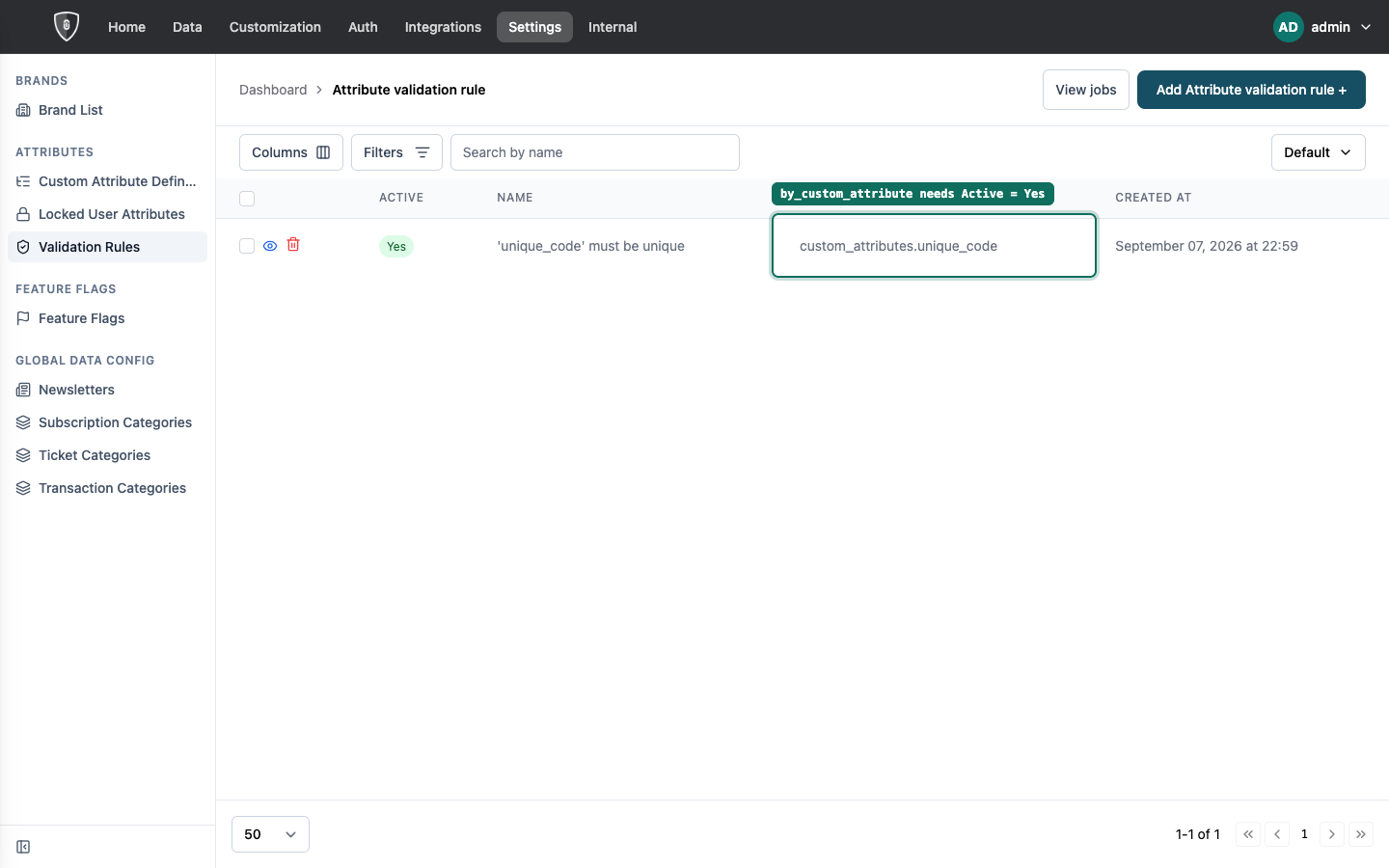
SETTINGS → VALIDATION RULES — the precondition for by_custom_attribute · highlight on the Attribute name, which is written custom_attributes.<name>. The Active column must read Yes; switch it off and the lookup starts answering 422 with no change to your code.
Update a known customer
Use PATCH /api/v1/users/{user_id} for supported profile fields. Repeating the same scalar assignments converges on those values, subject to validation and concurrent writers. Read the user back if the response is lost. Use the dedicated email-change operation for email changes and the custom-attribute operations below for custom values; the ordinary user update does not accept custom_attributes.
Sync users incrementally
GET /api/v1/users requires a date-based changed_since. It does not offer a timestamp cursor or a stable snapshot. Read the pagination contract before using it for synchronization.
The following is application pseudocode. destination.apply_versioned must durably reconcile each user's parsed updated_at against the version already stored. checkpoint.commit must happen after all destination writes and be safe against concurrent runs.
run_started_at = now()
previous = checkpoint.load()
# Request earlier calendar days as an overlap, in the API's date timezone.
since_date = overlap_date(previous, initial_date, overlap_days)
page = 1
visited = set()

while True:
    if page in visited:
        raise RuntimeError("Pagination repeated a page; checkpoint unchanged")
    visited.add(page)
    body = api.get("/api/v1/users", params={
        "changed_since": since_date,
        "include_custom_attributes": "true",
        "limit": 250,
        "page": page,
    })
    # api.get raises on non-success or an invalid response envelope.
    for user in body["results"]:
        destination.apply_versioned(
            user["id"], parse_timestamp(user["updated_at"]), user
        )
    next_page = body["meta"]["next"]
    if next_page is None:
        break
    if not isinstance(next_page, int) or next_page <= page:
        raise RuntimeError("Invalid next page; checkpoint unchanged")
    page = next_page

# All destination writes must already be durable here.
checkpoint.commit(run_started_at, expected_previous=previous)
On failure, keep the old checkpoint and replay the overlapping interval from page 1. Do not advance a global high-water mark while merely fetching records, filter out all records below the largest timestamp seen, or keep only the first copy of an ID. A later occurrence can contain a newer version; equal timestamps with different content need a reconciliation policy too.
Overlap and replay reduce some failure modes but cannot recover every row omitted by unordered offset pagination. Use webhook delivery for prompt changes and deletions, periodic reconciliation for drift, and a separately agreed export mechanism when completeness is required. A successful walk is not evidence of a lossless sync.
Import transactions
Enable transactions and obtain a category with GET /api/v1/transaction_categories. The returned category id is a UUID; use it as transaction_category_id in write bodies. User IDs in these bodies are also UUIDs. Batch records can instead supply email; that path can create a missing user. Use a known user_id when automatic customer creation is not intended.
Choose the write operation according to its semantics:
| Operation | Scope | Behavior to handle |
|---|---|---|
POST /api/v1/transactions | transactions:write | Create one transaction; supply user_id (UUID) or email as a query parameter. Email can create a missing user. A repeated create can conflict. |
POST /api/v1/transactions/batch | transactions_batch:write | Create up to 100 records. Inspect transactions, skipped, and errors; import failure can return 422. |
POST /api/v1/transactions/batch/upsert | transactions_batch:write | Create or update up to 100 records by business key. A 200 can contain per-record errors; valid records can already be written. |
The business key is external_id + source_platform + source_channel_id. Fix your channel convention before importing. For no channel, consistently send null; batch upsert normalizes blank channels, while other write paths need not normalize them identically.
Save a request such as this as batch.json, substituting a real user and category UUID:
[
  {
    "user_id": "13a10e14-330d-4169-8b17-5b0263aedae9",
    "transaction_category_id": "1e6a6b09-e287-471c-8427-aef2bc68d850",
    "external_id": "ORDER-10042",
    "reference": "ORDER-10042",
    "source_platform": "commerce",
    "source_channel_id": "web",
    "state": "paid",
    "placed_at": "2026-09-08T10:30:00Z",
    "currency": "EUR",
    "total": 49.99,
    "line_items": [
      {
        "external_id": "ORDER-10042-LINE-1",
        "name": "Shirt",
        "quantity": 1,
        "external_product_id": "PRODUCT-42",
        "unit_price": 49.99,
        "total_price": 49.99
      }
    ]
  }
]curl --request POST \
'https://your-tenant-host/api/v1/transactions/batch/upsert?skip_events_if_no_changes=true' \
-H 'Authorization: Bearer YOUR_ACCESS_TOKEN' \
-H 'Content-Type: application/json' \
--data-binary @batch.jsonInspect both transactions and errors even on a 200. Record each item's outcome and reconcile failed or uncertain items individually. skip_events_if_no_changes=true suppresses update events for unchanged upserted transactions; it is not a general idempotency key and does not suppress events for actual changes or creations.
Choose line-item semantics deliberately
Batch upsert and individual PATCH behave differently:
| Operation | Line-item behavior |
|---|---|
Batch upsert, line_items omitted | Preserve existing items. |
Batch upsert, line_items supplied | Treat the array as the desired replacement collection; an empty array clears it. Replacement can create new item UUIDs. |
Individual PATCH /transactions/{id}, item with id | Update that existing line-item UUID; id plus _delete: true deletes it. |
Individual PATCH, item with external_id but no id | Match within the transaction by external ID and update or create. Use a stable, unique value. |
| Individual PATCH, neither item identifier | Append a new item on each application, including a retry. |
Individual PATCH with replace_line_items=true | Replace the complete supplied line-item collection, rather than incrementally merging items. |
A line-item product ID is not a line-item identity. Do not retry an uncertain append payload merely because the HTTP method is PATCH. Replacement can change item IDs, and repeated successful writes can emit events even when the final data matches. See errors and retries.
Reconcile an uncertain write
curl --get 'https://your-tenant-host/api/v1/transactions' \
  -H 'Authorization: Bearer YOUR_ACCESS_TOKEN' \
  --data-urlencode 'external_id=ORDER-10042' \
  --data-urlencode 'source_platform=commerce' \
  --data-urlencode 'channel=web'
Walk every returned page and select the exact business-key triple. For a blank channel, omit the channel filter and compare returned source_channel_id values using your chosen null/empty normalization. Then compare the intended state, including user, category, state, amounts, and line items. meta.count == 1 only establishes that one record matches the query; a pre-existing row may still hold old values.
If the row exists with different values, decide whether the difference is a failed update or a newer legitimate write before overwriting it. If absent, reconcile again or retry according to the operation's semantics and your concurrency policy.
Subscribe, reconcile, or unsubscribe a newsletter
Obtain the newsletter's internal_name and its valid preference identifiers. GET /api/v1/newsletters supplies the internal name. Preference definitions are available through the newsletter configuration or the SDK newsletter catalogue; they are not the newsletter's numeric ID.
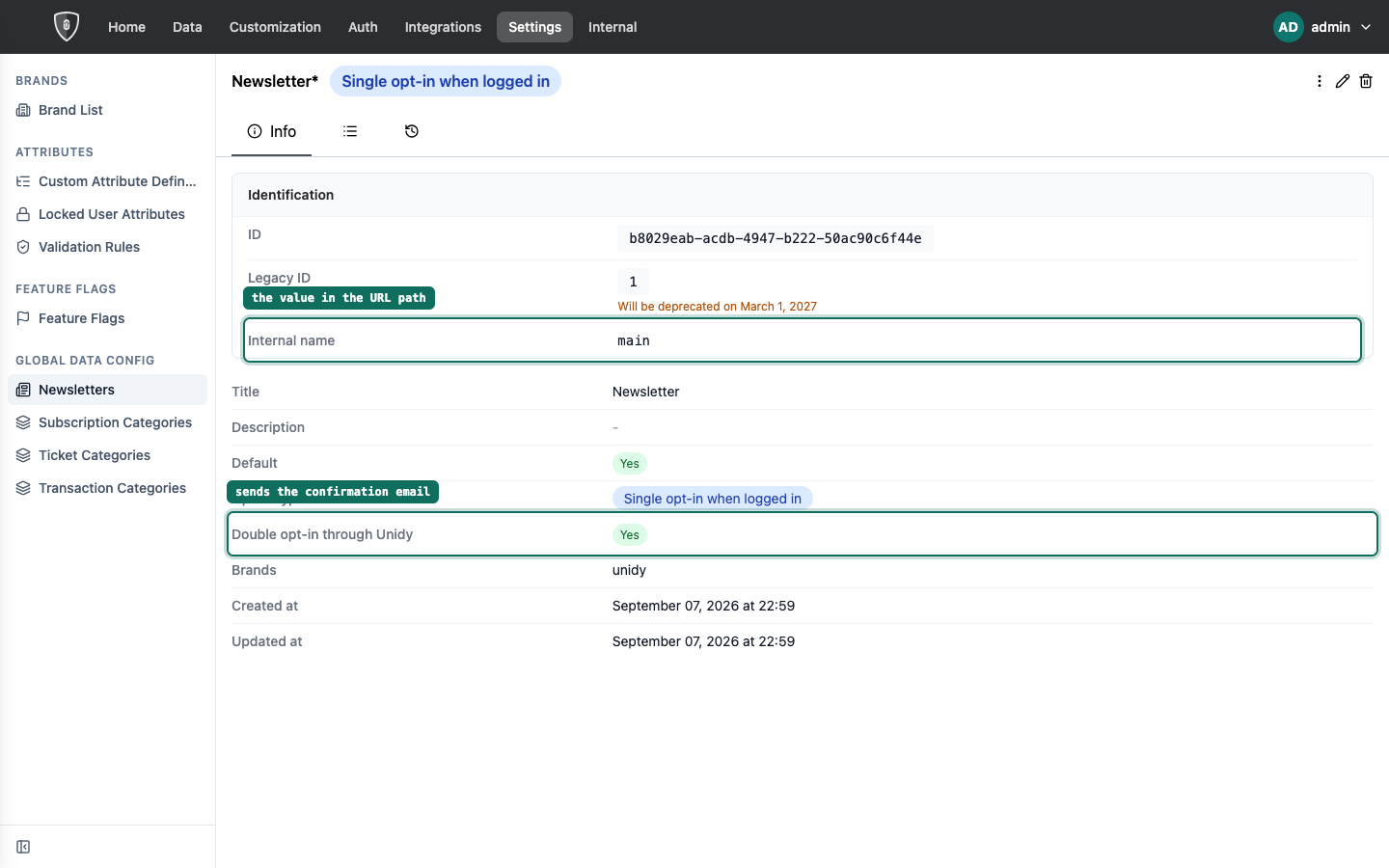
SETTINGS → NEWSLETTERS → NEWSLETTER — the two settings that decide what your subscribe call does · highlights on Internal name, the value that goes in the URL path, and on Double opt-in through Unidy, which is what actually sends the confirmation email. Note the Legacy ID row and its deprecation date.
Create a subscription:
curl --request POST \
  'https://your-tenant-host/api/v1/newsletters/main/subscriptions' \
  -H 'Authorization: Bearer YOUR_ACCESS_TOKEN' \
  -H 'Content-Type: application/json' \
  --data '{
    "email": "customer@example.com",
    "preference_identifiers": ["club_news"]
  }'
A successful create returns 201 and the bare subscription object. Its confirmation state depends on the newsletter's opt-in settings and any supplied confirmation evidence. Plain single opt-in can auto-confirm. An unconfirmed newly created subscription sends a confirmation email only when confirmation through Unidy is enabled. An existing customer address alone does not make this REST request an authenticated customer opt-in.
If consent was already captured by your authorized upstream workflow, supply the actual confirmed_at. Newsletter confirmation IP is no longer stored or returned, and incoming confirm_ip is ignored for compatibility. Keep any independently required consent evidence in your agreed evidence system. Do not invent confirmation evidence to avoid a confirmation flow. Review the newsletter configuration before importing, because creation can send real mail.
Reconcile conflicts and lost responses
An existing subscription can produce a conflict, including when it remains unconfirmed. Do not treat every 409 as success. Read the current subscription:
curl --get \
  'https://your-tenant-host/api/v1/newsletters/main/subscriptions/by_email' \
  -H 'Authorization: Bearer YOUR_ACCESS_TOKEN' \
  --data-urlencode 'email=customer@example.com'
Compare email, preference_identifiers, confirmed_at, and opted_out_at against the intended subscription state. A matching address alone is insufficient. An unconfirmed subscription needs the configured confirmation process; it must not be marked confirmed just to resolve a duplicate response. If confirmation has already been captured externally, the explicit POST …/subscriptions/{id}/confirm operation accepts the recorded confirmation timestamp and IP.
When preferences differ and your workflow is authorized to replace them, use PUT …/subscriptions/{id} with the complete desired preference_identifiers list. This replaces the preference set. Read back the result rather than assuming an earlier duplicate create applied the new preferences.
The numeric subscription id is supported for member routes. During the UUID rollout, responses may additionally include unidy_id, and UUID member paths are accepted only when that capability is enabled for the installation. Do not assume all tenants accept UUID paths merely because a schema lists the field. user_id may be null for a subscription without a linked user.
Unsubscribe
curl --get --request DELETE \
  'https://your-tenant-host/api/v1/newsletters/main/subscriptions/by_email' \
  -H 'Authorization: Bearer YOUR_ACCESS_TOKEN' \
  --data-urlencode 'email=customer@example.com'
Success is 204 with no JSON body. The operation destroys the subscription; it does not retain the row by setting opted_out_at. Keep any history required by your integration before deletion. After an uncertain response, read the same newsletter/address combination: 404 establishes absence for that lookup. A later resubscription creates a new record.
Write custom attributes
Before writing, expose each definition through its Accessible via API setting and confirm its configured type and validation rules. Use custom_attributes:write and custom_attributes:read for write plus read-back.
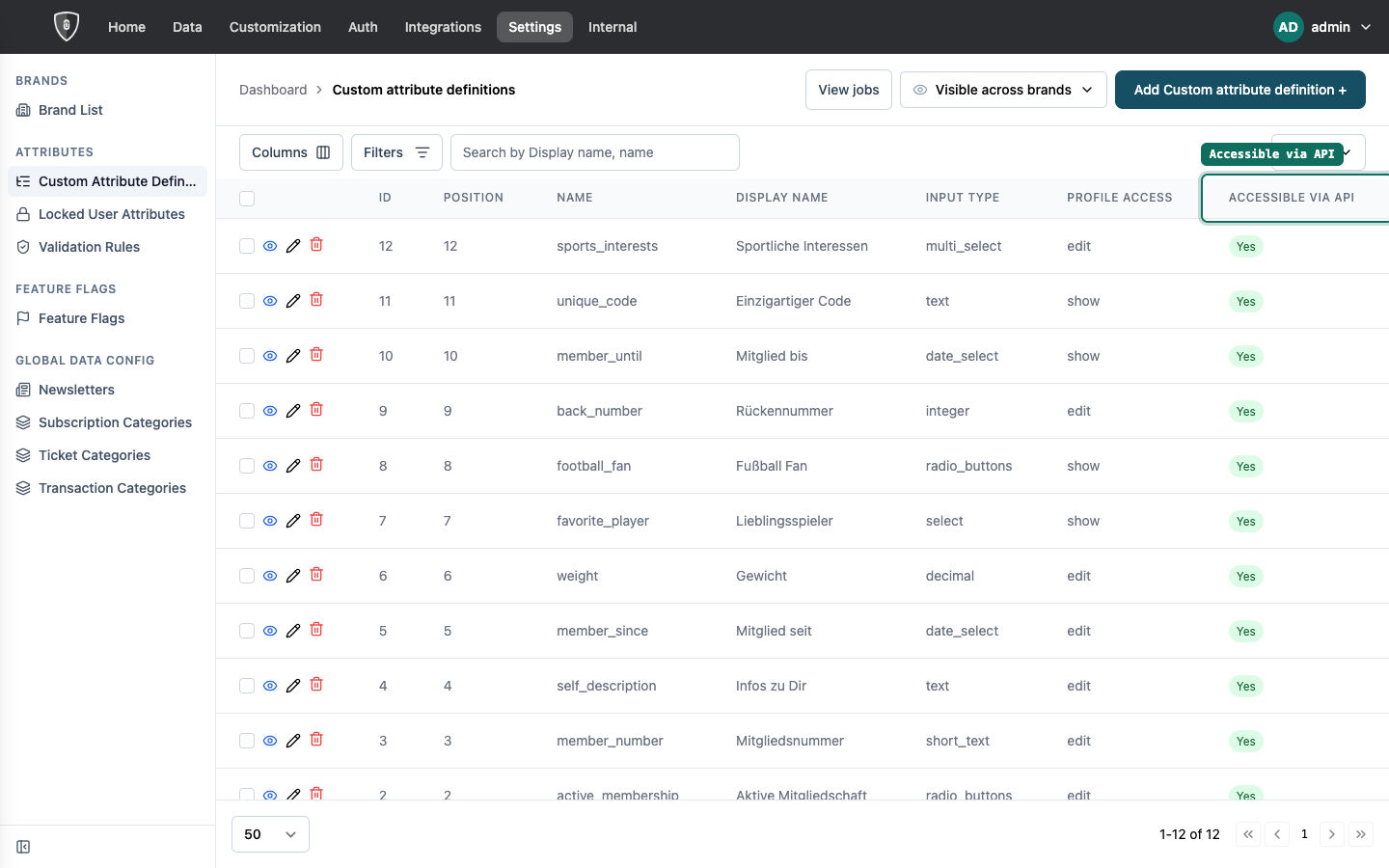
SETTINGS → CUSTOM ATTRIBUTE DEFINITIONS — all twelve seeded definitions · highlight on the Accessible via API column, which is the gate every call in this section passes. The Input type column decides the JSON type your value must have; decimal and integer both report as number and do not accept the same values.
curl --request PATCH \
  'https://your-tenant-host/api/v1/users/USER_UUID/custom_attributes' \
  -H 'Authorization: Bearer YOUR_ACCESS_TOKEN' \
  -H 'Content-Type: application/json' \
  --data '{
    "custom_attributes": {"member_number": "10042"},
    "custom_attributes_delete": ["former_member_number"]
  }'
This example assumes both named definitions exist and are API-accessible. Values for omitted attributes remain unchanged. custom_attributes_delete removes the named values; setting a value to null and deleting it are distinct operations. Do not put the same name in both the update map and the deletion list.
| Operation | Success body |
|---|---|
PATCH …/custom_attributes/{attribute_name} with {"value": …} | Bare attribute object. |
PATCH …/custom_attributes | Attribute array under custom_attributes. |
DELETE …/custom_attributes/{attribute_name} | 204, no body. |
GET …/custom_attributes | Attribute array under custom_attributes. |
Read back the affected attributes and compare value and defined. A removed value can still appear in the definition list as defined: false; a present null value is not equivalent. Respect the response's actual value type rather than coercing all values from its descriptive type field; decimal values can be represented as strings.
Unknown or inaccessible attributes and invalid values can return 400, so handle it alongside 422 validation failures. Retry only after understanding the failure. For existing users, keep these writes on the dedicated custom-attribute routes instead of putting a custom_attributes map in an ordinary user PATCH.