Eventim for ticketing
Connect Eventim customers, synchronize ticket orders, and configure entry tracking.
Connect Eventim ticketing
The Eventim connector links a Unidy user to an Eventim customer, maps profile fields, and imports ticket orders into Unidy tickets or subscriptions. Optional entry tracking processes access-control scans for synchronized tickets.
Eventim notifications identify an event; Unidy then fetches the full payload from Eventim in a background job. Receiving a notification successfully does not mean the customer or ticket has already been updated.
Before you start
Obtain the Eventim API client credentials for the intended staging or production environment and permission to configure integrations in Unidy. Decide which profile fields each system owns, how seasonal tickets should be represented, and which Unidy service and categories should receive tickets.
When brand-scoped integrations are available, choose a shared or brand-owned instance. The brand-owned instance takes precedence over the shared instance, even when disabled. Links between users and Eventim customers belong to that plugin instance; they are not one global identity mapping across every brand. An instance with synchronized data cannot be moved to a different brand.
Install and verify the connection
- Open Integrations → Add plugin, select Eventim, and choose the intended scope where available. Open Configure instead if that instance is already installed.
- Give the instance a recognizable name and select the Eventim environment that matches your credentials.
- Enter the client ID and client secret, then run Test connection.
- Select OAuth applications that should trigger initial linking when a user authorizes them. An empty selection matches no OAuth authorization events; it does not mean every application.
- Create the plugin. Unidy creates the outward
unidy_id → authorizationidentity rule and queues setup of Eventim webhook registrations. - Review the remaining configuration and field rules below. Enable the plugin and verify one linked customer before enabling ticket or entry flows for customers.
The OAuth application selection governs the authorization-triggered linking path. Synchronization of already linked users and optional synchronization of newly created users have separate rules.
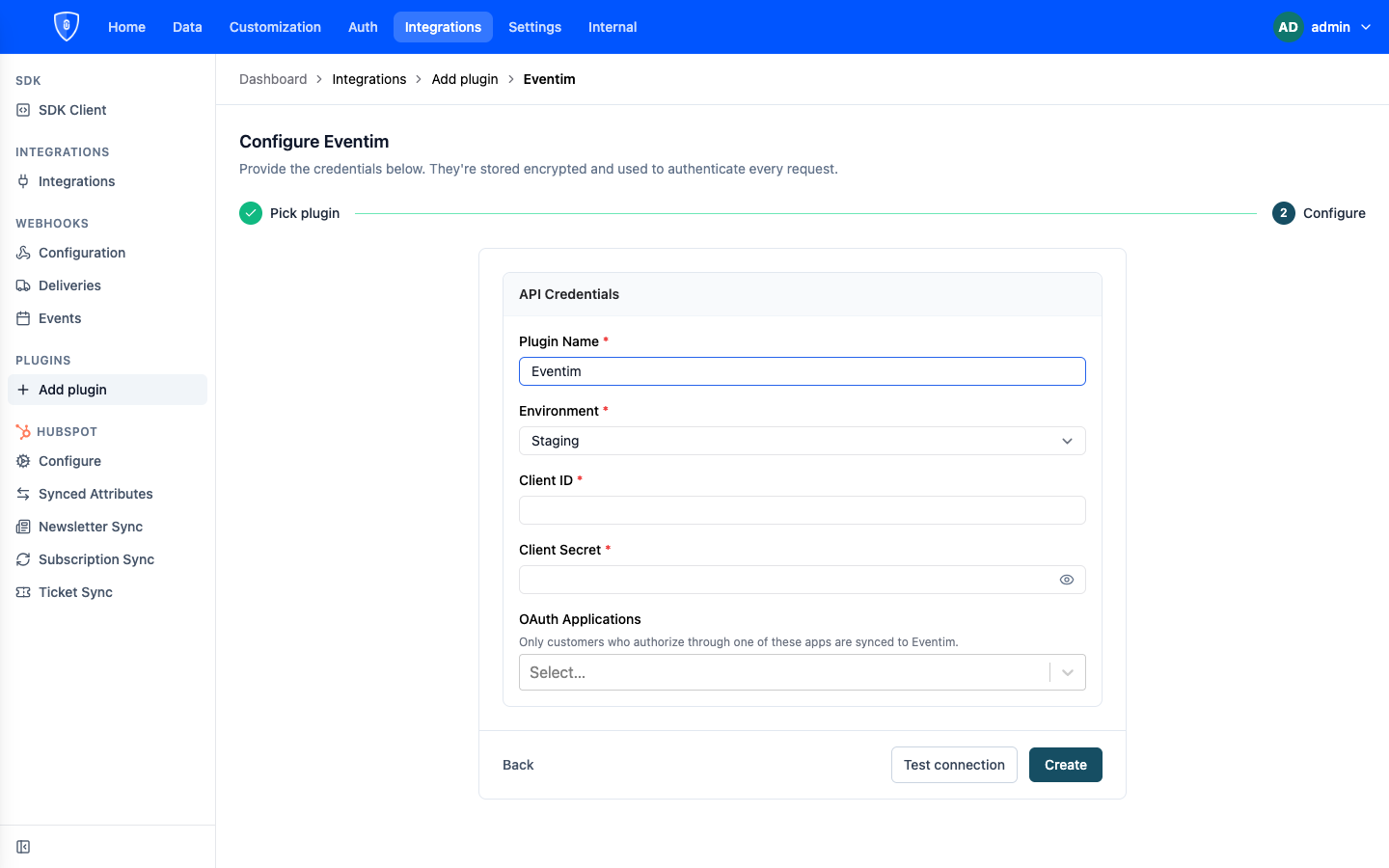
ADD PLUGIN → EVENTIM — the whole of step 2. Four required fields, one optional application filter, and a Test connection button that runs before anything is saved. Environment defaults to Staging outside production.
Configure the synchronization behavior
| Setting | Effect |
|---|---|
| Sync new users | Allows the new-user path to create a customer in Eventim. Turning it off does not stop updates to existing linked customers. |
| Assign users by email | Allows email-based matching in the inbound customer flow. Review identity collisions before enabling it. |
| Invite new users | Controls invitations for users created through the integration. |
| Update user fields with empty value | Allows incoming blank values to clear mapped profile values. |
| Ticket sync enabled | Enables processing of ticket event families. Requires a service and ticket category; configure the subscription category when seasonal tickets become subscriptions. |
| Sync seasonal tickets as | Choose Subscription or Ticket. Single tickets are stored as tickets. |
| Update ticket fields with empty value | Allows blank provider values to replace mapped ticket values. |
| Create missing users when syncing tickets | Allows the ticket-import path to create missing customer records rather than requiring an existing link. |
| Entry tracking enabled | Processes access notifications and applies entry changes; requires ticket synchronization. |
| Flag deleted users | Chooses how Unidy user deletion is reflected in Eventim, such as locking customer state, changing the email, or changing authorization. Review the selected strategy before enabling it. |
On Synced Attributes, generate and inspect the default rules, then set the direction for each field. Email and unidy_id are outward-only. Other profile fields may be mapped both ways. Prepare any custom attribute definitions required by the generated rules and decide which system may overwrite each value.
Notifications and ticket entry
Eventim's webhook registrations live in Eventim. They are separate from Unidy outbound webhook registrations. The callback uses the configured plugin's brand host, or the default brand host for a shared plugin.
| Event family | Event types | Processing prerequisite |
|---|---|---|
| Customer | CUSTOMER_UPDATE, CUSTOMER_GROUPREFERENCE_UPDATE, CUSTOMER_GROUPREFERENCE_DELETE | Enabled integration and the corresponding customer/link configuration. |
| Ticket | ORDER_UPDATE, ORDER_TICKET_UPDATE | Ticket synchronization enabled. |
| Entry | ACCESS_CREATE | Ticket synchronization and entry tracking enabled. |
| Error | ERROR | Enabled integration. |
Unidy stores the notification UUID and fetches the detailed payload from Eventim. Use Webhook Notifications to distinguish a received notification from processed or ignored work.
For entry tracking, test a synchronized ticket and a real scan in the agreed test environment. A single-ticket first scan sets its entry time and emits ticket.entered; seasonal ticket/subscription handling emits the corresponding entry event without consuming the seasonal entitlement. The earlier observe-only rollout mode has been removed. Unknown tickets may be retried and eventually ignored, so an access notification alone does not prove entry was recorded.
Inbound authentication
Eventim registrations send a per-plugin secret in X-Unidy-Webhook-Token. Unidy provisions the header through registration synchronization and begins rejecting missing or incorrect tokens after a valid notification first confirms that Eventim sends it. Before that confirmation, missing/mismatched tokens are reported without enforcement.
Verify registration synchronization and a correctly authenticated notification before treating enforcement as active. Once confirmed, a missing or wrong token returns 401. The numeric plugin ID is an identifier, not a credential. This inbound token mechanism is separate from Unidy's outbound HMAC signing.
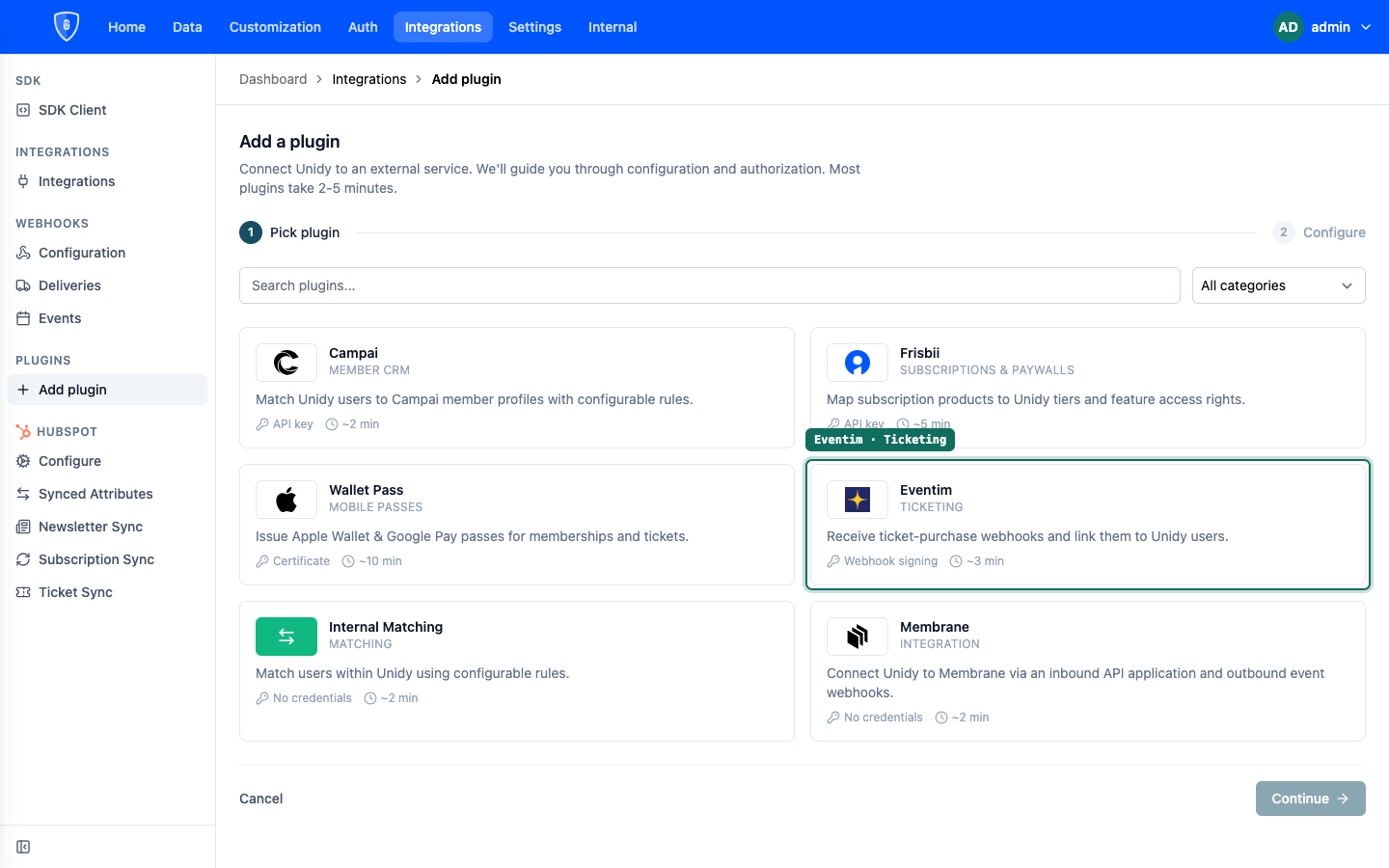
ADD PLUGIN — the catalog · highlight on the Eventim card. Note the Webhook signing label bottom-left of the card; the callout above explains why it is wrong.
Resolve identity conflicts
A notification can claim an Eventim customer already linked to another Unidy user, or propose a different Eventim customer for an existing link. Open the conflict, read the named records and proposed action, and verify ownership before resolving it.
| Conflict | Accept | Dismiss |
|---|---|---|
| Multiple assignment | Transfers the Eventim customer link and its synchronized ticket/subscription ownership to the selected user, applies the customer data, and synchronizes the result outward. | Force-synchronizes the affected users back to Eventim using Unidy's current state. This can overwrite provider values. |
| Duplicate Eventim connection | Clears the old Eventim authorization when possible and links the user to the proposed customer. If that customer is already linked elsewhere in the same plugin, its link and synchronized ticket ownership can transfer too. | Closes the conflict without changing the identity link. A later notification may raise the same collision again. |
The conflict's immediate resolver must succeed before the dashboard marks it resolved; an error keeps it open. Follow-up synchronization can still run in the background. Resolved conflicts are retained with resolution state and time. Check both systems after resolution. See Sync conflicts.
Diagnose missing orders and uncertain customer creation
Ticket updates can arrive before their invoice or customer link. Unidy waits with increasing delays over roughly 22 minutes. If the order remains missing, it records a Resource not found conflict for the invoice; an order that arrives without a particular ticket can produce a ticket-specific conflict.
A later invoice automatically wakes its waiting ticket updates and cancellations, spreading their processing over time. Successful ticket synchronization resolves the missing-order conflict. Do not start a second import solely because an out-of-order notification is waiting.
Invoice processing handles valid, entered, pending, expired and cancelled ticket lists. A cancellation remains final when an older invoice arrives later. Unsupported packages, fan cards or event types can be ignored rather than retried indefinitely; inspect the notification's recorded outcome.
An Eventim customer-create request can be accepted before the customer notification supplies its external identifier. Repeated manual synchronization does not resend an unanswered create. For an unlinked user, check pending work, error notifications and the provider delivery status before attempting another create. Eventim's error stream can turn an accepted-but-later-rejected write into a visible sync conflict.
Deleted users are not automatically recreated by a later customer notification. Resolve the deletion or linking decision explicitly rather than using redelivery as account restoration.
Pause or recover synchronization
To stop new plugin dispatch, turn off Plugin enabled on Configure and save. Incoming callbacks are acknowledged while disabled without entering normal synchronization. Previously queued customer or ticket work can still run, so coordinate a queue/in-flight-work procedure with the operator if you need a complete maintenance stop.
Turning off Sync new users and Ticket sync enabled is not a full stop: existing-customer updates have separate paths. Plan reconciliation for the disabled interval before resuming.
Use Ensure webhooks to synchronize the plugin's registrations, reactivate required event families and configure the authentication header. Synchronization also moves this plugin's earlier /api/v1/webhooks/{plugin_id}/all callback to /api/v2/internal/webhooks/{plugin_id}/all; both route forms remain served for compatibility. Do not assume it cleans up unrelated registrations at other hosts. Coordinate callback-host changes with the Eventim owner and inspect the provider registrations afterwards.
Scheduled catch-up requests redelivery of unsent and failed notifications for this plugin's registrations every 20 minutes, with a 25-minute overlapping window. A manual catch-up defaults to the last 24 hours and is bounded by Eventim's 30-day retention. Eventim does not automatically retry every failed delivery itself.
The plugin status view shows its Eventim registrations and provider delivery statistics. Received/processed local counts, where shown, are staff diagnostics; they are not a promise that customer administrators see those counters or that provider totals reconcile one-to-one with stored notifications.
For missed notifications, use the supported catch-up action with a bounded time window and monitor the resulting jobs. Redelivery can produce a burst of work. Duplicate processed notifications are acknowledged without applying the same notification again, but still verify affected customer and ticket records after recovery.
Troubleshooting
| Symptom | Check and next step |
|---|---|
| Connection test fails | Confirm the Eventim environment and matching client credentials. |
| No notifications arrive | Check plugin state, callback reachability and Eventim registrations. Run Ensure webhooks for the enabled event families. |
| Customer updates arrive but tickets do not | Check ticket synchronization, service/category configuration and ticket event registrations. |
| Existing users update but new users do not link | Check Sync new users and the separate OAuth application selection. A plain profile update does not create every missing link. |
| Entry notification received but no entry recorded | Check entry tracking, the ticket link, scan timestamp and the notification's processing/ignore result. |
| Callback returns 401 after working previously | Check the configured registration header and the plugin's confirmed inbound token; coordinate repairs without exposing the secret. |
| Ticket update waits or reports a missing order | Check the invoice's delivery and the customer's link, then monitor automatic wake-up when the invoice arrives. |
| A mapped value changes back | Check direction and blank-value rules. Choose one system as owner where two-way updates are inappropriate. |
| A conflict returns after Dismiss | Dismissing a duplicate connection does not repair the link. Resolve the identity disagreement before retrying. |
For failures, supply the plugin scope, customer or ticket identifier, notification UUID and time to the integration owner. Do not include the client secret.
Eventim shop SSO and contact fields
Coordinate setup with both your Unidy contact and Eventim/Ticketcorner owner. In addition to the API base URL and client credentials for the selected environment, Eventim needs the Unidy host, OAuth client ID and agreed scopes to configure SSO in the shop. The documented shop integration assumes that SSO is already connected before contact/ticket synchronization goes live; installing the data plugin does not install the shop's login flow.
The link uses the customer's Unidy public ID in Eventim's authorization field and Eventim's Tixx customer ID on the Unidy side. tixxCustomerNumber is a customer number, not a substitute for either identity key. Profile synchronization supports create and update events in each direction subject to the selected rules; email and the authorization identity remain outward-only in the current default rules.
| Eventim field | Unidy mapping / setup |
|---|---|
authorization | unidy_id, Unidy to Eventim. |
email | Email, Unidy to Eventim. |
firstName, lastName, dateOfBirth, salutation, company | First/last name, date of birth, salutation and company. |
street, additionalAddressInformation, postcode, city, countryId | Address lines, postal code, city and country code. |
tixxCustomerNumber | Custom attribute eventim_tixx_customer_number, inward. |
customerState.name | Custom attribute eventim_customer_state_name. |
customerState.description | Custom attribute eventim_customer_state_description. |
customerState.state | Custom attribute eventim_customer_state_state. |
Create the required custom definitions before generating rules. Inspect directions and custom value mappings, including membership or discount-group assignments, before enabling two-way writes. Synchronized contact data can support customer communication, but contact synchronization itself does not grant newsletter consent.
Recognize common identity conflicts
Duplicate connection means two Eventim customers propose the same Unidy user. It can occur when a ticketing employee buys for a VIP using an email already linked to another Eventim customer. It can also occur after merging two customers in Eventim: the surviving customer has a different Tixx ID from the one still linked in Unidy. Compare the existing/proposed Tixx IDs and customer data before choosing Accept to replace the link.
Multiple assignment means the same Eventim customer proposes two Unidy users. Editing an Eventim customer's authorization to another Unidy ID can trigger this. Verify the intended account and ownership of existing tickets before Accept, because ownership can move.
Older screenshots call acceptance Connect and also show Ignore. Use the current Accept/Dismiss actions and their effects in the table above. In particular, dismissing a duplicate connection does not promise an outward overwrite; the current behavior closes it without replacing the link. Do not copy a historic resolution choice without checking the current proposed action.
Resolve missing customers for ticket imports
Ticket synchronization needs an associated customer. Existing synchronized ticket/subscription references are updated rather than recreated. For a new record, the importer attempts customer matching using the Eventim identity/authorization information and email according to the configured path. The historical matching sequence checked the linked Unidy ID before email; do not use email matching as proof of identity when records conflict.
If no customer can be resolved, Create missing users when syncing tickets controls whether Unidy creates a customer or records a Resource not found conflict. Inspect the conflict, create/link the correct customer if appropriate, then arrange a retry or provider update. Waiting for a later purchase is not a guarantee that a historical ticket has been recovered.
Ticket payloads and mappings
ORDER_UPDATE supplies invoice/order information and status lists for the order; ORDER_TICKET_UPDATE supplies each individual ticket's detail. One order containing several tickets can therefore generate one order notification plus several ticket notifications. Changes to seating, dates and status update an existing synchronized record; an update can also create a record not yet present when customer matching and configuration allow it.
The notification UUID is used to retrieve each payload from Eventim's webhook API. This flow does not offer a general customer/ticket-list API for arbitrary reconstruction. Preserve delivery coverage and use supported catch-up/provider exports for recovery; the old claim that any missed notification is permanently irretrievable is too strong given the current catch-up path.
Map first-class ticket fields
Review the actual rules under Synced Attributes for the ticket/subscription record type. This table preserves useful source paths; it is not a promise that every row is generated by default.
| Eventim source | Unidy destination / interpretation |
|---|---|
id | External ticket reference. |
type | Distinguishes single versus seasonal tickets; combine with category value mappings and the seasonal Ticket/Subscription setting. |
eventData.name | title. |
eventData.description | text. |
totalPriceIso.amount | price. |
totalPriceIso.currency | Configure currency when needed; the historical recommendation put it in metadata. Inspect the rules instead of assuming it is generated. |
eventData.startTime, eventData.endTime | Single-ticket starts_at, ends_at. |
eventData.subscriptionPeriodStartTime, eventData.subscriptionPeriodEndTime | Seasonal-ticket validity in the current generated rules. |
eventData.venue.name | Available for venue; the current generated metadata rule also preserves the venue object. |
seat, eventData.venue, eventData.performer, eventData.competitionName | Included by the current default metadata rule. Add other metadata paths explicitly. |
Each record requires the appropriate ticket/subscription category. Map a provider event/type to a category UUID or select the fallback ticket category and fallback subscription category for unmapped values. With blank-value updates disabled, Use category title and description if blank fills missing display content; it is distinct from category fallback selection. Select the Ticket sync service to control the service associated with synchronized data and its later API access. Test an unmapped event and blank title/description before launch.
Provider-specific ticket metadata
The legacy payload illustrates the fields below. Select only fields your customer experience needs and confirm availability in the Eventim environment. Provider flags are metadata; they do not automatically enable Unidy transfer or personalization actions.
| Source paths | Meaning / mapping guidance |
|---|---|
isClubSale, isVirtualTicket, canBeTransfered, isBlockedInAC, needsPersonalisation | Club sale, virtual-ticket, transfer, access-block and personalization flags. Preserve the provider's spelling of canBeTransfered. |
affiliateId, userId, customerId, invoiceId | Provider references. Use the established customer link rather than matching on a sales-operator ID. |
eventURL, eventDescription, areaId, areaLabel, areaURL | Provider event/area link paths and labels. Relative paths require the correct Eventim base URL. |
seat.rowId, seat.rowLabel, seat.seatId, seat.seatLabel, seat.uniqueSeatId | Seat identifiers versus customer-facing labels. |
seat.priceCategoryId, seat.priceCategoryName | Price-category identifier and label. |
totalPrice, totalPriceIso.amount, totalPriceIso.currency | Provider display total versus explicit amount/currency. Use explicit ISO values for mapping. |
priceComponents[].amount, priceComponents[].isoAmount, priceComponents[].isoNetAmount, priceComponents[].isoVatAmount, priceComponents[].currency, priceComponents[].type, priceComponents[].vat | Gross/net/VAT component amounts, currency, component type and VAT. ISO amount objects contain amount and currency. |
status | Provider payment/status code; historical examples use B for paid and Z for returned. Confirm the current provider vocabulary and do not equate it to Unidy ticket state. |
barcode, isPrinted, prePrinted.ticketsPrePrinted | Admission barcode and print status. Treat barcode data as access-bearing. |
eventData.id, eventData.competitionId, eventData.competitionName, eventData.type, eventData.status | Event/competition identity, type and status array. |
eventData.vatCode, eventData.isFiscal, eventData.isDeletable | Event tax/fiscal and deletability metadata. |
eventData.endOfSaleTime, eventData.maxCancellationDate | Sales/cancellation cutoffs, distinct from event validity. |
eventData.requiresPersonalisation, eventData.requiresPoliceAuthorisation, eventData.uniqueVisitor, eventData.isChangeOfNamesAllowed | Event-specific personalization, authorization, visitor and name-change requirements. |
eventData.information, eventData.searchTerms | Additional event information/search text. |
eventData.performer[].name, eventData.performer[].imgUrl, eventData.performer[].type | Performer label, provider-relative image URL and role such as home/guest. |
eventData.venue.id, eventData.venue.name, eventData.venue.isFancardStadium, eventData.venue.fiscalCode | Venue identifier/name and additional venue metadata. |
Order notification context
These are source payload fields for understanding a ticket notification, not a transaction-ingestion contract. A ticket import does not automatically create a Unidy transaction.
| Order paths | Purpose |
|---|---|
invoiceId, extNumber, orderId, type, date | Invoice, external/order references, document type and order timestamp. |
validTickets, expiredTickets, cancelledTickets, pendingTickets, enteredTickets, transferedTickets | Ticket-reference status lists. Preserve the provider spelling transferedTickets. |
customer.id, customer.customerNumber, customer.authenticationEmail, customer.authorization, customer.status | Customer identity/authentication context and status. |
customer.firstName, customer.lastName, customer.middleName, customer.initials, customer.ticketName, customer.company, customer.title, customer.salutation, customer.gender | Customer identity/display profile. |
customer.nationality, customer.fiscalCode, customer.dateOfBirth, customer.placeOfBirth, customer.countryOfBirth | Optional demographic/fiscal data; do not import it unless required. |
customer.streetAndNumber, customer.postalCode, customer.city, customer.province, customer.country, customer.addressSupplement | Customer address. |
customer.additionalAddresses[], invoiceAddress, deliveryAddress | Address objects with id, customerId, salutation, title, firstName, middleName, initials, lastName, company, street, postalCode, city, country, province, addressSupplement, addressType. Billing/delivery addresses can differ from the customer profile. |
customer.communications[].id, customer.communications[].customerId, customer.communications[].communicationType, customer.communications[].communicationValue, customer.possessedCardIds | Additional contact channels and card references. |
affiliate, parentAffiliate, saleOperator, salesChannel | Affiliate objects expose id, title, companyId; operator exposes id, username, name; channel exposes code, description. |
vatPrepaid, totalPrice, totalPriceIso, paymentType, payments[] | Tax/prepayment and payment context. Payment entries contain paymentType and isoAmount (amount, currency). |
additionalFee[] | Fee objects with id, description, isoAmount (amount, currency) and vat. |
deliveryMethod.id, deliveryMethod.name, accounts, events[] | Delivery details, optional account collection and event information. Event objects use the corresponding event fields described above. |
Coordinate larger integration scenarios with your Eventim/Ticketcorner and Unidy contacts. The legacy external use-case deck is not required to configure the contracts documented here.
For sign-in, registration, missing emails, account changes, deletion, and correcting an account link, follow Eventim account procedures.