Make your first request
Complete an initial authenticated request.
Get an application access token and use it to read one page of users. This walkthrough is for a trusted backend using OAuth client credentials.
The backend sends its credentials directly to the token endpoint and receives an application access token. This exchange has no customer sign-in, browser redirect, or authorization code.
For a customer granting access to their own tickets or subscriptions, use User-authorized access. For customer sign-in and profile UI, use the SDK HTTP API.
Before you start
You need:
- Your Unidy tenant's HTTPS host.
- A confidential OAuth application and its client ID and secret.
users:readexplicitly provisioned on that application.- A terminal with
curlfor this read-only example.
An administrator with global OAuth-application write permission can provision the application under Auth → OAuth Applications. Ask them to share the secret through an approved secret store. Secret access requires appropriate write permission; merely being able to open an application does not imply access to its secret.
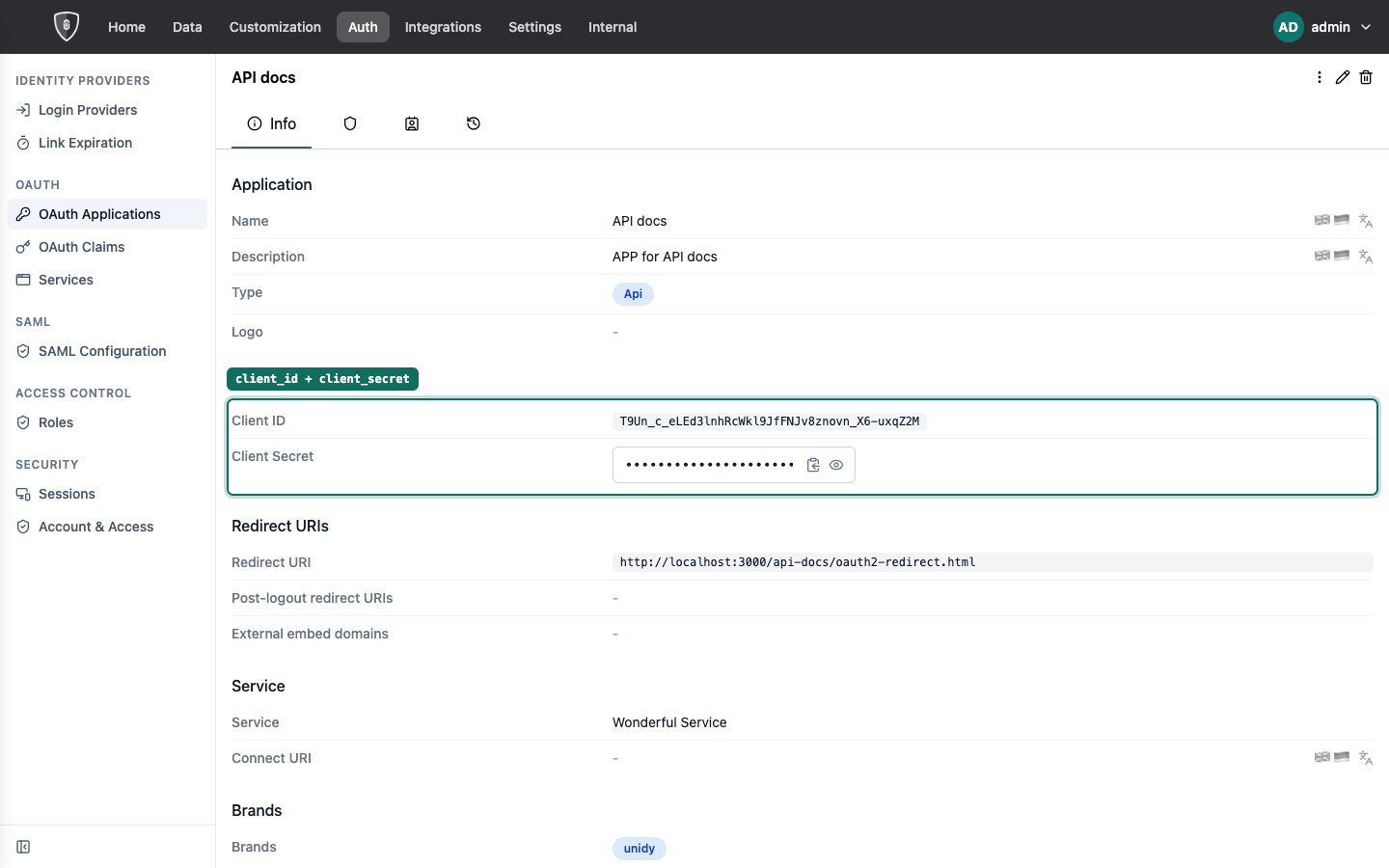
AUTH → OAUTH APPLICATIONS → an application → INFO — the two values you need · highlight on the Credentials block. Client ID is shown in full with a copy button; Client Secret is a masked field — click it to reveal, or use the copy button beside it.
Keep the client secret on your backend. Public browser and native applications use a different OAuth flow; they must not embed this secret or use client credentials.
1. Request an access token
Send a form-encoded request. Replace the example values locally; do not paste a real secret into shared logs, tickets, or source control.
curl --fail-with-body --request POST 'https://your-tenant-host/oauth/token' \
  --header 'Content-Type: application/x-www-form-urlencoded' \
  --data-urlencode 'grant_type=client_credentials' \
  --data-urlencode 'client_id=YOUR_CLIENT_ID' \
  --data-urlencode 'client_secret=YOUR_CLIENT_SECRET' \
  --data-urlencode 'scope=users:read'
A successful response contains an access token and its lifetime:
{
  "access_token": "YOUR_ACCESS_TOKEN",
  "token_type": "Bearer",
  "expires_in": 7200,
  "scope": "users:read",
  "created_at": 1790899200
}
Use the returned expires_in value, not the example's lifetime. Cache the token until shortly before expiry, with a small clock-skew margin. Coordinate refresh between concurrent requests so they do not all request new tokens at once. Client credentials does not return a refresh token: request a new access token using the same grant when necessary.
Confirm that scope contains the permissions your request needs. Request only resource scopes for this grant; identity scopes such as openid, profile, and email belong to user authentication.
2. Read one page of users
Supply the token from step 1 and a date for changed_since. The filter is date-based; choose an earlier date if you want to include older accounts.
curl --fail-with-body --get 'https://your-tenant-host/api/v1/users' \
  --header 'Authorization: Bearer YOUR_ACCESS_TOKEN' \
  --data-urlencode 'changed_since=2026-01-01' \
  --data-urlencode 'page=1' \
  --data-urlencode 'limit=25'
The response has a results array and meta pagination metadata. Each user's id is its public Unidy UUID. results: [] is a successful read with no matching users, not an authentication failure.
Check the HTTP status before parsing the body. A successful JSON response proves that the token is accepted and has access to this operation. It does not prove that every resource or brand is accessible.
If the request fails
| Response | Check |
|---|---|
OAuth invalid_client | Tenant host, client ID, secret, and confidential application configuration. |
OAuth invalid_scope | Requested scope spelling and the application's provisioned scope list. |
API 400 | Include a valid changed_since date and use an application token for this route. |
API 401 | Token expiry or revocation; inspect WWW-Authenticate. An error body may be empty. |
API 403 | Token scopes and applicable access restrictions. Repeating the same request with the same permissions will not fix it. |
API 429 | Wait at least Retry-After before retrying; reduce concurrency. |
Next steps
- Pagination and filtering explains how to continue with
meta.nextand the limits of incremental synchronization. - Scopes and permissions maps routes to token types and permissions.
- Common REST workflows covers writes and outcome verification.
- Errors, idempotency, and retries helps you distinguish safe reads from writes requiring reconciliation.
- REST API reference explains the interactive reference and its current coverage limitations.
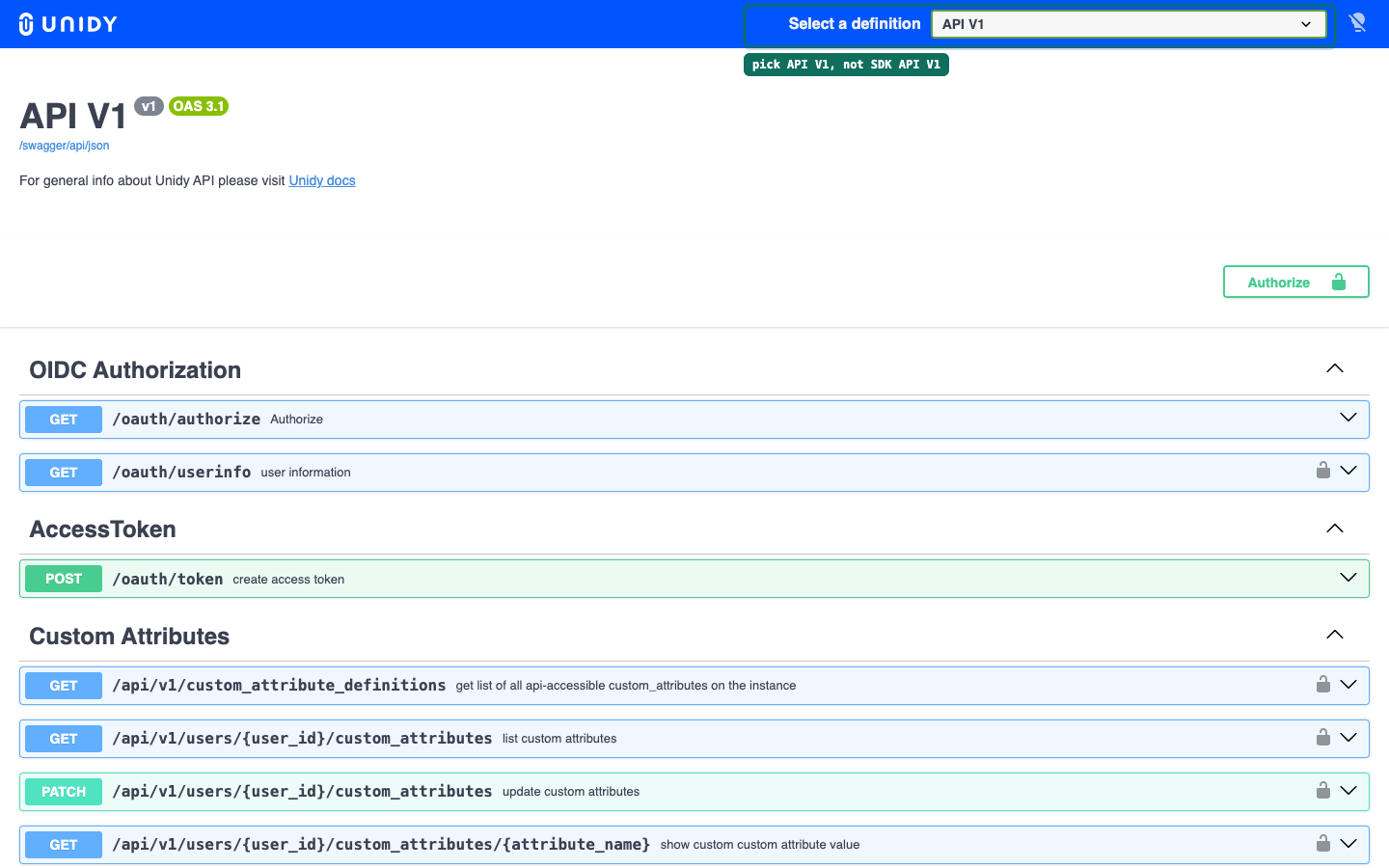
/SWAGGER/API/HTML — the generated OpenAPI 3.1 reference · highlight on the definition picker. The same page also serves SDK API V1, which is the other surface entirely.