Responsibilities
Clarify customer, partner, and Unidy ownership.
Responsibilities
Agree who delivers, accepts and operates each part of the implementation. Replace the role labels below with named people and backups in your project record. An implementation partner can act as the developer or operator, but the customer still needs an owner who accepts the resulting service.
Assign owners by deliverable
The matrix is a starting point for agreement, not a support contract or an automatic grant of dashboard access. Confirm the work covered by your arrangement with Unidy and any third-party provider.
| Deliverable | Customer owner | Administrator or data owner | Developer or integration partner | Unidy / provider input | Acceptance evidence |
|---|---|---|---|---|---|
| Scope and launch decision | Own customer outcomes, scope and go/no-go | Identify operational constraints | Identify integration dependencies | Confirm platform/provider dependencies in scope | Approved implementation and launch record |
| Environment, hosts and sending domain | Supply approved domains and responsible domain contact | Record brand/host mappings | Supply callback/origin requirements and configure customer systems | Confirm required platform provisioning and sender setup | Reachable intended hosts and verified representative message delivery |
| Brands and data model | Approve business meanings and customer scope | Configure definitions and maintain identifier mapping | Validate API/connector consumers against the mapping | Resolve capability or architecture questions | Setup worksheet with sample data |
| Administrator access | Approve who may administer each scope | Assign and review permissions; name a backup | Request only access needed for assigned work | Confirm feature/rollout constraints where needed | Role/scope inventory and representative access checks |
| Authentication and integration | Approve the intended journey and connected systems | Configure applications, providers and subscriptions within assigned access | Implement flows, mapping, security controls and failure handling | Supply agreed platform/provider settings or credentials | Integration checklist |
| Customer-facing content | Obtain content, language and legal approvals | Apply brand settings, pages, styling and templates | Implement customer application behavior where applicable | Clarify supported customization and delivery setup | Customer-experience checklist |
| Migration | Approve source scope, cutover boundary and exceptions | Prepare files, perform imports and reconcile | Implement API loads/reconciliation or connector changes where needed | Agree any privileged recovery or operational support | Migration ledger and recovery plan |
| Monitoring and support | Agree contacts, support coverage and escalation | Operate assigned dashboard tasks | Operate customer applications/receivers and their alerts | Agree platform/provider escalation and responsibilities | Accepted support handoff |
| Ongoing changes and credentials | Approve risk and change windows | Maintain access/configuration inventory | Update consumers, test and operate credential cutovers | Perform platform-controlled changes where agreed | Change record, readback and functional verification |
For every deliverable, record primary owner, backup, required input, due date agreed with that owner, acceptance evidence and escalation contact. The person doing the work and the person accepting it may be different.
Prepare a useful request
Before asking another team to unblock work, include:
- The environment and relevant brand/application/provider identifiers.
- The desired customer or integration outcome and the configuration needed to achieve it.
- The inputs that only the recipient can provide, such as a provider-side credential, approved host or platform capability.
- The dependency being blocked, requested timing and the project contact who can clarify it.
- The acceptance check and evidence that will show the request is complete.
Share credentials through an agreed secret-sharing mechanism, not in the request body. Agree expected lead times and escalation with the responsible team. Do not infer a response-time promise by sending an artificial test request, or assume every platform change requires a release.
Who should handle a blocked task?
| Symptom | First action | Route |
|---|---|---|
| A screen is missing or an operation is refused | Check current environment/brand, feature availability and the actor's permissions | Roles and feature availability, then the customer access administrator |
| A setting is unavailable to your role or installation | Identify the exact capability and affected scope | Customer implementation owner and the agreed Unidy contact |
| A required value belongs to another application | Ask its owner for the exact callback, origin, metadata, field mapping or credential | Integration developer or provider administrator |
| The UI/API cannot perform the required recovery | Preserve evidence and define the desired state before another mutation | Assigned platform operator via the agreed support channel |
| A customer or receiver flow fails despite saved settings | Collect request/event/job IDs and reproduce in the agreed test environment | Integration/customer-experience owner, escalating with evidence as needed |
Grant access for the work being assigned
Use Roles and permissions as the access reference. Current behavior depends on effective account/brand RBAC configuration; a role name alone is not proof that an action is permitted. Check actual resource/action scope with a representative operator.
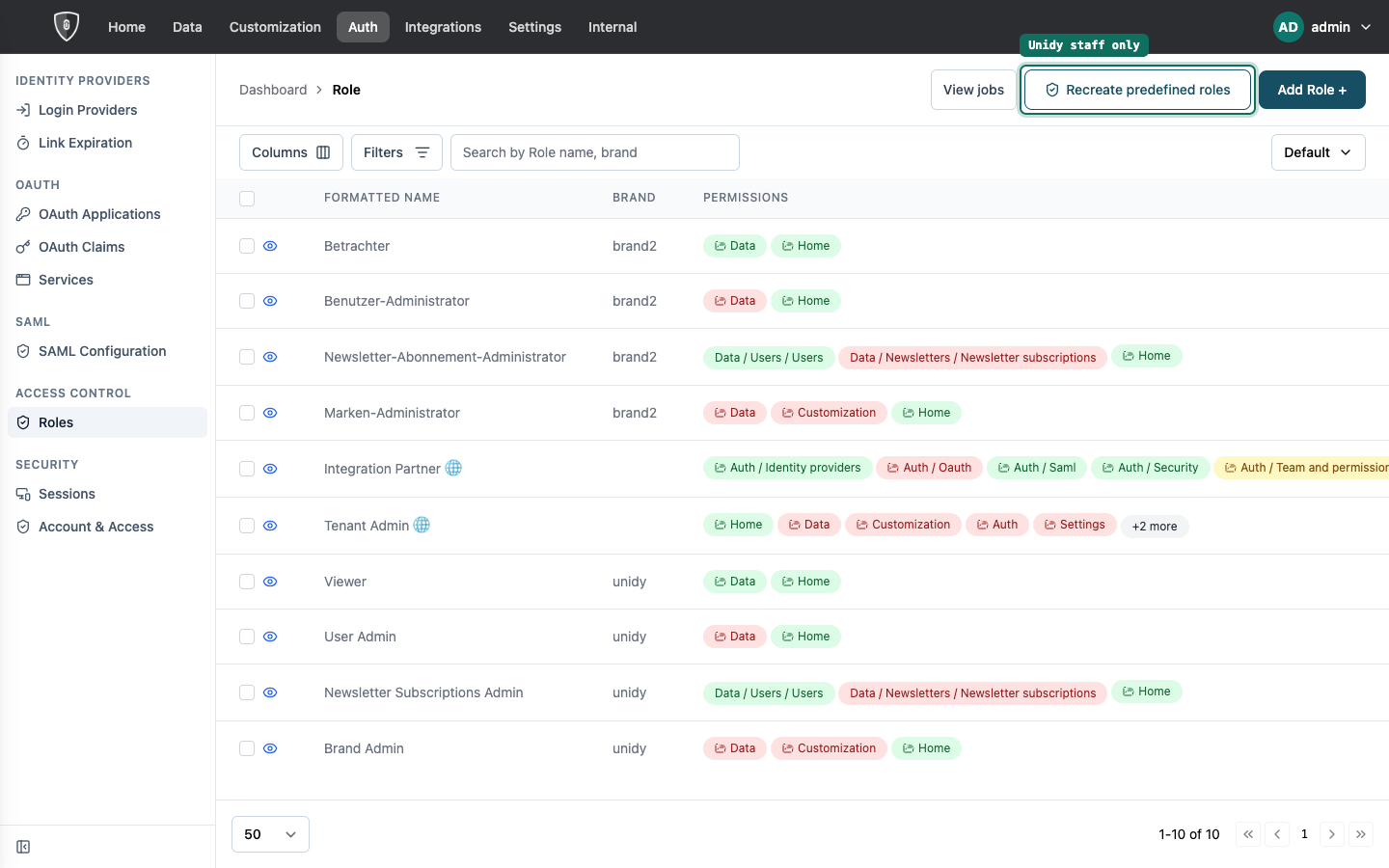
AUTH → ROLES — the product's whole vocabulary for who owns what: two global predefined roles and four per brand, in each brand's own language · highlight on Recreate predefined roles, a Unidy-only toolbar action (rows 2.2, 2.7).
Review the permissions of predefined roles before assigning them. For example, Integration Partner includes role-management capability; do not assume its label means credentials-only access. Prefer the appropriate scoped role for the agreed duties. Keep at least one reachable backup administrator and review temporary implementation access at handoff.
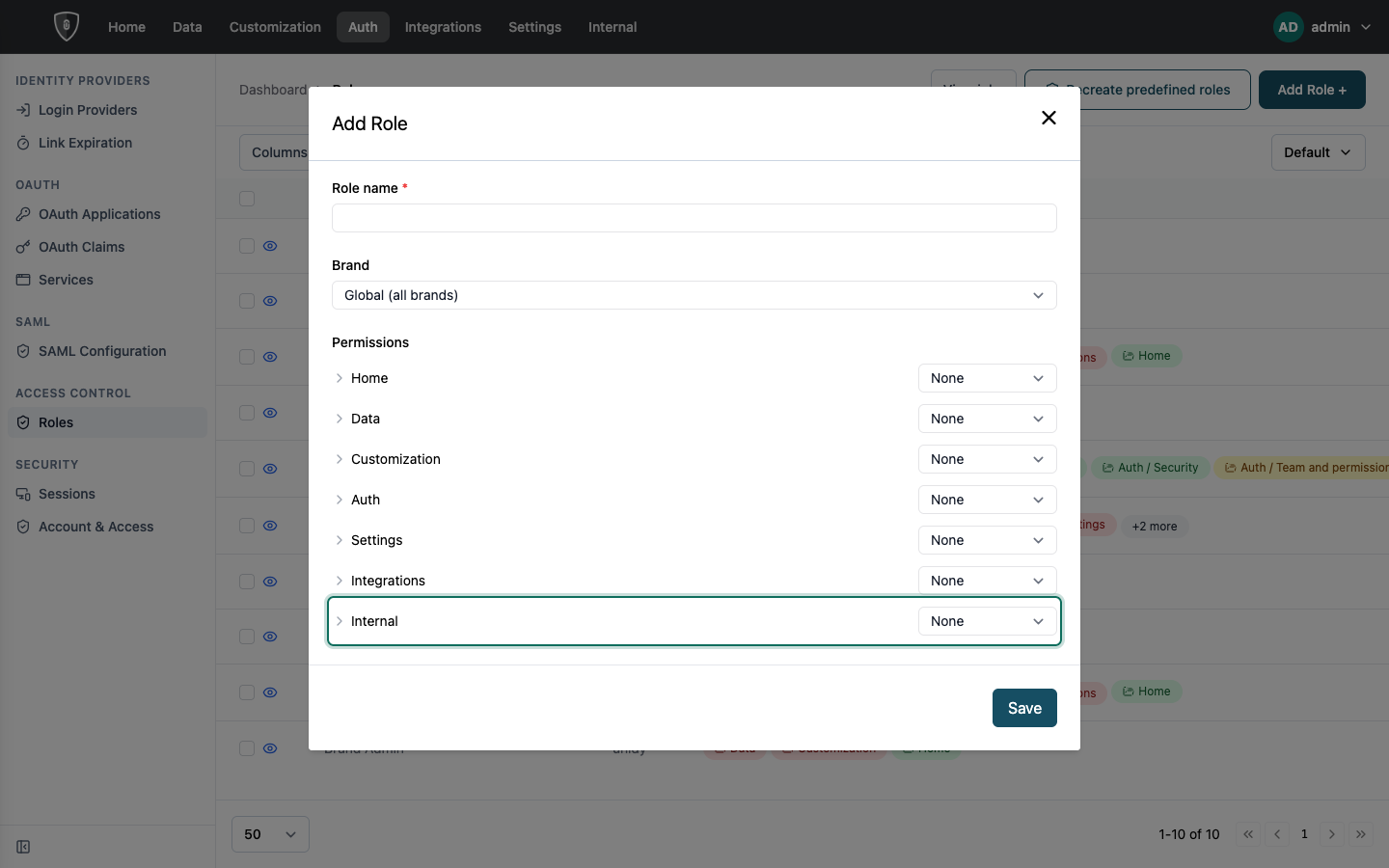
AUTH → ROLES → Add Role, as Unidy staff · highlight on the Internal category. A customer administrator's copy of this form has six rows, not seven, and its Home row has no assignable child — source-verified, not photographed (rows 2.7, 3.5).
An authorized brand administrator can change a brand RBAC setting, but cannot disable enforcement while the account-wide enforcement flag remains on. Escalate that account-level decision through the agreed owner rather than promising a universal brand-level off switch.
Accept the handoff
- The customer owner accepts the completed deliverables and any explicit exceptions.
- Administrators and operators can locate the live configuration, mapping, evidence and runbooks using their own access.
- Every integration has a primary and backup operator, monitoring responsibility and a contact for the other system.
- Credential retrieval, storage, renewal/rotation and retirement have named owners. Use a credential-specific cutover; a randomly generated replacement is not available before rotation.
- Support contacts, channels and coverage are confirmed from the actual service arrangement, including the fallback when a normal contact is unavailable.
- The next access/configuration review is scheduled and remaining work has an owner and date.
Store the resulting names and links in Communication and support handoff. Revisit this agreement when a new brand, provider, application or operating team is added.