Tenant, brand, and data-model setup
Make foundational platform decisions.
Tenant, brand, and data-model setup
Decide the account boundary, brands, hosts and shared data definitions before entering production data. The output is a mapping worksheet that administrators, import operators and integration developers can use together.
Begin with the brands and customer journeys in the current launch scope. Record likely future requirements when they affect today's data or access boundaries; you do not need to predict every future brand before starting.
1. Decide the account and brand boundaries
A brand controls a customer-facing experience within an account. It does not automatically create a separate customer database or an independent deployment. Discuss a separate account when the requirement is actual data, administrative or operational isolation; confirm the architecture with your implementation contact.
Distinguish four decisions:
| Decision | Question to answer |
|---|---|
| Account capability | Does this installation support and enable the required tickets, subscriptions, transactions or newsletters? |
| Brand presentation | Which categories, menu links and customer journeys should appear for this brand? |
| Record access | Which users and administrators may read or change which records? |
| Isolation boundary | Must data, administration, deployment or operating responsibility be separated beyond brand scoping? |
For example, one club brand might display tickets while another displays memberships. That presentation requirement does not by itself require two accounts: brand category associations, enabled menu links and the customer's data affect navigation. Confirm the required customer view and access separately from the account-wide feature switch.
Use Tenants, brands and environments and Roles and permissions to record these boundaries.
2. Record brands, hosts and external dependencies
| Brand worksheet field | What to record |
|---|---|
| Brand name and identifier | Exact target name and known identifiers; display wording and import lookup values where they differ |
| Environment and host | Separate staging/production hosts and the owner of each domain |
| Customer journeys | Registration/login, account area, ticket or subscription views, and each connected application |
| Languages and content owner | Launch languages, default language, translations and approval owner |
| Sender identity | Approved sender/reply-to details, domain owner and delivery-test responsibility |
| Authentication consumers | OAuth applications, SDK clients, SAML peers and login providers serving this brand |
| Data associations | Required categories, newsletters and custom attributes, including shared definitions |
| Access scope | Customer/administrator boundaries and the role owner who will verify them |
Confirm host, issuer, provider callback, allowed-origin and sender-domain work with the respective platform/domain owners. A host change can affect several integrations and needs a coordinated test and cutover plan. Do not infer readiness from a saved brand form alone.
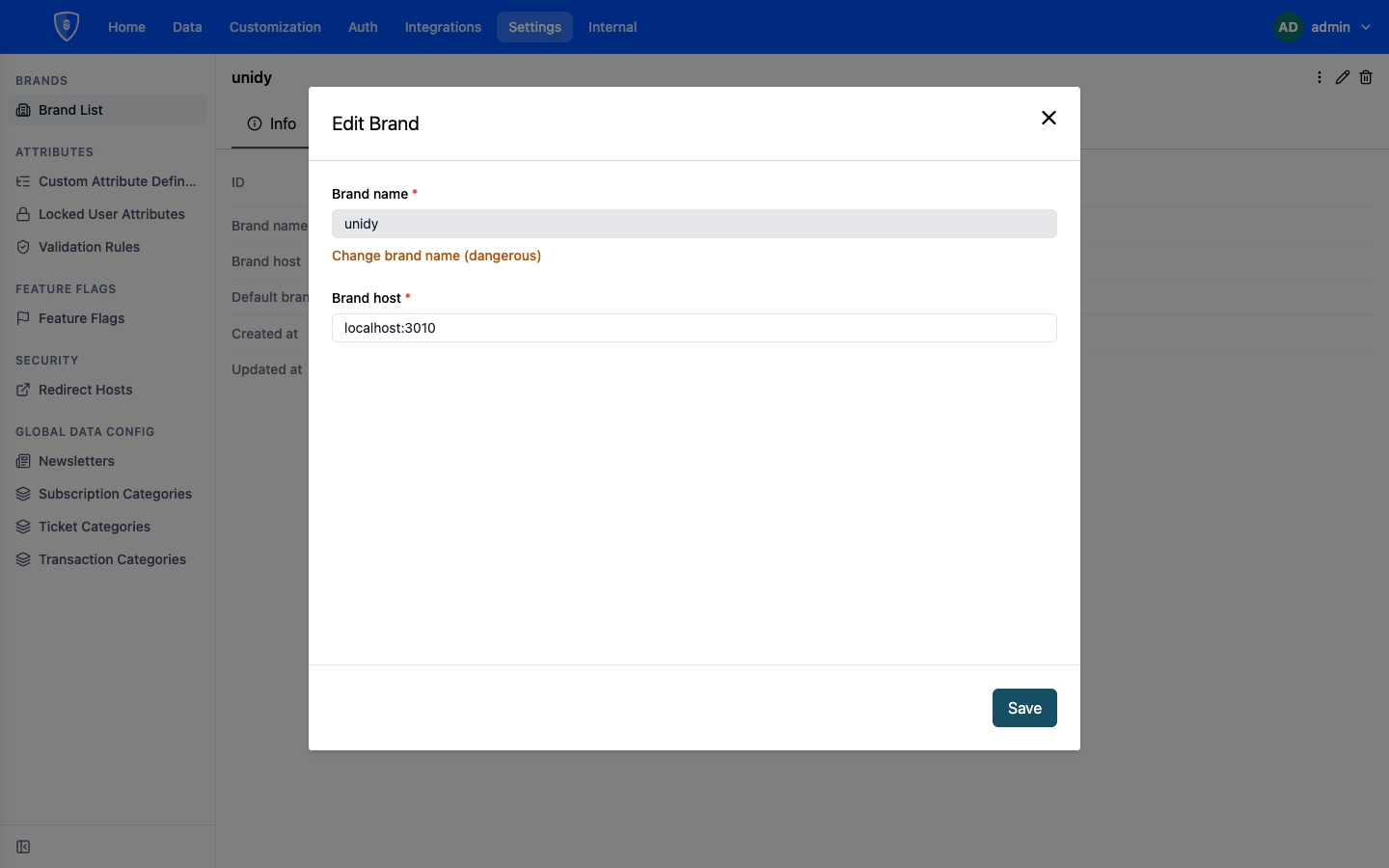
Settings → Brand List → the pencil icon. Brand name is greyed out and Brand host is not — the field the product freezes is not the field with the cutover behind it. The amber Change brand name (dangerous) line under it is the staff-only override. A customer admin does not see that line at all; it is here because the seeded admin is treated as Unidy staff, which is the same limitation pages 39, 42 and 69 record.
3. Define stable identifiers and attribute formats
Create custom attributes with an agreed Name, input type, display label, allowed values and validation behavior. The name and input type are fixed after creation in the dashboard, so decide them against representative source data and consumer requirements.
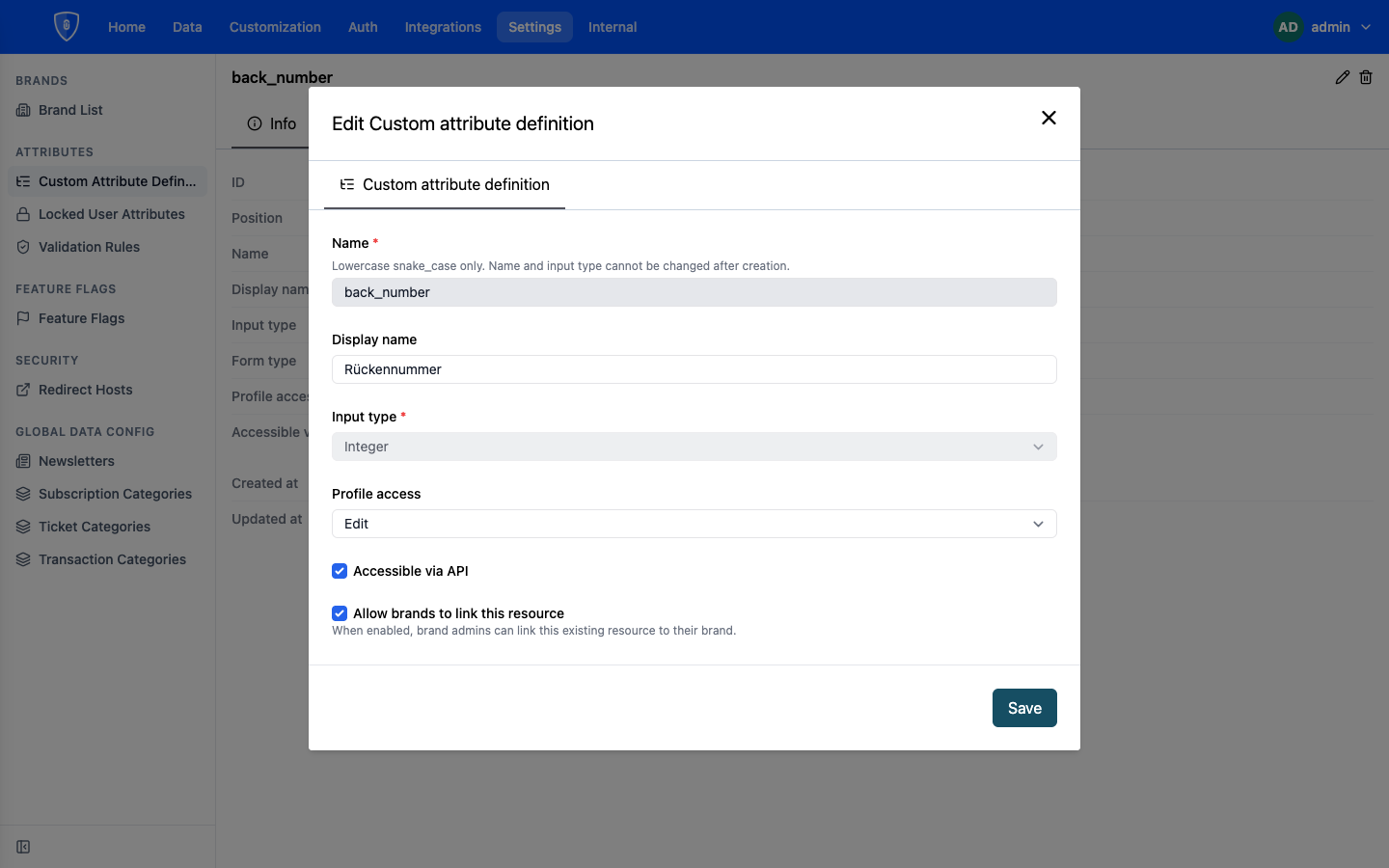
Settings → Custom Attribute Definitions → the pencil icon. Name and Input type are both greyed out; the help text under Name reads "Lowercase snake_case only. Name and input type cannot be changed after creation." Compare with the brand form above: there is no equivalent of Change brand name (dangerous) here, for anybody.
| Definition worksheet field | Example or decision |
|---|---|
| Business meaning and owner | Membership level; customer data owner |
| Stable name | membership_level, used by mappings and consumers |
| Display wording | A customer-facing label, translated where required |
| Input type and allowed values | Select with agreed identifiers such as standard and premium |
| Required/validation scope | Which customer flows and brands require a value, and how existing customers are handled |
| Source and update policy | Which system owns the value; what blank, omitted and explicitly cleared inputs mean |
| Consumer mapping | CSV column, API attribute and provider field that use the definition |
| Representative cases | Valid, invalid, missing and existing values to test before rollout |
Keep identifiers separate from labels in integration specifications. A renamed display label is not a new identity. A changed data type may require a replacement definition and a deliberate migration, not a form edit. Verify the permissions needed to create or change definitions; do not infer a fixed superadmin requirement from a screen name.
4. Map categories, newsletters and services
Create the category definitions required for tickets, subscriptions or transactions, and link them to the intended brands. Prepare newsletter internal names, preferences and relevant brand associations. Record services used by applications and related resources.
| Source item | Target definition and identifiers | Brand/service scope | Match rule and owner |
|---|---|---|---|
| Ticket or membership type | Category name, internal/public identifier as appropriate | Brands and owning service | Relevant importer/API identifier or exact title; data owner |
| Newsletter | Internal name or numeric identifier; display title separately | Intended brands | Email + newsletter identity for subscription import; newsletter owner |
| Provider resource | Provider identifier and corresponding Unidy identifier/reference | Configured provider and brand/service scope | Connector's documented matching rule; integration owner |
| User | Stable source key plus mapped Unidy ID/email | Intended brand membership | Agreed create/update policy; customer data owner |
Lookup behavior is resource-specific. Ticket/subscription imports can resolve category IDs or titles; newsletter imports use a numeric newsletter ID or internal name. A user import's unknown brand name can fall back to the default/current brand, so verify memberships explicitly. See Data migration before producing files.
5. Review what can change later
| Decision or action | Change behavior | Plan before changing |
|---|---|---|
| Display labels, copy and translations | Generally editable through their configuration screens | Content approval and a customer-language check |
| Supported draft/preview settings | Allow a preview or draft where the feature provides one | Verify publish/enable behavior before assuming the change is live |
| Attribute name and input type | Fixed after creation in the dashboard | Replacement definition, value migration and consumer updates if the contract changes |
| Host, issuer or integration identifiers | May affect authentication and connected systems | Coordinated configuration change and functional verification |
| Adding a brand | Requires reviewing associations, application access and brand-specific configuration | Repeat the worksheet and representative customer/integration checks |
| Removing a brand, category or final association | Can delete configuration or dependent data | Review the actual removal path and retain needed evidence first |
Do not remove a category's last brand as a temporary visibility control: that path can destroy the category and its dependent records. Use supported navigation/presentation controls for presentation requirements, and review record access separately.
6. Prove the worksheet with representative data
In staging, create or import a small representative set containing the relevant brands, an existing and a new customer, shared and brand-specific definitions, and the edge cases from the worksheet. Confirm:
- The customer sees the expected categories, navigation and language on the correct host.
- The administrator can perform the assigned tasks and cannot cross the intended access boundary.
- Imports and integrations resolve the intended identifiers, brands and services and preserve the chosen field semantics.
- Authentication, messages and linked customer records use the intended brand and application configuration.
Record the target identifiers and results in the worksheet, resolve differences, then give the approved mapping to the migration and integration owners. Continue with the authentication and integration checklist, customer-experience checklist and data migration where applicable.