Authentication errors
Look up identity and session error behavior.
Authentication errors
Use the endpoint and response channel to identify the failure, then branch on its machine-readable identifier. OAuth and SDK errors use different envelopes, and some authentication failures have no JSON body.
Where did the error arrive?
| Response channel | Common endpoints | What your application should read |
|---|---|---|
| Browser page on Unidy | Invalid authorization requests to /oauth/authorize | The visitor sees the error; your callback may never be called. Check application settings and the original request. |
| Redirect to your callback | Authorization denial and OpenID Connect prompt failures | error, optional error_description, and state in the callback. Validate the returned state before handling either success or error. |
| OAuth JSON response | /oauth/token, /oauth/introspect, /oauth/revoke | HTTP status and the error identifier. |
| Bearer challenge, sometimes with an empty body | /oauth/userinfo and OAuth-protected REST API v1 routes | HTTP status and WWW-Authenticate; do not assume JSON. |
| SDK JSON response | /api/sdk/v1 operations | HTTP status and usually error_identifier. Consult the operation for additional fields and envelope exceptions. |
Log the endpoint, status and identifier with a request ID when available. Keep tokens, passwords, authorization codes and full callback URLs out of logs. Descriptions can help diagnosis when sanitized, but their wording and language are not a stable interface. Show your own localized customer messages.
Authorization and silent authentication
A malformed authorization request may render an error on Unidy instead of redirecting to your application, especially when the client or callback cannot be trusted. A signed-out visitor may first encounter the hosted login screen, so reaching that screen does not prove that the authorization parameters are valid.
| Identifier | Meaning | Next action |
|---|---|---|
invalid_client | The application could not be identified or authenticated. | Check the client ID and environment. |
invalid_redirect_uri | The requested callback does not match the application's registered redirect URIs. | Compare the scheme, host, port and path. Prefer an explicitly registered callback; do not assume a trailing slash is interchangeable. |
invalid_scope | A requested scope is unknown or unavailable to this application. | Request only the scopes assigned to the application. |
invalid_request | A required parameter is missing or invalid. | Check the authorization request against the flow guide. |
unsupported_response_type | The requested response type is unsupported. | Use response_type=code for the authorization-code flow. |
invalid_code_challenge_method | The PKCE method is invalid. | Use S256 and preserve the corresponding verifier until the exchange. |
access_denied | The visitor declined authorization. | Return them to a useful signed-out screen; do not immediately restart consent. |
login_required | A silent request cannot use an existing authenticated session. | Offer an interactive sign-in. |
consent_required or interaction_required | The request needs user interaction. | Restart interactively after the user chooses to continue. |
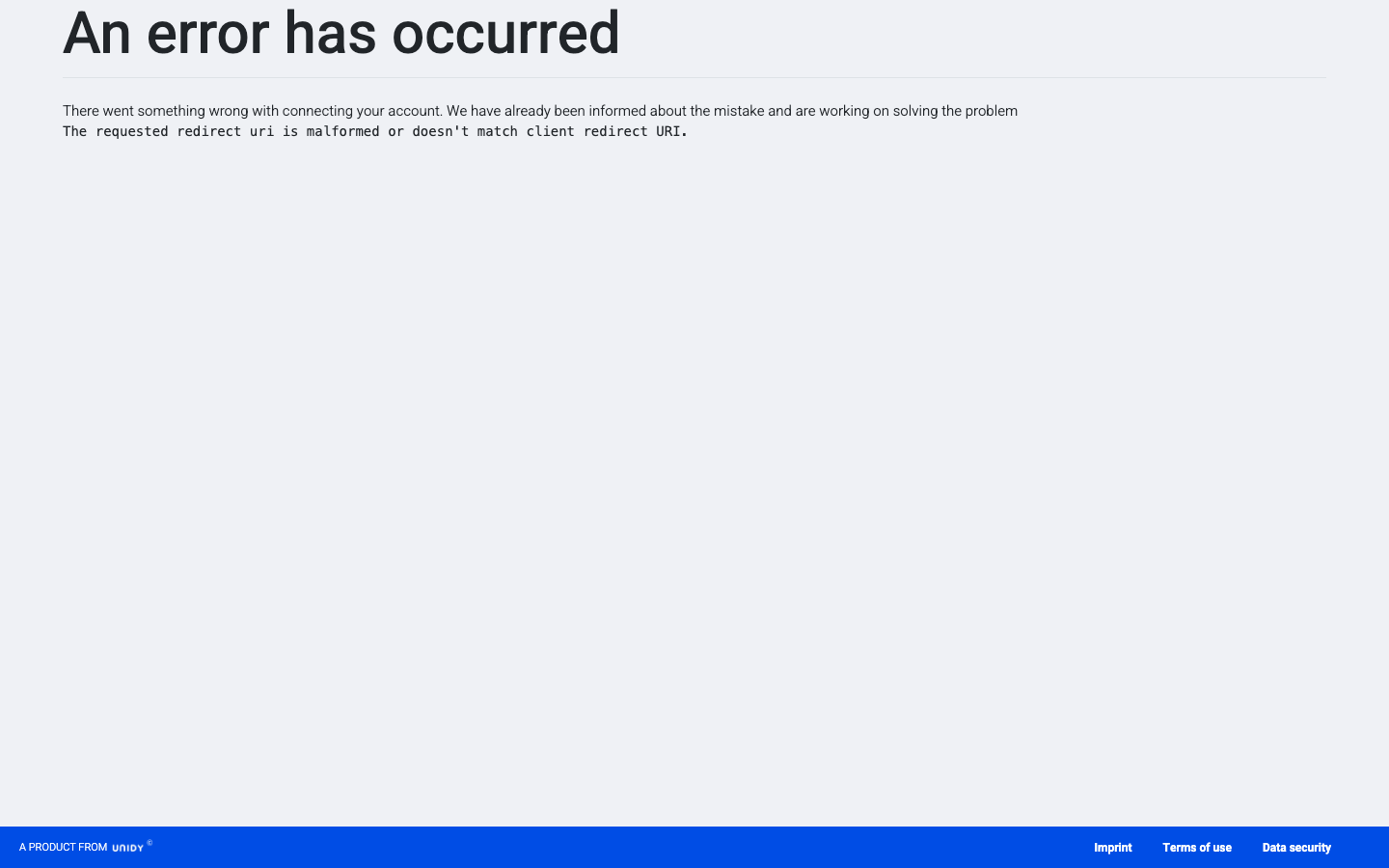
HOSTED LOGIN — the entire error surface a customer gets from the authorization endpoint. One apology, one sentence, no error code, no request ID and nothing to quote at support. Every row in the table above renders this same page with a different last line.
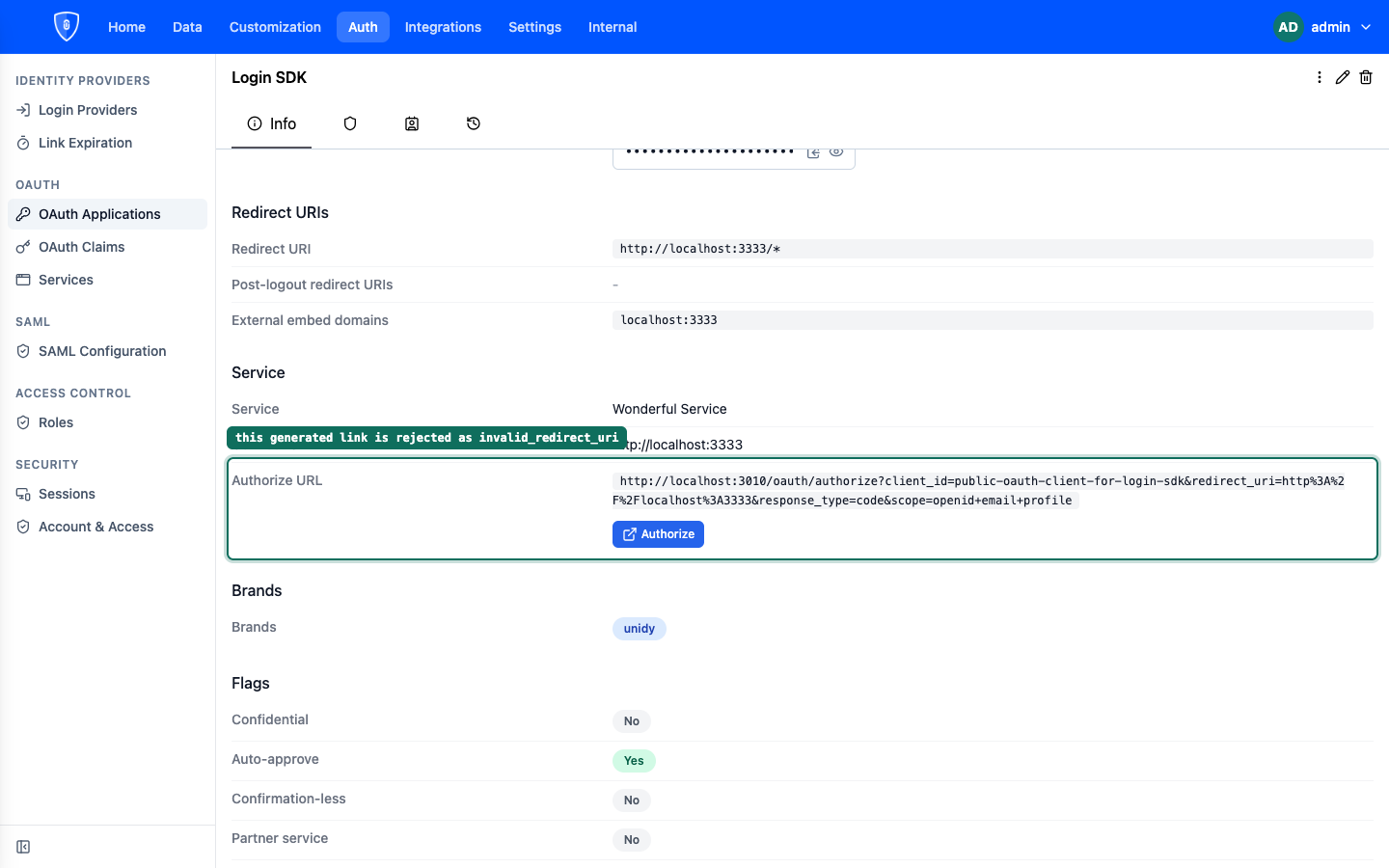
OAUTH APPLICATIONS — the same screen shows the registered Redirect URI http://localhost:3333/* and an Authorize URL whose redirect_uri is http%3A%2F%2Flocalhost%3A3333. The two do not match, so the Authorize button on this screen fails · highlight on the generated link
For prompt=none, handle the callback error and a bounded timeout. Browser cookie restrictions can prevent reuse of a hosted session. Malformed requests and server failures can still render a page or fail outside the callback; avoid automatic redirect loops. See Silent authentication.
Token exchange and refresh
OAuth token failures normally contain an error and may include an error_description:
{ "error": "invalid_grant" }| Status | Identifier | Meaning and recovery |
|---|---|---|
401 | invalid_client | Check client credentials and the application's public/confidential configuration. Retrying unchanged credentials will not help. |
400 | invalid_grant | The code, refresh token, redirect URI or PKCE verifier could not be accepted. Do not reuse an authorization code. For an invalid refresh grant, end the local authenticated state and start authorization again. |
400 | invalid_scope | Correct the requested scopes and application grants before retrying. |
400 | unsupported_grant_type | Use a supported grant type configured for the application. |
400 | invalid_request | Correct the missing or malformed request parameters. |
Use only machine-to-machine API scopes with client credentials. Identity scopes such as openid, profile and email require a user context and do not belong in that grant.
Distinguish a permanent grant rejection from a network failure, 429 or 5xx. A transport failure does not prove that the server rejected a request: do not launch concurrent refreshes or repeatedly exchange the same code. Preserve the current session while applying the bounded retry strategy in Token refresh, sessions, and logout.
Protected identity endpoints
A failed call to /oauth/userinfo can return an empty body with a bearer challenge:
HTTP/1.1 401 Unauthorized
WWW-Authenticate: Bearer error="invalid_token"| Status and identifier | Recovery |
|---|---|
401 invalid_token | Check that the correct access token was sent in the bearer header. Refresh an expired token when possible; otherwise authorize again. Retry the protected read once with the replacement token. |
403 insufficient_scope | Check application grants and the scopes on this token. A refresh cannot invent permission the application or user never granted. |
Inspect headers before parsing the body. Treat introspection separately: 200 {"active":false} is a successful introspection response saying the supplied token is not active for that request. It is not a network error or a reason to retry indefinitely.
A logout redirect also does not prove that every application session or token has been revoked. Follow the logout procedure for each session layer.
SDK credentials and sign-in errors
SDK API operations normally authenticate the IntegrationSDK clientThe application configuration and API key used to call Unidy’s customer-facing SDK HTTP API.Not the same as OAuth application: An OAuth application supports OAuth/OIDC flows. An SDK integration does not normally require the integrator to create both configurations.5 fields — listed in full on the pageRelated: OAuth application · REST API · SDK HTTP APIRead the page →Open SDK client (choose an instance) with Authorization: Bearer YOUR_SDK_CLIENT_API_KEY. Operations requiring a signed-in customer additionally use X-ID-Token. Starting a sign-in or registration does not require an already authenticated customer. Browser redirect operations have their own contracts.
| Status | error_identifier | Recovery |
|---|---|---|
401 | missing_api_key / invalid_api_key | Supply the SDK client's key for this environment in the bearer header. A customer JWT is not an SDK key. |
403 | origin_not_allowed | Link the SDK client to the brand whose host you are calling. This identifier is about the client-brand relationship, not the request's Origin header. |
401 | missing_id_token | Supply the customer token on an operation that requires one. |
401 | invalid_id_token | Check token type, signature, audience and environment. Start a new sign-in if the stored credential is unusable. |
401 | expired_id_token | Refresh the SDK token pair, then retry once. |
403 | real_email_required | Complete the real-email step through the profile surface before using the protected operation. |
403 | captcha_token_missing / captcha_verification_failed | Complete the SDK client's configured captcha flow and submit a valid captcha token. |
404 | account_not_found | Check the address and offer the appropriate registration path. |
422 | account_unconfirmed | Continue the confirmation or invitation flow indicated by the response. |
401 | account_locked | Stop repeated attempts; see the distinction below. |
401 | invalid_password | Let the person correct their password or start recovery. On password reset, 422 invalid_password instead reports validation errors for the proposed new password. |
401 | magic_code_not_valid / magic_code_expired / magic_code_used | Ask for the current code or request a new one subject to the resend limit. |
404 | sign_in_not_found | Start a fresh sign-in; the supplied sid is not available. |
422 | sign_in_expired / sign_in_already_processed | Do not continue authenticating that sign-in. Reconcile local state or begin a new one. |
422 | sign_in_not_authenticated | Complete the required authentication step before submitting fields or continuing. |
424 | missing_required_fields | Render the fields returned by that operation and complete them before continuing. |
401 | missing_refresh_token / invalid_refresh_token / refresh_token_revoked / refresh_token_expired | Supply the current SDK refresh token for this sign-in. If it is no longer usable, sign in again. |
422 | unprocessable_content | Correct the payload using the operation's validation details. |
429 | rate_limit_exceeded | Wait for the applicable retry delay; avoid parallel retries. |
Temporary and administrative locks
401 account_locked covers both an administrative account lock and a temporary failed-attempt lock. The automatic lock escalates after each group of five failed attempts, from 30 seconds up to six hours. Successful authentication resets the attempt counter.
The authentication error may contain no lock duration. Missing timing metadata does not prove an administrative lock. Stop retrying, show any supplied delay, and offer recovery or support. An authorized administrator can inspect and reset the timed login lock; a deliberate account lock needs an authorized administrative decision. See Account state and access.
Envelopes and successful responses that need attention
SDK operations do not all return the same object. Registration-social failures can use error instead of error_identifier; required-field responses can place fields at different paths. A combined create-sign-in-and-send-code request can return 201 with an embedded error_identifier when sending the code failed. Inspect that field before displaying “Code sent.”
Use Sign-in and registration operations for the complete state transitions and SDK HTTP API reference for the operation-specific contract.
Browser CORS failures
The SDK client's allowed-host configuration controls browser access separately from origin_not_allowed. If CORS fails, fetch or XHR rejects and JavaScript may be unable to read the response. The HTTP request may still have reached the server and performed its action. Inspect the browser console and network panel, fix the allowed origin, and check state before repeating a write.
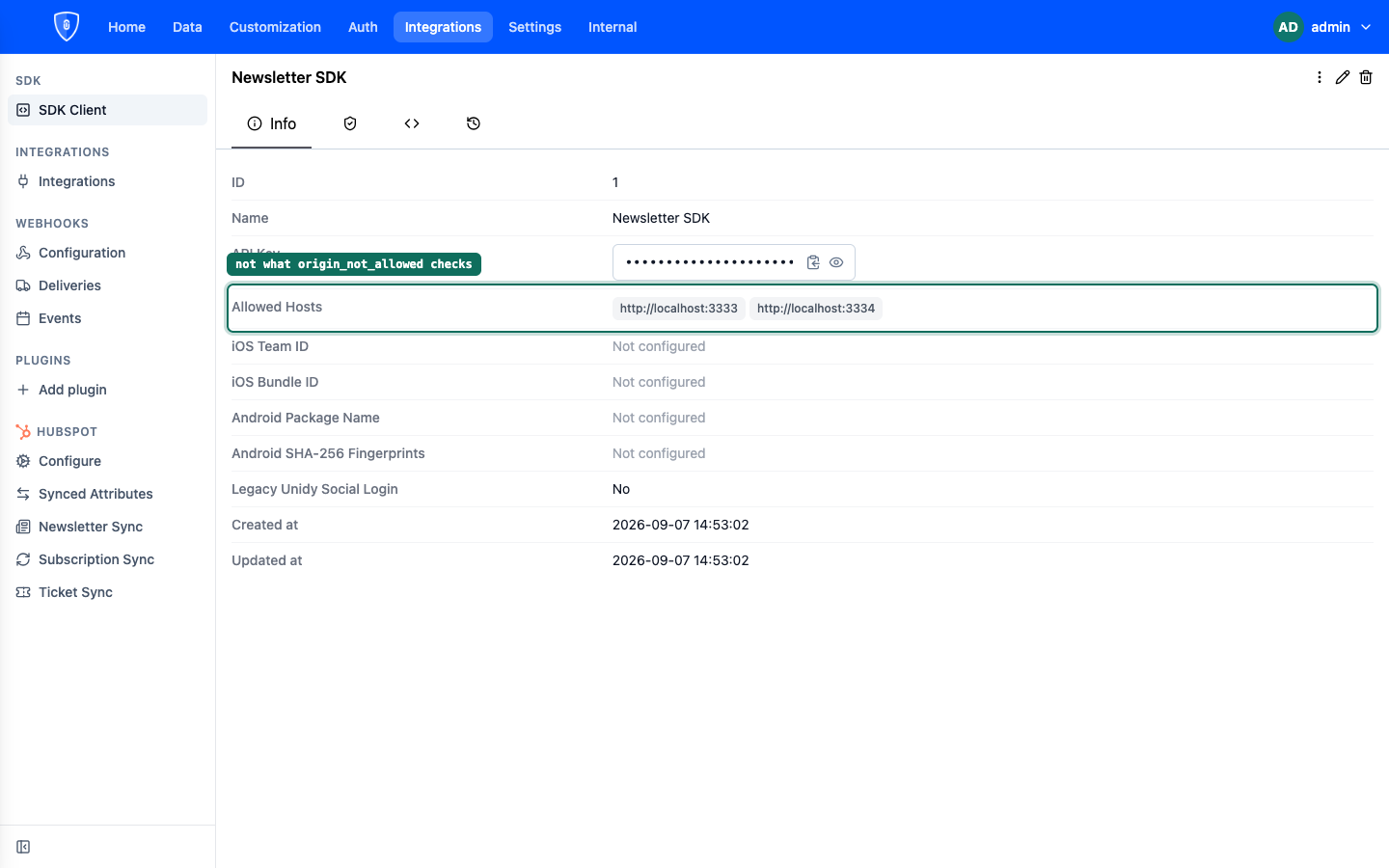
SDK CLIENT — Allowed Hosts governs CORS in the browser, not the origin_not_allowed identifier. A CORS failure never reaches your error handler; it is only visible in the browser console · highlight on the Allowed Hosts row
SAML and one-time login
SAML failures are diagnosed at the browser endpoint and service provider; do not assume an OAuth error envelope. Use Test and troubleshoot SAML for its status and configuration checks.
One-time login links are consumed on redemption. An invalid or spent link does not use the SDK error catalogue; generate a new link through the authorized flow described in One-time login.
For authenticated business requests and retry safety, continue to Errors, idempotency, and retries.