Glossary and help
Look up terminology and support channels.
Glossary
Look up a term and follow its guide for the configuration steps, permissions and exceptions. For the relationship between tenants, brands, users and integrations, start with Core concepts.
Need help with a task or error? Use Get help for the information to collect and how to contact the appropriate team.
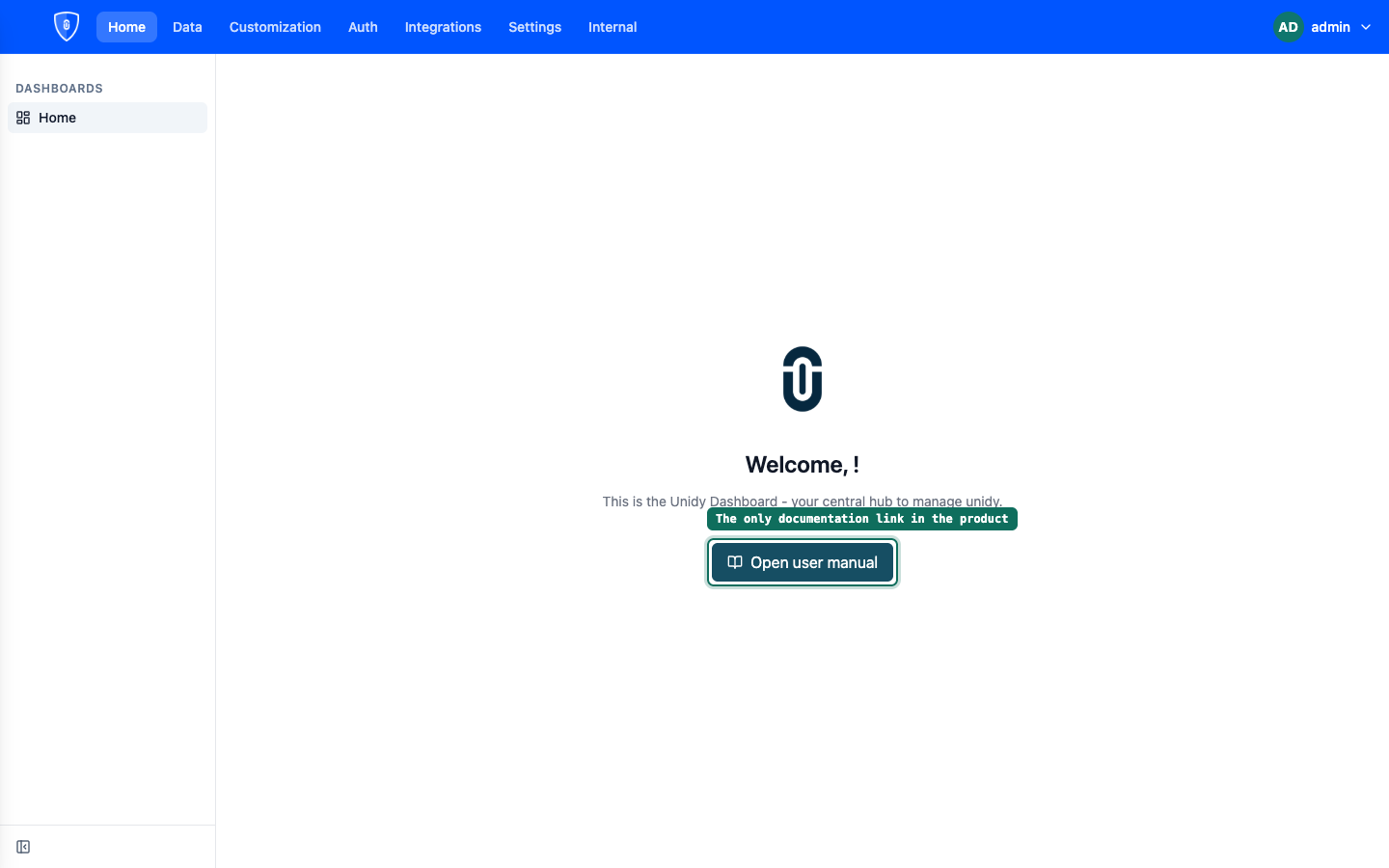
DASHBOARD HOME — the welcome panel, with the whole top-level navigation visible above it · highlight on Open user manual, the only link to documentation anywhere in the product. The empty name in the greeting is a seeded-data artefact, documented on page 22.
A to Z
| Term | Meaning | Guide |
|---|---|---|
| Access level | An action granted on a resource, such as Read, Write, Delete or Manage. Check the permission model rather than assuming one action includes every other action. | Read guide |
| Access token | A credential authorizing API requests within its issued scope and lifetime. Treat it as opaque and use the returned expiry information. | Read guide |
| Account | In customer workflows, a user record. “Unidy account” can also refer to the tenant; confirm which is meant before changing or deleting data. | Read guide |
| ACS URL | The SAML service provider’s Assertion Consumer Service endpoint, which receives the response issued by Unidy. | Read guide |
| Allowed Hosts | SDK-client configuration used for browser CORS and supported redirects. It does not authenticate the customer or protect against non-browser callers. | Read guide |
| API key | An umbrella term: an SDK client key identifies an SDK app, while personal/system API keys are separate, role-bearing credentials shown only at creation or rotation. | Read guide |
| Authorization / Authorizations | Access-related dashboard labels. Legacy account authorization flags and assigned RBAC roles are different controls; enforced RBAC evaluates resource permissions. | Read guide |
| Authorization Code | An OAuth flow that returns a short-lived code to the application, which exchanges it at the token endpoint. Public clients use PKCE. | Read guide |
| Brand | A customer-facing identity within a tenant, with its own hostname, presentation and experience settings. | Read guide |
| Brand switcher | The dashboard control for changing the current brand context. Brand membership and permission to administer a brand are separate. | Read guide |
| Bulk action | An operation applied to selected records, such as export or deletion. Check its selected-record scope and background-job status. | Read guide |
| Change source | Context identifying where a change originated, such as an API, administrator or connector. Available source information can accompany a webhook. | Read guide |
| Claim | A named value in an identity response or token. Its presence depends on the protocol, granted scopes and available data. | Read guide |
| Client credentials | An OAuth grant in which a confidential backend authenticates as an application rather than as a customer. Use endpoint-appropriate API scopes. | Read guide |
| Client ID | The public identifier of an OAuth application; it does not prove possession of a client secret. | Read guide |
| Client secret | A confidential OAuth client’s credential. Authorized editors with write access can reveal it; keep it on the backend. | Read guide |
| Code challenge / code verifier | The PKCE pair: the client retains a random verifier and sends its S256 challenge during authorization, then proves possession when exchanging the code. | Read guide |
| Confidential | An OAuth client type able to protect a secret on a backend. Browser and native public clients use an appropriate public-client flow instead. | Read guide |
| Connection status | A connector’s indication of its current connection state. It is separate from completion of individual synchronization operations. | Read guide |
| Consent | A customer choice recorded by the relevant feature, such as newsletter opt-in, application authorization or brand membership. | Read guide |
| Consent and opt-in | A customer choice recorded by the relevant feature, such as newsletter opt-in, application authorization or brand membership. | Read guide |
| Custom attribute | A configurable customer field whose shared definition specifies its key, type and presentation. | Read guide |
| Delivery | Qualify the term: a webhook delivery tracks an event sent to a subscription across attempts; email delivery concerns sending a message. | Read guide |
| Direction | The direction in which a connector synchronizes data: to Unidy, from Unidy, or both where supported. Rules can differ by record or field. | Read guide |
| Discovery document | The instance’s OIDC metadata at /.well-known/openid-configuration, including endpoints and supported protocol capabilities. | Read guide |
| Double opt-in (DOI) | A newsletter workflow that requests confirmation before recording a confirmed subscription. Review the newsletter’s configured confirmation mode. | Read guide |
| Email template | A brand- and language-specific override for a supported transactional email. | Read guide |
| Entitlement | A recorded right such as a ticket or product subscription. A transaction records a commercial event and does not by itself establish every access right. | Read guide |
| Feature flag | A configuration switch controlling whether a capability is available. Feature availability and a person’s permission to use it are separate. | Read guide |
| Filter | A condition limiting the records displayed, using a field, operator and value. Check how it combines with search and any saved view. | Read guide |
| Global role | A role with global scope. Its assigned resource/action permissions determine access; the word global is not an unrestricted-access grant. | Read guide |
| Headless mode | A brand setting that redirects supported hosted account pages to a configured frontend URL. It does not redirect every route or act as an access-control boundary. | Read guide |
| Holder | The account currently holding a transferred ticket; the owner is recorded separately. Without a separate holder, the owner holds it. | Read guide |
| Hosted login | The customer sign-in pages rendered and operated by Unidy, used by supported redirect-based authentication flows. | Read guide |
| ID token | A signed identity assertion addressed to an application. Validate issuer, audience, expiry, signature and the flow’s nonce; it is not an application session. | Read guide |
| Idempotency key | An identifier used by an operation to recognize a repeated request. Support is endpoint-specific; sending a header alone does not make an operation safe to retry. | Read guide |
| Import | A background CSV import configured through Upload, Map and Finalize. | Read guide |
| Insights dashboard | An embedded Lightdash dashboard made available through the Unidy dashboard. | Read guide |
| Introspection | An OAuth endpoint operation that checks a token’s current active state and returned metadata. Follow the instance’s authentication requirements. | Read guide |
| Job | A background operation whose progress and outcome can be inspected where the feature exposes a job record. Not every connector operation appears in the same job list. | Read guide |
| JWKS | A JSON Web Key Set publishing keys used to verify token signatures. Resolve the token’s key ID and handle key rotation through the documented verifier. | Read guide |
| Liquid | The template language used to interpolate supported variables and reusable content into transactional emails. | Read guide |
| Locale translation | A brand or global override for product wording, separate from translations of content stored on customer-facing records. | Read guide |
| Locked | An access state that can refer to an administrative account lock or a temporary sign-in lock. Check the displayed reason and the appropriate unlock action. | Read guide |
| Login method | An authentication option offered to customers, such as password, magic code, passkey or an external provider. | Read guide |
| Login provider | An external identity provider offered as a sign-in method for a brand. | Read guide |
| Magic code / magic link | Email sign-in options using a short code or a token-bearing link. Follow the flow’s current verification and expiry rules. | Read guide |
| Mapping rule | A connector configuration relating a source field to a destination field, including supported direction and transformation behavior. | Read guide |
| Newsletter | The definition of a mailing list that customers can subscribe to. | Read guide |
| Newsletter subscription | The subscription and opt-in state for one email address and one newsletter. | Read guide |
| Nonce | A fresh value bound to an OIDC authentication request and checked in the resulting ID token to associate it with the intended request. | Read guide |
| OAuth application | An OAuth/OIDC client representing an application or backend that connects to Unidy. | Read guide |
| OAuth claim | A mapping that releases selected user attributes in ID tokens and userinfo responses when its scope is granted. | Read guide |
| OIDC | OpenID Connect, the identity layer on OAuth 2.0 used to authenticate customers and issue ID tokens. | Read guide |
| Opt-in | An affirmative choice recorded by the relevant feature. Newsletter opt-in state is stored on the newsletter subscription. | Read guide |
| Owner | The account a ticket belongs to. Transferring a ticket changes its holder while retaining the owner; separate reassignment operations have their own effects. | Read guide |
| Passkey | A WebAuthn credential used for supported customer authentication, associated with the relying-party configuration and the customer’s authenticator. | Read guide |
| Permission | A resource/action grant evaluated in its global or brand scope. It is separate from whether the feature is enabled. | Read guide |
| Personal or system API key | A role-bearing API credential whose plaintext is shown only when it is created or rotated. | Read guide |
| PKCE | Proof Key for Code Exchange: binds an authorization-code exchange to the client that initiated the flow, using a verifier and S256 challenge. | Read guide |
| Post-logout redirect URI | A return destination used after a supported logout flow. Its matching rules are separate from authorization callback rules. | Read guide |
| Predefined role | A built-in role that is read-only in the dashboard. Create a custom role when different permissions are required. | Read guide |
| Preference token | A customer-specific token used by newsletter preference and unsubscribe links. Do not publish or share these links as generic URLs. | Read guide |
| Provider connector | A configured integration that exchanges supported data with an external platform. | Read guide |
| Public view | A saved list view made available to other authorized dashboard users. It does not make the underlying customer records publicly accessible. | Read guide |
| RBAC | Role-based access control: evaluates assigned roles and resource/action permissions in the relevant scope. | Read guide |
| Redirect URI | The registered callback destination for an OAuth authorization response. Register the exact application callback where possible. | Read guide |
| Refresh token | A credential used to obtain replacement tokens under the relevant OAuth or SDK contract. Handle rotation, expiry and revocation as that flow specifies. | Read guide |
| Registration | Usually customer sign-up. A webhook registration is a different configuration: an endpoint and its delivery settings. | Read guide |
| REST API | The REST V1 interface for backend data access and synchronization, using OAuth access tokens. | Read guide |
| Role | A named set of resource/action permissions assigned in global or brand scope. | Read guide |
| Rollout flag | An operational switch used to control the availability of a change during rollout. It is separate from a customer’s role permissions. | Read guide |
| SAML configuration | A SAML connection in which Unidy is the identity provider and the connected application is the service provider. | Read guide |
| Saved view | A named list configuration used to return to a chosen set of columns, ordering or filters, according to the list’s supported controls. | Read guide |
| Scope | A named permission requested by an OAuth application and carried by an issued token. | Read guide |
| SDK client | The application configuration and API key used to call Unidy’s customer-facing SDK HTTP API. | Read guide |
| SDK HTTP API | The customer-facing HTTP API used by Unidy’s web and mobile SDK integrations. | Read guide |
| Search | A text query applied to the fields supported by a particular list. It can combine with the list’s filters. | Read guide |
| Segment | A group of records selected by criteria. In dashboard list workflows, use filters and a saved view for the required population. | Read guide |
| Service | A named grouping that connects applications and related subscriptions, tickets or webhook subscriptions to the same service. | Read guide |
| Session | A maintained signed-in context. The Unidy browser session, an application’s session and API token sessions are distinct and have different logout rules. | Read guide |
| Silent authentication | An authentication request that attempts to reuse an existing Unidy session without interactive sign-in; the application must handle cases requiring interaction. | Read guide |
| Single opt-in (SOI) | A newsletter mode that does not require the double-opt-in confirmation step. Use the configured newsletter policy when interpreting its state. | Read guide |
| Site lock | Shared HTTP Basic credentials configured for a brand’s web pages. Some redirects can run before the challenge, and API coverage differs. | Read guide |
state | An opaque, unpredictable value used to associate an OAuth response with the initiating request and protect the application’s callback flow. | Read guide |
sub | The subject claim identifying the authenticated account in an identity token. Treat it as an opaque identifier. | Read guide |
| Subscription | A product or membership relationship associated with a customer account. | Read guide |
| Superadmin | A legacy account authorization flag. Under enforced RBAC it does not bypass resource permissions or automatically reveal secrets. | Read guide |
| Sync conflict | A connector conflict requiring an explicit resolution choice. Resolved records can be retained with their outcome rather than being deleted. | Read guide |
| Tenant | A separately configured Unidy deployment with its own customer-data database and one or more brands. | Read guide |
| Ticket | A ticket associated with an owner and, when transferred, a separate holder. | Read guide |
| Transaction | A commercial event recorded against a customer account, with amounts and optional line items. | Read guide |
| Transactional email | A message triggered by an account or product workflow, such as confirmation or password recovery. Its trigger and recipient rules are specific to that workflow. | Read guide |
| UNIDY ID | A public identifier used to reference a supported resource across integrations. Treat it as an opaque string and use the endpoint’s documented identifier field. | Read guide |
| Unidy-only | A staff-restricted operation or screen. This is separate from ordinary global or brand-scoped customer permissions. | Read guide |
| User | An account in the tenant’s shared user base, identified publicly by its UNIDY ID. Customers and administrators use the same account model. | Read guide |
| Userinfo | The OIDC endpoint returning eligible claims for the access token’s user and granted scopes. | Read guide |
| Web component | A reusable HTML element provided by the JavaScript SDK to build supported customer flows in your own frontend. | Read guide |
| Webhook delivery | The delivery record linking one webhook event to one subscription, accumulating attempts and the latest response. | Read guide |
| Webhook event | A recorded notification about a resource change, entry or other supported event. | Read guide |
| Webhook registration | An outbound webhook endpoint and its signing and delivery configuration. | Read guide |
| Webhook signature | An authenticity check over the delivered bytes. New registrations use timestamp-bound v2 HMAC; legacy v1 has a different scheme. Verify the indicated version before parsing. | Read guide |
| Webhook subscription | A registration’s selection of one event type, with its service and brand filters. | Read guide |
Common distinctions
- Tenant, brand, user: a deployment, a customer-facing identity within it, and an account. Sharing a user base does not mean every user belongs to every brand.
- Product, newsletter and webhook subscriptions: a product entitlement, an email address’s newsletter state, and an event selection for an endpoint.
- OAuth client secret, SDK key and personal/system API key: different credentials with different storage, display and endpoint support. Choose the credential for the flow you are implementing.
- Role and scope: roles group resource/action permissions; OAuth scopes describe granted token access and claims. Neither removes endpoint-specific checks.
- Event, delivery and attempt: an event records a notification; a delivery connects it to a subscription; retries are further attempts on that delivery.
- Confirmation and consent: a confirmed account is not automatically opted into newsletters or authorized for every application.